Search Engine Optimization is the process of improving the volume and quality of traffic to a website from search engines through search results. SEO with online marketing
can provide many benefits for all kinds of business websites.
Needless to say, the competition in SEO is fierce no matter the domain.
Google’s top search rankings have been dominated by big players. The
most popular search terms belong to 15-ish companies that own big
networks of authoritative sites linking to each other.
They can pass link juice around and dominate trending keywords in a
new niche in a matter of months, leaving almost no space for smaller
players.
Not to mention all the SEO junkies that act on every Google update and optimize their sites down to the smallest detail.
As such, making the first Google page for even long-tail,
low-search-volume terms can take forever for small businesses,
freelancers, or solo entrepreneurs that have sites with a low domain
authority (DA) rank and presumably no SEO support.
But there’s a workaround I call “syndicated SEO content”.
My SEO “aha” moment
The other day I was reviewing an archive of my client’s SEO articles
and their rankings. A whole lot of articles didn’t even make the top-30
positions because the competition had much higher DA ranks.
Since we were syndicating more newsworthy content to high-profile publications likes Forbes, Business Insider, I thought, “why don’t we try more evergreen and long-form content on those sites?.”
My intention was to drive some traffic to our site in the short term and then reuse those articles for other SEO efforts.
As expected, the articles did drive some short-term traffic. But
unexpectedly, we kept receiving more and more traffic from them over
time, which was out of the ordinary for those publications.
Then I looked up the articles on Moz…
In the span of several weeks, these articles made it to the first
pages for the keywords we optimized them for on our site. And that’s
because our media partners had DA ranks of 85+, which allowed us to
outstrip the competition.
Unintentionally, we used them as high DA proxies for our SEO efforts.
In hindsight, it’s seems so obvious. But obvious things often get overlooked when you are deeply immersed in your field.
The SEO article doesn’t have to reside on your page
I know the mantra of content marketers: don’t build property on
someone else’s land. That especially holds true in the SEO field, as
your syndicated content eventually starts competing with the originals
on your site.
But look, if there’s an opportunity to compete for a keyword with a
monthly volume of 10,000+ searches by placing your content on someone
else’s land, isn’t it worth it?
The good part of it is that the buyer’s journey stays almost intact.
People read an article, find a call-to-action (CTA) at the bottom, which
links to a lead magnet on your site. Isn’t it the same with content
posted on your site?
Of course, you can optimize your article pages better by customizing
and visualizing the CTA, setting up exit-intent pop-ups and more. But
what can you do with your highly optimized page for conversions if it is
not receiving traffic?
It’s clear that potential gains of syndicated SEO content outweigh its downsides for those on the lower part of the DA spectrum.
Use only high DA sites as proxies
Now, not all the sites work the magic. If you want to get the most
out of syndicated SEO content, you have to go after the most
authoritative and credible sites in your domain.
I personally use Moz
and their domain authority (DA) metric to evaluate potential sites for
syndication. Your goal is the first page, and more precisely, the first
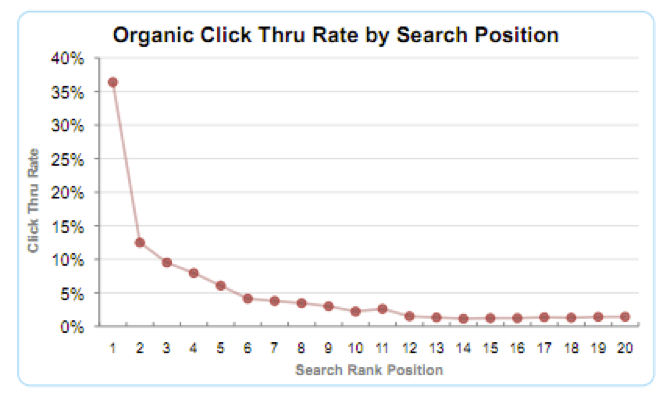
three positions, as the click-through rate drops below a mere eight after the 3d ranking (see the chart below). Credit: SmartInsights
As such, in most cases, you are shooting for sites with a DA of 80 or higher.
For perspective, here are the DA ranks of several highly credible sites: www.forbes.com — DA: 96 www.thenextweb.com—DA: 89 www.contently.com— DA: 71
Make sure you use effective CTAs
Another key to the success of syndicated SEO content is the quality
of CTAs in the article. Since the content doesn’t reside on your site,
you are limited to text CTAs, which are not the best type of plugs to
catch attention.
But still, there are ways to achieve damn good click-through rates if
you are doing it right. (For some reference, I managed to achieve a CTR
of five percent with a CTA on sites like Forbes. Please note that I’m not adding visits to related articles in this figure, which would pump it up twice.)
Now, let’s get back to the topic.
First, you have to understand that the majority of the audience will
just glance through the article and spend no more than 10–30 seconds on
it, according to multiple studies.
For those people, we want to include a bold CTA that visually stands
out from the rest of the article. To that end, I use a CTA note at the
bottom with a bolded subhead, a short paragraph about the offer followed
by a sentence that entices to take action now. Example: FREE eBook: How to Build an Email list of 50,000+ Subscribers from Scratch In this eBook, you’ll learn seven ways to drive traffic that
converts to your brand new blog, five types of high-converting lead
magnets and much more to build highly-targeted email lists of 50,000+
subscribers in a year. Claim your free copy today!
Some readers, however, will dive deeper into your article, for whom
we need something more organic. To that end, I use one or several subtle
contextual CTAs inline with the text. If the publication’s link policy
allows me, I bold them. Example: …your lead magnets must contain five important elements if you want to achieve a high conversion rate. (I discuss them in depth in my free eBook, 5 lead Magnets that Convert. Download it here)
This kind of CTAs also serves another purpose. Since a CTA note is
placed at the bottom, inline CTAs cover the audience that will not make
it to the bottom—that’s going to be the bulk of the audience.
In addition to these two types of CTAs, I include links to related content on my sites.
Conclusion
It’s a no-brainer to post SEO content on your site and leave it there
if you have a high DA rank that can compete for keywords with a decent
volume of searches in your domain.
But if you are just starting out or have a low-DA site that can’t
beat the competition in this respect, this is a good workaround.
I know, getting featured on sites like Forbes is hard and it’s a
completely different topic I won’t dive into now. But achieving a DA
rank that is not even close to theirs takes way more time and resources.
Every SEO has their own favorite strategies to implement. When
interviewing candidates for an SEO position, it’s important to know
whether their strategies align with yours. While you’ll never be in
agreement 100% of the time, the interview should give you a basic
understanding of how the candidate’s strategies would align with your
business.
Having an understanding of a candidate’s knowledge and experience
is essential, and I have addressed those questions in previous posts.
But knowledge and experience are only gateways to the most important
thing: what the SEO will actually DO.
The following questions will
help you better understand how your candidates stack up against each
other and help you filter out those who are not right for your company.
1. What are three things you think are important to know before working on a new website?
The
three things aren’t as important as why those things matter to them.
This can tell you a great deal about how the candidate assesses a site’s
needs and the responsibilities that lie ahead.
2. What is the first thing you do when you start optimizing a site?
The
candidate will likely tell you that it depends on what they find out
about the site, but don’t let them off the hook that easy. There are
typically several things any SEO will want to do first. Encourage them
to articulate what those are.
3. How do optimized pages and landing pages differ, and how do you employ these in your strategy?
Historically,
landing pages are for PPC and optimized pages are for SEO. But really
good SEOs think of every optimized page as a landing page. They should
be able to outline what they do to treat optimized pages as such.
4. How do you go about optimizing a site with millions of pages?
You
don’t need to have a million-page site for this question to be
relevant. You want the candidate to provide some large-scale SEO tactics
and strategies. Not every aspect of SEO needs to take a long time, and
it’s these strategies that can help even small sites achieve results
more quickly.
5. What do you do when your first attempt at SEO fails?
First
attempts at SEO are rarely successful, at least not immediately. And
this is what you want to hear from a candidate: not only what they do
when their first attempts fail, but whether they allow their efforts
appropriate time (and assistance) to produce the desired results.
6. How do you future-proof websites against algorithm changes?
This
uncovers the candidate’s overall philosophy. Every SEO will tell you
that they do SEO for the long term, but this is where you can force them
to discuss specific long-term tactics.
7. Other than content, what on-page elements do you optimize?
The
candidate should talk about other important factors that may not be
content — or even SEO — related. Today, things such as usability, visual
appeal, and other factors are just as important to a site’s success as
keyword and content optimization.
8. How do you deal with duplicate content?
Most
SEOs will talk about canonical tags, but those are really just
band-aids. Press candidates to discuss more permanent — and effective —
solutions.
9. What are some things you never want to do as part of the optimization of a site?
This
is an open-ended question, which can make it difficult to answer. The
candidate might revert to the more typical answers that have been a
problem with SEO since the beginning. However, a more experienced
candidate might go into some uncharted or more controversial territory.
10. What plugins or tools do you use?
Tools
were discussed in the experience-related questions, but this time you
can either dive deeper into their list of tools or how particular tools
are used specifically to assess a site and implement effective
strategies.
11. How do you use competitor knowledge to succeed at SEO?
Competitor
knowledge can be a goldmine of information, but not always. The
candidate should be able to outline ways they use competitor data, how
they integrate it into their strategy, and when they ignore what a
competitor is doing.
12. A client is ready to roll out a new website. What do you do?
Let
the candidate detail the process of launching a new website. What steps
will they go through to make for a seamless launch? Listen for them to
list things that should be done long before the launch date.
13. How do you approach keyword research?
Tools, process,
keyword assessment — all of these are on the table for discussion. The
candidate should have one or more processes they use to find and assess
keywords for optimization.
14. How do you determine which keywords to optimize and where?
Jumping
off the previous question, talk deeper about how keywords are selected
for specific pages. Make sure the conversation addresses searcher intent
and how it factors into page/keyword selection.
15. What is your process for optimizing keywords into a page?
Encourage
them to get as detailed as possible so you can determine if they
attempt to integrate all the keyword phrases targeted or how they go
about focusing on the overall topic.
16. How does keyword proximity factor into your optimization efforts?
You
don’t need to specify proximity to what. Let the candidate do that.
They should understand the various ways algorithms look at keywords in
relation to other elements on the page. Let them do the talking to see
if they know how to take advantage of this.
17. How do you assess the quality of inbound links?
The
candidate can give you a tour of the tools and assessment they utilize
to understand a site’s backlink profile. They should be able to
articulate what constitutes a good or a bad link and their process for
ensuring bad links don’t hurt the site.
18. How do you get backlinks?
Getting links
is still important. The SEO may not want to perform actual link
building, but they need to know how and be willing to if necessary. Let
them take you through their process of researching, assessing, and
obtaining high-quality links.
19. How have you dealt with link penalties?
Not
every SEO will have experience with link penalties, but they should
know what to do if they come across one. Have them discuss their process
for getting out from under such a penalty.
20. Is it ever OK to pay for a link?
Download Your Competitors SEO & PPC Campaigns
Get
instant access to competitive insight that will help you increase your
traffic and increase profit. SpyFu is free to try. No CC required.
If
this wasn’t discussed above, get an understanding of the candidate’s
beliefs regarding paying for links. This can include a healthy
discussion on link-related search penalties.
21. What is your internal linking strategy?
The
candidate should outline a course of action to massage internal links
for search engine ranking exposure. Look for a measured approach. The
candidate should be able to articulate the differences between good and
bad internal linking strategies.
22. How do you use redirects?
Broken
links may not harm your SEO, but that doesn’t mean redirects won’t help
your efforts. Let the candidate discuss when, where, and how they use
redirects, the benefits of doing so, and when redirects should not be employed.
23. How would you redirect a page?
The
candidate should be familiar with the multiple ways to redirect pages
and the different kinds of redirects. Have them discuss where and when
each type should be used.
24. How would you optimize a site for local performance?
You
aren’t looking for a discussion on local search algorithm signals but
more of a list of things the candidate would do and why. Have them
indicate a level of priority for each action.
25. How do you configure a site for mobile?
There
are mobile sites, responsive sites, and AMP sites. The candidate should
be familiar with the pros and cons of each of these and indicate their
preference and why.
26. How would you go about assessing and improving site speed?
This
can be a detailed and technical question. Ask the candidate for the
broad strokes so you can determine their assessment skills and what they
can (or can’t) do to improve a site’s speed.
27. How do you use nofollow tags?
Nofollows
can be used strategically for good optimization, but not as once was
believed. The candidate should outline a sensible strategy for using
them, which should have nothing to do with channeling PageRank.
28. How do you use analytics to assist your SEO strategy?
Every
SEO should have a basic understanding of analytics and the data needed
to assess and improve their SEO strategy. Don’t just discuss metrics but
how they use and compare those metrics.
29. What role does the TLD play in your SEO strategy?
Search
engines generally don’t give preference to one top-level domain (TLD)
over another until you get into country specific TLDs for international
SEO. However, some TLDs might help with branding and marketing. See what
your candidate says about this.
30. How do you optimize a site that targets customers in multiple countries using multiple languages?
If
you aren’t optimizing for an international audience, you can skip this
question. However, it can’t hurt to get an understanding of the
candidate’s knowledge and strategy. Discuss options for optimizing for
various countries and multiple languages, how that would impact the
existing site, and what the candidate sees as the best way forward.
31. What role do heading tags play in your SEO strategy?
Many
believe heading tags have minimal impact on SEO, but “minimal” doesn’t
mean “none.” Discuss how much effort the candidate will invest in
optimizing headings, as well as the time versus reward factor. Get a
sense of where the candidate prioritizes this over other efforts.
32. How do you use sitemaps in your SEO strategy?
The
candidate should be able to discuss the two types of sitemaps, how each
is used, and why. They should also be able to communicate when sitemaps
are a bad idea and when multiple sitemaps are better than one.
33. How would you try to improve click-through rates?
Many
SEOs think that their job stops at achieving rankings, but that’s not
so. Not only do click-through rates impact rankings, it’s an important
part of the business’s success. And that makes it the business of the
SEO.
There are specific things SEOs can do to influence CTRs from SERPs. Find out what strategies the candidate might employ.
34. How would you try to improve bounce rates?
As
with click-through rates, bounce rates impact not only rankings but the
bottom line of the business. Bounces occur for many reasons, and the
candidate should be able to articulate a good handful of them, but make
sure they dial in on those that are specifically impacted by the work
the SEO does.
35. How would you try to improve conversion rates?
While
this may technically fall outside of the SEOs purview, it’s important
to the company’s success, which makes it important to the SEO. They may
not be conversion experts, but they should have some conversion
improvement ideas.
36. How would you try to improve a site’s engagement?
This
question will be the one the candidate is least likely to have in-depth
knowledge in, but that makes it a great question to ask. It’s always
good to have team members who can provide feedback in other areas based
both on their own industry knowledge and as a general user. See what
ideas they have and how much the candidate stumbles over this question,
or not.
37. How do you employ microsites into your SEO strategy?
Microsites
do have a place, but they are often more harmful to the main site
optimization than they are helpful. The candidate should be able to
explain how, when, and why to use microsites.
The Final Test
As
the interviewer, you need to be confident that the candidate’s
strategies are going to help and never harm the sites they are working
on. Knowledge and experience questions should be asked first as they can
be used to more easily weed out poorly qualified candidates. But every
remaining candidate needs to pass the strategy test.
Mobile SEO is the single most important marketing factor for the typical local business.
Mobile online marketing is now synonymous with online marketing. More users consistently use mobile devices today than connected ones. In late 2016, Google began testing a mobile-first index.
When they rollout and begin using the index, search engines will look
to the mobile version of your website before the desktop version to
determine ranking.
Websites
without a mobile version or with a poorly optimized mobile website
will slip even further in search engine results pages (SERPs) as the
rollout encompasses more sites. The good news is that some mobile SEO
tasks are very easy to do yourself.
If your content performs inconsistently across mediums, you’re missing an audience engagement opportunity. Mobile SEO,
much like traditional SEO, is about creating and tagging content in a
way that makes it stand out online. Use this list of DIY mobile SEO tips
to protect your brand from search engine penalties and maintain online
visibility:
1. Create a Google My Business listing.
One of the most important listings businesses owners can create, Google My Business
accounts are free and simple to set up. Fill out the information to the
best of your ability, and include as many images of your business as
possible. When people enter a search for your business online or via a
Google app, they will likely see this information first. Make it count. Related: How to Set Up 'Google My Business' for Your Small Business
2. Frequently review all directory listings.
Beyond
the Google My Business account, mobile users may use other websites and
applications to find your brand. Frequently review and update all
listings for your business online. Update listings on Yelp, local
websites, TripAdvisor, Facebook, Angie’s List, the Better Business
Bureau and other popular business directories. These listings will
ensure searchers reach the right information when they search for your
name. Related: 7 DIY SEO Tactics for Companies Not Ready to Hire a Consultant
3. Get social.
On mobile devices, social media sites drive a significant amount of traffic. Around 80% of social media users spend their social media
time on mobile devices. If you want to maintain visibility with mobile
users, prioritize your social media marketing strategy. Use
platform-specific advertising, engage with users, and/or post
prolifically to ensure your brand stands out. Related: Is Amazon's 'Merch' the Next Big Thing?
4. Take advantage of plugins.
If
your business uses WordPress or another platform, take advantage of the
plugins designed to make your mobile site more user friendly. WordPress
offers plugins to improve site speed, optimize images, and take care of
other important mobile SEO tasks. WPtouch
is a somewhat ubiquitous WordPress plugin that will create a
Google-approved mobile-friendly version of your website. If you’re not
currently using a professional to update and optimize your website, look
into how plugins can help you maintain visibility online. Related: 20 Crucial WordPress Plugins
5. Use keywords for content visibility.
Mobile
users search differently than desktop users. Optimize for mobile
keyword searches to keep your content in front of the right people.
While you can purchase tools to find the right keywords for your
content, you can find keyword comparisons by device in Google’s Search Analytics. Related: 3 Tools to Uncover Your Competitor's Keywords
6. Optimize images.
To
improve page loading times on mobile devices, optimize images for
mobile users. If you don’t use a plugin to help with images, identify
the ones that present a problem using a page speed tool and then compress or change the dimensions for faster loading times. Related: 5 Ways to Optimize Your Ecommerce Campaigns
7. Prepare your content for mobile.
In
addition to searching differently on a mobile device, many people
digest content differently. Readable and scan-friendly content tends to
work better on mobile devices, but testing is the only way to know for
sure. Consider using a basic A/B test format to determine which types of mobile content perform better. Related: So, What's the 'X-Factor' in the A/B Testing Formula? (Infographic)
8. Optimize for local searches.
You
may not want to dive into detailed code optimizations that can boost
search rankings, but you may want to consider a few basic activities. To
optimize for local searches, include both the city and state in title
tags, the URL, the H1 heading, and Meta description.
Mobile SEO
will soon trump desktop SEO. Consider working with a professional or
attempting a DIY head start today to ensure your site maintains
visibility in mobile and desktop searches. A few simple tweaks can boost
your digital presence and bring local customers to your door.
Personally I never thought web hosting
services really had impact in any business. All it summed up to was more
money for the host. If you share the same school of thought you’re
probably right especially if you haven’t seen clouding services. On my
side I’ll take my sentiments back. What experience has taught me is the
truth. Web hosting for SEO and cloud based services is really important.
In reality it has more benefits to the business than anyone would
imagine. Here are some of the most factual benefits it provides. It keeps your links checked. Dead links deny your website the
juice it deserves. Additionally it leads to high bounce rates and
minimal conversions. At the end of it this leads to losses. When you
have a web host this is often minimized. The reason is simple. Part of
the host’s job is to keep an eye on your links and to update them every
time they die. This keeps your website very active. At the end of it all
your website will have minimal or no dead links at all and that cool. It’s good for optimization. Today many prospective buyers own a Smartphone,
tablet, or a browser. The best websites should be able to provide all
the prospective visitors with a smooth ride irrespective of their choice
of gadget. Such optimization is crucial in case you want a smooth flow
of business. Expert web hosting services often cover for this kind of
integrate-able optimization. It is extremely convenient. The best web hosting services just
don’t end with a single service, no! Actually there are often a variety
of services provided including content creating, website design, and
many more. Having all these services under one host is extremely
convenient. You don’t have to waste so much time looking for independent
services, money hiring new employees to do the job, and energy that
over works your limited staff. That’s why hosting for SEO is ideal. It’s also very much targeted. Imagine this, having a single
platform whose main intention is to rank you? What this means is that
every service they provide is intended to give your top notch
visibility. These services are therefore targeted and will include
downsizing the number of HTTP requests, minimizing load time to Google
standards, developing ideal CSS, and many more. It cuts down overall costs. Web hosting can be a shared
affair. If shared, you’ll share the overall costs too. This would mean
cutting costs. Additionally have an independent server means hiring
techs to service and maintain it, web hosts provide those services
within their package. At the end of the day you don’t have to hire such
services. In overall you will minimize your costs. It offers vital backups. If your server crashes it’s an
obvious disaster. When hosted you don’t lose everything as these
services involve routine backups. These routine backups ensure that you
get back everything that you had worked for. It is therefore more
reliable than having a personal system.
Conclusion
There is no doubt that hosting for SEO is very beneficial. For
startup it is an assured security path too. In addition to all these it
is also very affordable and extremely viable for cutting costs.
Make sure you find the best services. These should be provided by
highly experienced experts. The experts should be trained professionals
with the knowledge of the most vital business needs.
A little bit of healthy competition won’t hurt anyone, right?
Well, that’s not always true. When it comes to branded bidding wars on Google paid search, things can turn real nasty.
Imagine
the scene. You wake up one morning, search for your company’s brand
name in Google, and discover your competitor has stolen the number 1
position in paid search and is gobbling up a large percentage of your
traffic.
This is no ordinary traffic either. This is highly valuable traffic — they’re your best potential (or existing) customers.
For
most brands, this would cause instant chaos, especially if your brand
terms are searched for in large volumes. So, what next? Surely if you
report this PPC shark to Google, they will take immediate action and
remove their listing, right?
Think again.
Google lifted the
ban on bidding on competitors’ branded keywords way back in 2008, and
since then it’s been completely acceptable to bid against your
competitor’s brand, as long as you don’t mention their trademark name
within your ad copy. It’s a bit of a gray area, but completely fair in
Google’s eyes.
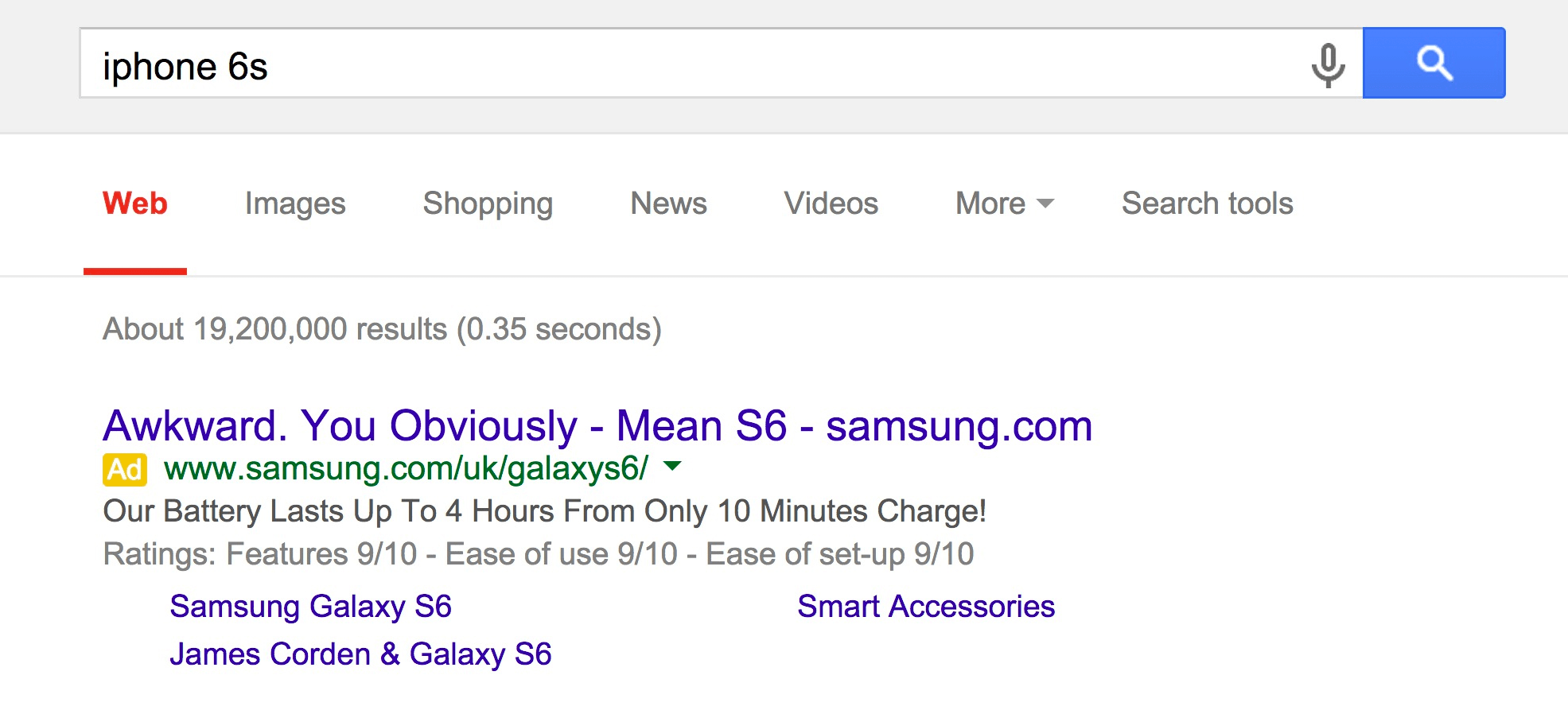
Many of us will already know about Samsung’s famous
‘Awkward. You obviously mean’ Google AdWords campaign targeting Apple’s
precious iPhone 6s branded terms.
And I have to admit, this is
creatively genius. It sparked plenty of media attention and the traffic
was highly valuable. But I can guarantee Apple didn’t look at this in
the same light.
In such a scenario, what would the best course of action?
Step 1: Acknowledge That Your Competitor May Never Take Down the Listing
It’s
a tough blow to accept, but your competitor is under no legal
obligation to remove their ads as long as they aren’t using your brand
name in their ad text.
You have to come to terms with the fact
that they will never remove the ads. The results may just be really
powerful for them, leading to a high ROI/ROAS which could potentially be
their most profitable campaign of all.
If they’re using your
trademark name in their ad copy, however, this can be an infringement of
Google’s trademark policy and therefore, you can submit a request to Google have their ads removed.
Step 2: Check Google Search Partners
Google
isn’t the only search engine you should monitor for branded PPC. Its
search partners could potentially be driving your competitors a lot of
traffic.
Unfortunately, Google doesn’t disclose a list of its
search partners as its network is growing and they are subject to change
at any point. That said, some of the most popular search
partners are AOL.com, Ask.com, Dogpile.com, and Amazon.com.
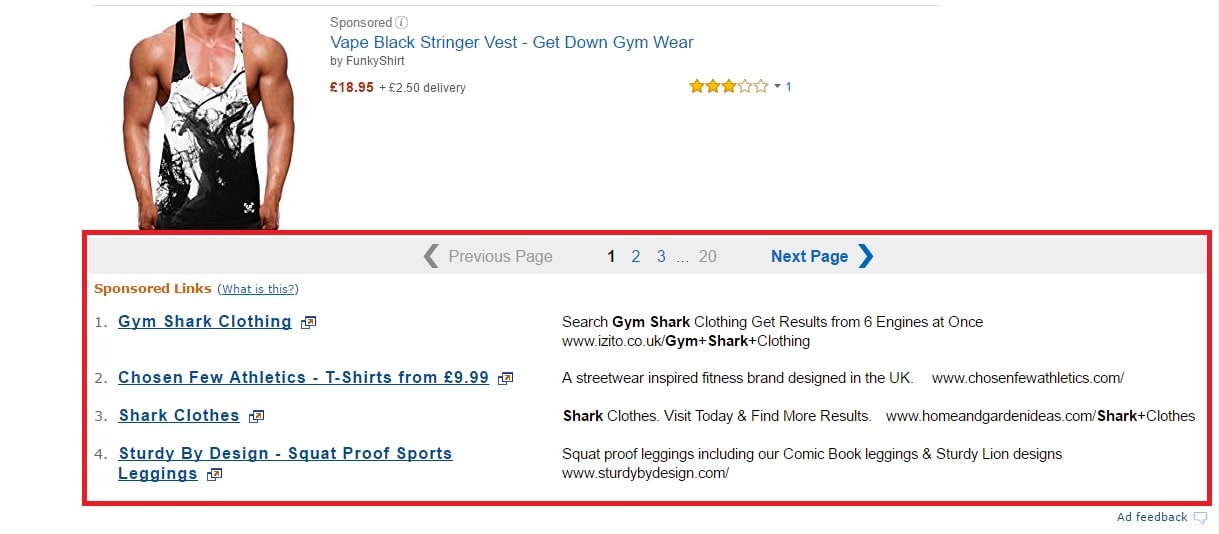
Here’s
an example of how the ads would appear on Amazon. For this example, I
searched for “Gym Shark”, which is a popular sports and activewear brand
based in the UK.
If you’d like to dig a bit further to uncover more search partners, a list can be found here, albeit they may not be 100% accurate.
Step 3: Check Bing and Its Search Partners
For
sure, Google is by far the most dominant search engine, but don’t
underestimate the power of Bing and its search partners to drive highly
relevant, targeted traffic. This is not always true for unbranded search
because CPCs tend to be lower, but conversion rates aren’t always as
high as the Google search network.
For branded search, however, you may just uncover a heap of new customers you never knew existed.
If
your competitors are going full throttle stealing your most prestigious
web traffic, chances are they’re taking advantage of Bing and its
search partners, too — particularly Yahoo. So keep your eyes peeled.
Download Your Competitors SEO & PPC Campaigns Get
instant access to competitive insight that will help you increase your
traffic and increase profit. SpyFu is free to try. No CC required.
Step 4: Send Your Competitor a Polite Email Request
Think twice before going all out guns blazing, picking up the phone for a good old argument with your competitor.
Chances
are, this will only make matters worse and they will be even more
determined to conquer your branded search traffic. This could
potentially have a serious impact on your bottom line, particularly if
your USP is difficult to distinguish or your competitor has incentives
in place to steal away your customers.
The best course of action
is to send a polite email to your competitor asking them to take down
the ad, in the interest of fair play. You can certainly send a word of
warning later about your plans to take PPC revenge, but you should first
give them an opportunity to remove the ads.
It could be the case
that their PPC agency has set up these ads without permission or any
prior notice. (This isn’t a good agency practice, but it’s been known to
happen.)
Step 5: Set Up Your Own Branded Search Ads
Whoa, you mean to say you haven’t already done this?
Branded PPC ads are an absolute must. This is especially true if you wholesale products to other retailers.
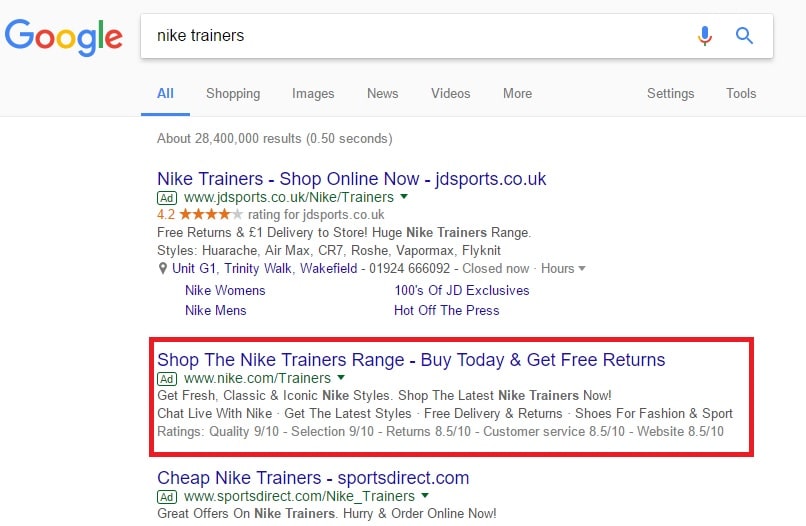
Take Nike, for example:
But why would brands such as Nike bid on their own branded keywords if they’re already ranking highly organically?
Simply
put, this allows brands to dominate the SERPs. Having multiple listings
in Google (both paid and organic) can drastically improve your
click-through rates and micro and macro conversions.
Unless there
are numerous brands bidding against your brand name and thus increasing
the bids, the CPCs are usually really cheap and you can maintain full
control of your brand messaging.
Additionally, if you’re targeting
your brand name as a broad or phrase match, you can check the search
term reports to see what other terms people are associating with your
brand.
Did I mention the cost-per-clicks are really cheap?
You
should also consider targeting ‘top of page’ bid strategy to ensure
your branded search ad is always at the top of the search results,
capitalizing on the bulk of the traffic and knocking your competitors
down. But this depends on their level of PPC knowledge and, ultimately,
how much they’re willing to pay for placement positions.
Step 6: Consider Targeting Your Competitors’ Branded Keywords
As
a last resort, but a tactic which can absolutely be worthwhile, is
targeting your competitors’ precious branded terms with a new ad
campaign. This may lure your competitor into taking their ads down as a
mutual agreement to doing the same.
If their brand search volume
is much lower than yours, however, this most likely won’t be the case as
they will see more benefit from targeting your keywords.
Targeting
your competitors brand terms as “revenge” can be considered as damage
limitation, but it certainly can be a route worth taking if they’re
reluctant to remove their ads.
Conclusion
Targeting your
competitors branded terms can certainly be highly profitable, although
it can lead to a serious marketing war which could be more damaging in
the long-run. It’s important to weigh all the pros and cons before
taking the plunge. Remember to do your research prior to taking this
dark route.
so you're interested in search engine optimization (SEO), but like
most newcomers, you're intimidated by the perceived complexity of the
field. To be sure, there are hundreds of independent variables that collectively bear an impact on your site's rankings and search engine visibility. Related: 6 Essential SEO Strategies to Incorporate in 2016
And, learning how to master all of them is a process that takes years of experience and practice.
However,
you don't need a huge budget or years of experience to get started with
SEO. Dominating the top rankings for general keywords related to your
brand may be out of your reach, but even a slight investment in SEO can
help your business earn more traffic and visibility.
To get started, you'll need these seven basic components of a starter SEO campaign:
1. A website with a good SEO plugin
First,
you need a decent website, and if this one is your first effort, and/or
you want to keep things simple, it's in your best interest to use a
website builder like Wordpress.
In fact, this and most other website builder tools are inexpensive and
easy to use; and, importantly, they come automatically equipped to
handle basic SEO fundamentals.
For example, they'll be coded in a
way that's neat, clean and easy to crawl, and they'll be responsive, so
you needn't worry about a separate strategy for mobile optimization. You
may also want to consider a separate SEO plugin,
which can help you with technical tasks like optimizing title tags and
meta descriptions, and pinpointing the keyword density of your various
pages.
2. A carefully chosen niche
Next,
you'll want to define your niche and target a list of carefully chosen
keywords. If you go too general, you'll end up competing with businesses
that have a much bigger budget and a longer history of development.
Instead, it's better to focus on a highly specific niche that's relevant
only to your customers.
At that juncture, you'll need to conduct some keyword research.
You don't need to get fancy here; just target a mix of basic "head"
keywords and extended "long-tail" keywords, and aim for terms with high
volume and low competition ratings.
3. An on-site overhaul.
Next,
you'll need to optimize your site directly. It's true that your website
builder will set you up with some fundamentals, but you'll still need
to add your own content.
Organize your pages into categories and
subcategories, including page titles that contain some of your target
keywords. Make sure every page of your site contains at least several
hundred words of helpful, well-written, relevant content; and optimize
all your title tags and meta descriptions while you're at it. Related: 5 SEO Techniques You're Doing All Wrong
4. A regular blog
I'd argue that the most important thing for a new SEO strategy to take off is a high-quality, regular content-marketing campaign.
Aim to produce at least two new posts every week, covering topics that
are relevant to your readers, and providing detailed, helpful
information that your competitors haven't already covered.
Originality,
practicality and aesthetic value all matter here, so spend some time
refining your strategy and stick to your editorial calendar. You'll also
want to include a blend of mediums, including images and videos, if you
can.
5. An off-site publication schedule.
Aside
from on-site optimization and content marketing, the most important
element of your strategy is your link building campaign -- otherwise
known as off-site optimization. The quality and quantity of links you
have pointing to your domain determines your overall authority, which in turn determines where you rank for various search queries.
However, you can't just spam off-site links -- nor would you want to. Instead, focus on writing valuable content for external publishers,
establishing your author profile and your expertise simultaneously.
Usually, you'll earn at least one link back to your site, and over time,
you'll develop your authority so you can rank higher.
6. Integrated social media
Contrary
to popular belief, social media doesn't have a direct relationship with
your search rankings. However, it can have an indirect bearing on the
success of your SEO campaign. So, flesh out your profiles and regularly
promote your latest content; you'll earn more shares and links to those
blog posts, which can boost your search visibility.
Additionally,
you'll earn more followers, which can become an additional stream of
traffic to your site (and a good way to get your foot in the door with
more publishers since it establishes your credibility).
7. A good reporting strategy
Finally,
you'll need some way to measure your effectiveness (so you can
determine what changes you need to make to your strategy). A good
starter tool for this is Google Analytics,
which will allow you to measure your "organic traffic" -- meaning the
amount of traffic you're generating naturally through search engines.
Ideally, this will grow over time.
Implementing these seven
"starter kit" items won't let you tap your business's full online
marketing potential, but they can and will get you started on the right
path. With a decent infrastructure in place, including a baseline domain
authority score, your subsequent investments will become even more
valuable.
Any
website that’s had SEO work done has potentially hundreds or even
thousands of undiscovered hidden ranked keywords lurking in the top 100
positions of search engines. Hidden ranks are one of the biggest SEO
treasure troves that unfortunately are neglected by website owners and
SEO experts, often due to low awareness of the subject. So, what can you
do about it? Read on.
First Off, What Are These So-called “Hidden Ranks”?
Hidden
ranks are essentially keywords that are ranking in at least the top 100
positions in a search engine for your website that you are NOT aware
of. They are keywords you didn’t promote directly, but they could bring
quality organic traffic.
Since they fly under your radar (because
you are not actively searching for them), all that traffic potential
goes unfulfilled. Believe it or not, some of these low-ranked keywords
can already account for some organic traffic trickling to your website,
unbeknownst to you. It’s pure organic traffic that should be boosted and cultivated — traffic that you deserve and have earned.
How Do Hidden Ranks Come to Be?
Some
of you already know this, but this is actually just a natural side
effect and positive outcome of a typical organic ranking process of
search engines. As you run an organic SEO campaign to promote your
targeted keywords, other related keywords are positively
influenced as a result, and they also float upwards in the search engine
ranking algorithm stream and reach the top 100 or even top 50 shores.
Example: You directly promoted the keyword “cake decorations”
for a local cake-decorating website in Denver, Colorado. Depending on
the content strategy you used, a keyword such as “birthday cake
decorations” might be positively influenced as well and get ranked, even
though it wasn’t directly promoted.
Another aspect of this
phenomenon is that the keywords you promoted directly for Google could
reach the top 10 ranking positions on desktop devices, and as a result,
these keywords might also rank top 50 for Google mobile, Google local
ranks, and even Yahoo! and Bing. But again, since you are not actively
searching for hidden ranks, you might only be aware of part of the
picture.
Regrettably, this is as far as these keywords will go if you don’t start promoting them directly.
So, how do you discover them?
Well,
there are three ways: Either you start arbitrarily and painstakingly
searching for them manually on search engines yourself (this is a fairly
annoying task, since you don’t actually know what to even look for),
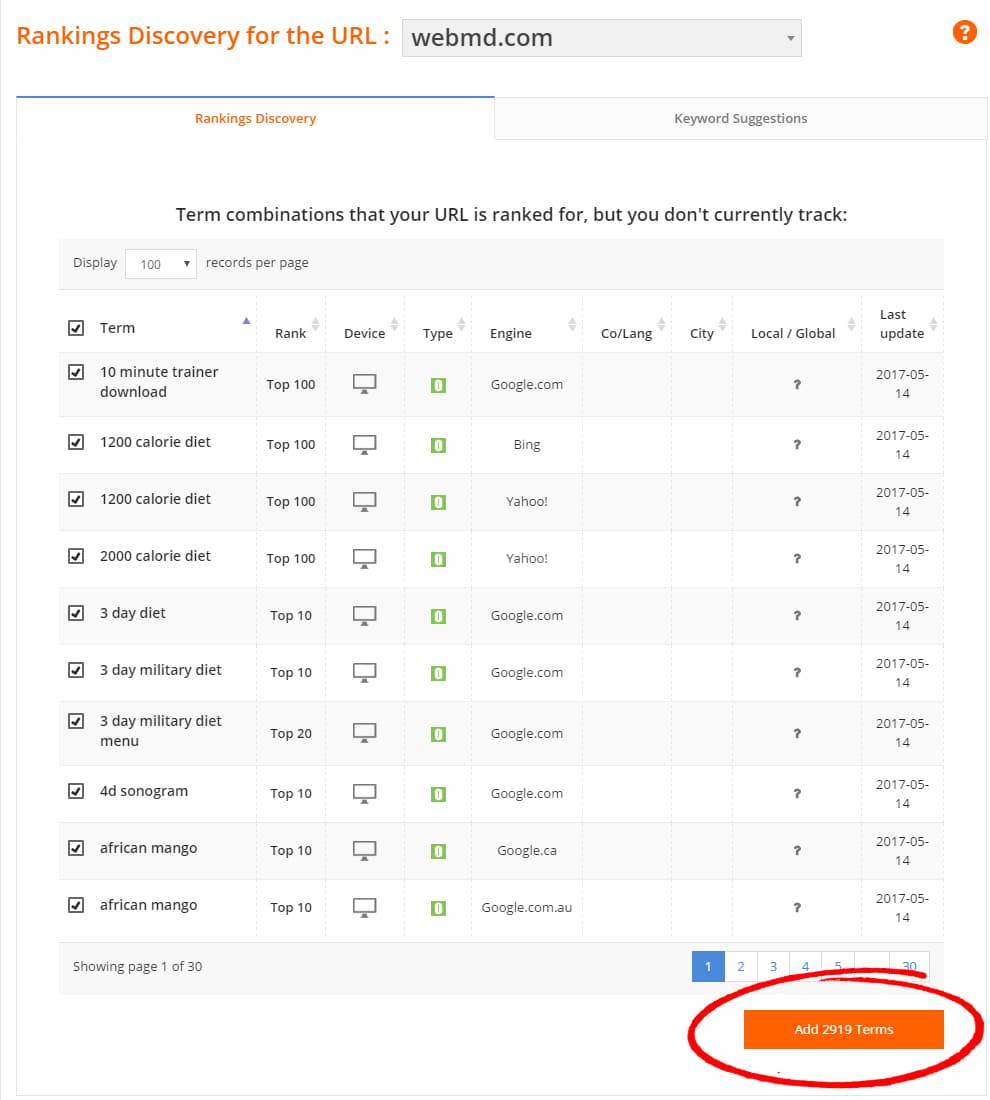
you can stumble upon them by sheer chance, or you can use Pro Rank
Tracker’s designated Ranking Discovery Tool specially designed for this
purpose!
What Is This Ranking Discovery Tool, and How Does It Work?
This tool comes FREE with PRT’s SERP tracker,
and operating it is easy — any URL you track with PRT can be put into
the tool, then any top 100 ranked keywords on record for that URL will
be revealed before you, instantly. The tool, in a way, reverse engineers
the search process and will only become better as search engines
evolve.
What can you do once you’ve discovered all these keywords?
Simple — promote them to top 10 positions! As these keywords are
already in the game, it will be much easier than promoting them from
scratch, and the additional organic traffic your website will receive
will be well worth the extra effort.
A few more SEO-centered applications to this tool:
Bring value and insight to future clients. If
you are meeting a potential client whose website already has some
presence on search engines, use the tool to see what keywords are ranked
top 100 for that website. Show them what keywords are already ranked
and which ones can rank even higher.
Discover all the best keywords for almost any niche. By
checking the top 10 leading websites of any niche with the tool, you
can see what keywords are being promoted in that niche most of all. This
is a great way to research a niche and get high-quality keyword ideas
for tackling almost any niche on the internet successfully.
“Spy” on any website, and get the full picture of what they rank for. The
same principle as above applies in this case: Input any URL into the
tool, and see all the keywords on record that rank top 100 for that
website. You can use it to research competitors or as an aid to building
your base SEO strategy.
Of course, these are just a few of
the possibilities. All the potential applications and strategies are
still waiting to be discovered! It’s all up to you. Give this tool a spin, and see for yourself what keywords you can discover for any website.
Staying
on top of SEO best practices and increasing organic traffic is a
priority for many B2B marketers. The more targeted buyers you bring to
your content, the more you will increase your conversion rates and
generate leads.
I sat down with Stephen Johnson, resident SEO expert at Salt Water Digital, to find out how search engine optimization is affecting B2B marketers in 2017.
Q: How has SEO changed in 2017?
Stephen: Google
made some major updates in the early part of 2017 that we are still
trying to understand. Many of the core principles of SEO remain
valuable. But we need to determine what best practices will move the
needle the most. The two most important SEO considerations are content and domain authority. It’s important to publish high-quality, long-form content,
as search engines send traffic to pages that are authorities for
keywords. Pages with thin content won’t perform as well as pages with
longer content.
However, content isn’t everything. The strength of
your domain is still critical. A domain’s age, size, and popularity
determines its authority. A site gains authority when other sites with
high authority scores recognize it. To improve your domain authority, focus on link building.
Q: Everyone talks about link building. How do you effectively build links?
Stephen: Passively waiting for backlinks is not an effective way to improve your SEO. You must be proactive.
We
recommend two strategies for building links. The first involves using
industry-specific citations or directories. Most industries have online
resources where you can list your company or provide content in return
for a link, such as through an interview or a guest post. Providing your expertise on blogs is an excellent way to acquire links.
While
some directories aren’t high impact, they can still support your
link-building efforts. Industry blogs and resources often have high
domain authority – not to mention the respect of your customers. Find
out which sites can provide you with high-quality links and form
relationships with their editorial team.
The second strategy is to outsource your link building to an SEO company
that can take care of everything for you. However, it’s important to
learn how they plan to acquire links to your website so that you can
avoid penalties from Google.
For example, ensure that they won’t use black hat techniques that spam your site around with low quality or hacked accounts.
Avoid Fiverr at all costs. You should also find out which websites they
will get links from and check their domain authority using MOZ.
Q: Are one-way links more valuable than linking between websites?
Stephen:Google looks for logical link building. Does the link make sense?
For
example, you can’t add your financial planning software to a website
about dogs. The website doesn’t have any relevancy, and Google will
recognize this. Industry relevant links are important.
Q: To avoid thin content, is it better to have one long post per month instead of four shorter posts?
Stephen: You
don’t need to write super posts all the time because you’ll burn out
and send your blog to an early grave. But the meatier your content, the
better. Write at least 500 words for your blog posts and product pages. Mid-length content will go a long way in improving your SEO.
But don’t create fluff articles just to meet your blog’s deadlines. You must produce useful content. Hire a copywriter to ensure that your content is something that your customers want to read.
Also,
include images and videos whenever possible. When you add media to your
content, you can tag it with keywords and increase your chances of
getting found. Google wants to provide search results with great content
– including images and especially videos. The more media you add, the
better more likely your content will succeed.
The content you
create – whether text or media – should relate to your targeted
keywords. You should also interlink and optimize it using anchor text.
Meaning, if you want to rank for “HR software,” use this phrase as your
anchor text when you interlink between your blog and your product page. Don’t use “click here” as your anchor text.
Q: Should all B2B companies focus on SEO?
Stephen: SEO isn’t for every business. Optimizing the SEO for a B2B company can be tough. Many B2B keywords have low search volumes when compared with B2C keywords.
This makes achieving ROI challenging, as you might target keywords that
only get a few searches per month. In these cases, I recommend
investing in PPC strategies.
Q: If my keywords have a low search volume, will I get any value from SEO?
Stephen:
Yes. Even if the keywords that describe your products or services have a
low search volume, they could still provide you with value. For
example, optimizing for specific phrases can bring targeted buyers to your website. These customers can go on to purchase something that costs thousands of dollars – making your SEO investment worthwhile.
Q: What mistakes do you see B2B marketers making with SEO?
Stephen:
When B2B companies tell me they are “doing SEO,” I often see a
disconnect in what this means. Many aren’t doing anything other than
adding keywords to their web pages or blog posts.
Also, some B2B companies fail to perform keyword research.
They guess what people are searching for, rather than doing research to
find out what customers actually look for. You can use free tools,
including the Google Keyword Tool, to see which phrases your customers
are using.
Q: What are your favourite tools?
Stephen: There are a number of tools that I find helpful for marketers. Moz is a great tool to check your site’s domain authority and get an idea of what links already point to it. If you’re interested in checking out the competition from an SEO and PPC perspective, Spy Fu is really cool. It gives you an idea of what your competitors are doing to get found online.
The Google Keyword Planner
is the tool that I use the most for clients. The foundation of SEO is
knowing what people are searching for, and the Keyword Planner shows you
this information.Finally, I use SEMrush
for its keyword tracking capabilities. It is fantastic if you are
pursuing aggressive content strategies, as you can clearly see how your
content performs from an SEO perspective.
Maybe it’s your company’s yearly
planning session, or maybe the meeting is being called because your
website is in dire need of a refresh.
Whether the goal is to help form a new layout for the website, or to
start creating the content calendar for the year, the planning sessions
will naturally have product heads, key executives, and marketing
managers in attendance.
As your company conducts this careful planning process and dreams up
the site’s future, there’s one other important voice that should be at
that table: your SEO expert. Whether this is an in-house individual or
an external SEO agency or consultant, the knowledge this person can
provide will have a critical impact on the site’s ultimate success.
Here are five ways that your go-to SEO expert can positively affect the outcome of your website project:
1) Ensure that your site has a design that’s search engine friendly
Just as it’s the job of your designers to ensure that the website is
inviting and communicates elegantly with users, your SEO expert’s
responsibility includes making sure the site communicates all the right
information to search engines.
Your SEO lead can help tailor a site design that delivers essential
company/product information from the homepage, in a way that assists
search engines in efficiently learning all they need to know about your
site. By doing this, your SEO expert sets the stage for your site to be
viewed more favorably when it comes to organic search rankings.
2) Discover and make the most of content opportunities
Your content specialists ought to work hand in hand with your SEO
expert to craft content that has legs and delivers business value. The
right content selection process can lead to subject matter that works
for you, naturally pulling in traffic by providing desired information
on the correct topics.
Your SEO expert can really help inform this process, identifying
those content opportunities that will bring in new customers and then
optimizing that content so that it receives the visibility it deserves.
3) Optimizing updates to page content, metadata, and locations
When making any changes to the structure of your site, make sure your SEO expert is involved.
How your site is designed to move visitors from page to page – and
the content and metadata within those pages – have a determinative
effect on how search engines value your site. Your SEO expert can
inspect the user flow of your site’s pages and suggest any content
changes that would be beneficial.
Your expert might also take the opportunity to rewrite metadata and update pages to follow the best practices for heightening visibility in search engine queries.
4) Utilize the possibilities of off-page content
From videos to presentations and beyond, remember there are
opportunities to gain visibility for your brand away from your website.
In certain cases – which your SEO expert should be able to recognize –
these pieces of content can ultimately contribute to your brand’s SEO by
enhancing your overall presence in search engine results.
For example, a video screencap displayed in search results can
capture clicks and attention, and ultimately increase traffic to your
site.
5) Execute large-scale SEO initiatives
When making preparations for a site redesign, it may also be an optimal time to pursue major SEO initiatives.
Some site-enhancing projects worth considering: adding HTTPS to make the site more secure (and trustworthy for visitors), or adding schema markup
where appropriate – likely for videos, recipes, products, etc. – to
enable search engines to provide users with more informative results.
Category
and tag pages are considered “weak” in SEO since they have very little
content. Normally they have image thumbnails with a “Read More” link.
How can we optimize these types of pages to increase their organic
visibility?
I’m assuming you’re talking about
category and tag pages like you’d find on a blog (like WordPress). Where
all it really provides is a repeat of all the information available
elsewhere on the site in a re-organized way.
I think where people
go wrong most often is having too many categories or tags. You want your
categories and tags to be mutually exclusive. In other words, you don’t
want category=blue widgets and tag=blue widgets.
There are a few things you can do to make these more valuable and therefore more useful to search engines and their visitors:
Is your PPC Agency Wasting your Budget? Find out by downloading a FREE copy of our complete guide to the DO's and DON'TS of your PPC agency.
Define them carefully.
Set some plan in place and stick to it. Maybe categories will be intent
based (like News, Fashion, and Promotions) and tags will be product
based, like dresses and shoes. Whatever you decide, just make sure they
serve different purposes.
Choose nomenclature that is inclusive rather than exclusive.
Try to limit tags to just one per topic, and only 2-3 per post. In
other words, you wouldn’t tag a single article with “dresses”, “summer
dresses”, and “sleeveless dresses”. You’d just tag it with “dresses”,
and maybe “sleeveless” or “summer”.
Provide some summary or description of what’s in each category or tag page.
For the category page, maybe you can have a description of the category
appear on the page along with a few featured posts on that topic and
some pins on that topic from your Pinterest account. The idea is to make
the page a hub of information on a specific topic, beyond just a
relisting of posts in that category. It should be the same with tag
pages.
If this is more effort than you’re willing to give, then just noindex them.
Category and tag pages aren’t duplicate content per se, but they do waste crawl budget
(the time search engines spend on your website gathering information),
especially if you have thousands of similarly tagged or categorized
pages.
If you can’t see a reason why someone would bookmark your
category or tag page to refer back to, then it’s unlikely a search
engine is going to want to send people there.