Wednesday, March 7, 2018

Six steps to improving your local search strategy


With local search proven to be one of the hottest SEO trends of 2017, it is projected to maintain its standing among make-or-break optimization factors in 2018.
The competition between online and brick-and-mortar stores is heating up, and local search optimization can become a decisive factor in how a site ranks locally and, consequently, in how much traffic and clients it drives from local, on-the-go searches.
Fortunately, major local search tactics are not that hard to master. Follow the six steps below to achieve the best results in terms of SERPs, traffic, and conversions on the local battlefield.

Claim Google My Business

Failure to claim your company’s account at Google My Business may be the reason your website does not show up at the top spot of Google’s local search results. If you are not there (and Bing Places for Business), you are missing out on incredible opportunities to drive local traffic.
With Google’s local three-pack considered to be the coveted spot for every local business, you need to please the Google gods to get listed there:
  • Go through the verification process. Google will send you an actual postcard, with a private PIN inside (provided you register at the GMB website and you own a business’s physical address). P.O. boxes are not allowed.
  • Fill out all GMB listing elements: logo, photos, description, categories, business hours, payment methods, physical address (if any), phone number, website, etc. This information must be consistent across your website, GMB, and other directories.
  • Optimize your GMB listing. Ensure that all text elements are written for humans and feature your top-priority local keywords (e.g. city, neighborhood, type of service, brand name, etc.)
According to Google My Business guidelines, any business can be unlisted if they violate any of the following rules:
  • Using a URL redirect instead of a site’s actual URL
  • Stuffing a company’s name field with keywords
  • Registering multiple GMB listings for one company. If you have a multi-location business, read our guide to how to optimize your Google My Business listing to avoid a penalty
  • Using any address that is not your business’s actual physical address.

Register with online directories and listings

According to a Local Search Ranking Factors Study 2017 by Moz, link signals play a key role in how sites rank in local search. However, many website owners pay zero attention to online directories and listings, which are a safe source of relevant, high-quality links.
The process here is simple:
  • Find top business directories to get your company listed. Google, Bing, Yahoo!, Yelp, Merchant Circle, Citysearch, Better Business Bureau, Angie’s List, and Yellow Pages are a must
  • Research local business directories. Check out local media and government websites, or simply do a Google search
  • Fill out and optimize your directory accounts. Be descriptive, write for humans, and do not forget about keywords. Confirm that all business details are consistent across every directory.
Bonus tip! Like directories and listings, citation data aggregators feed search engines with crucial bits of information about your business, such as your business name, address and phone number (NAP). Ensure that all information you submit to CDAs is consistent. Do not confuse your customers and Google.

Optimize titles and meta descriptions

Titles and meta descriptions are still a biggie in local search. Customizable HTML elements act as ads that define how a page’s content is reflected in search results, and they have to be catchy enough to get clicked.
Since titles and meta descriptions are limited to ~50+ and ~160+ characters, they may pose a challenge. These tips should help:
  • Research the local keywords you want to rank for; analyze your competition
  • Place local keywords at the beginning of the tag (you might use a formula by Moz: Primary Keyword – Secondary Keyword | Brand Name)
  • Cut page names from your titles (e.g. Home, Services, Products, etc.)
  • Keep your titles relevant to corresponding pages; never duplicate your titles
  • Write title tags for humans; avoid keyword stuffing.
What it comes down to is this: Even if your business gets a coveted No.1 position in local search thanks to all of your SEO efforts, you still have to incentivize users to click on your link. Masterfully crafted and meaningful titles and meta descriptions can make a big difference.

Collect and manage online reviews

According to BrightLocal’s 2017 Local Consumer Review Survey, 97% of consumers read online reviews for local businesses, with 85% trusting them as much as personal recommendations.
Since reviews can become your ultimate weapon for building trust and a positive reputation among your targeted audience, it makes sense to ask for them. As of 2017, 68% of consumers are willing to leave a review when asked by the business (70% in 2016).
So where do you start? Implement this simple process to manage your reviews:
  • Start monitoring reviews. Use one of these tools: Reputation Loop, Get Five Stars, Trust Pilot, Vendata, Awario, Social Mention, Mention, Talkwalker Alerts. You may also rely on Hootsuite and Tiny Porch.
  • Respond to each review, whether positive or negative. 30% of consumers consider an answer to their review as a key factor when judging a local business.
  • Manage Google My Business reviews for your SEO. According to Google, the amount and score of GMB reviews are calculated into local search ranking.
  • Manage Yelp, Facebook, and BBB.org reviews for marketing. These are the most trusted review platforms among consumers.
  • Bonus tip! Since consumers read an average of seven reviews before trusting a business, develop a strategy for generating ongoing positive reviews. Make sure to contact happy customers and ask for their reviews to mitigate the effect of negative reviews.

    Use local structured data markup

    Schema markup, a code used for marking up crucial bits of data on a page to assist search engine spiders in determining a page’s contents, is one of the most powerful but least-utilized SEO methods. With  ~10 million websites implementing Schema.org markup, you should start using this leverage against your competition.
    However, structured data is not simple to master. As of 2017, Schema’s core vocabulary consists of 597 Types, 867 Properties, and 114 Enumeration values.
    The good news is that Google has developed several tools to help business owners, marketers, and SEO professionals:
  • Structured Data Markup Helper
  • Google Data Highlighter
  • Structured Data Testing Tool
Bonus tip! Make LocalBusiness schema your top priority. Particularly, discover specific Types for different businesses below the list of properties.

Appear in local publications and media

On the link-building side of things, content is your most powerful weapon. Reach out to local publications, media sites, and bloggers to serve up content that soothes the pain points of local consumers. You will not only get coverage and reach new audiences, but you will also garner relevant backlinks that push your site up in local searches.
Follow this process to amplify your linkbuilding efforts through content marketing:
  • Make a list of local publications where you want your business featured or mentioned
  • Research the people in charge (e.g. editors, journalists, bloggers, etc.)
  • Figure out how to contact them
  • Start sending out your individual pitches with content ideas
  • Collect responses and find common ground on publication terms
  • Analyze feedback if your attempts fail
  • Rinse and repeat!
Bonus tip! Consider cooperating with other local businesses to build powerful content. Reach out to your partners to research ideas and create content with meat on its bones. Otherwise, you may fall short of beating out competition from national-level players.

Conclusion

SEO changes all the time, and local search is not much different. However, the six steps above will provide a solid bedrock for your local SEO strategy. Implement these tactics, and you will outperform your competition in local search results.

Reference:https://searchenginewatch.com/2018/02/28/six-steps-to-improving-your-local-search-strategy/

Tuesday, March 6, 2018

The 5 SEO mistakes holding your ecommerce site back right now


Ecommerce sites are so different from other web platforms that SEO for them can almost be considered a separate branch of the industry.
While many fundamentals are the same, ecommerce, especially of the marketplace variety, introduces complications that could almost be ignored if they occurred on a smaller scale on a different type of website.
Let’s talk about five SEO mistakes that could be holding back your ecommerce site as we speak.

1. Duplicate content

Duplicate content is the bane of the ecommerce site’s existence, and I can almost guarantee you right now, if you have an ecommerce site that you haven’t audited for duplicate content, you have duplicate content. Especially if your site is on a marketplace model.
It doesn’t matter what platform you’re using or how informed you are about SEO – if you haven’t checked for it recently, it’s probably hurting your rankings.
Consider what Ben Davis at Econsultancy noticed happened to pages on three of Sports Direct’s websites. The parent company hosted the same product with identical product descriptions and similar layouts, on three different sub-brands: Cruise, Flannels, and Van Mildert.
What he found is that none of the pages had a consistent presence in the search results. The brand’s strong authority with search engines allowed the pages to rank with some semblance of consistency on the second page, but with a very important caveat: only one page would show up at a time.
Whenever one page did well, the others fell well below position 100 in the search results, effectively impossible to find.
This type of duplicate content is common for ecommerce sites, in particular marketplaces that sell products, which can be found elsewhere. Large marketplaces generally use generic product descriptions provided by the product seller, but in doing so they are creating duplicate content and, unless they are lucky, they almost certainly will not rank consistently on the front pages of the search results.
Custom product descriptions and design templates are highly recommended in order to combat this problem. Ecommerce sites with very large marketplaces can’t necessarily hope to ever do this for every product.
But following the Pareto principle – an economic principle which states that 20% of the invested input is responsible for 80% of the results obtained – updating your highest performing and most promising product pages with unique content is well worth the effort if you do so with a strong background in both SEO and writing copy for conversions.
However, this isn’t the only type of duplicate content that plagues ecommerce sites.
Another frequent issue is duplicates on your own site. The most common cause of this form of duplicate content is placing a filter in the URL parameter, such as a URL parameter for different colors of the same product, URL parameters to filter products on a category page, and so on.
While this form of duplication doesn’t typically lead to results as extreme as duplicates across different websites, it does dilute the search engine authority dedicated to any single version of the page, and if done en masse it can result in a downgrade in your site’s overall rankings because of Google Panda.
To deal with this type of duplicate content, you need to be sure to implement the rel=canonical tag in such a way that it consistently points to only one URL for any page with nearly identical variations.

2. Too many low-performing indexed content pages

The correlation between additional content on your site and additional search engine traffic is probably the most battle-tested strategy out there. A solid content marketing strategy is essentially guaranteed to increase your search engine traffic in the long haul, and we’ve seen it happen for literally every single client who stuck with it long enough to see the results.
Even so, there are circumstances in which a poorly optimized content strategy can actually backfire, produce too many irrelevant pages, and believe it or not, drag down your entire site in the search results. In fact, this happens a lot more often than many people realize.
Consider the case of Une Belle Vie. When they came to Inflow for help, they were seeing declines in search engine traffic.
After analyzing their site and performance in the search engines, Inflow concluded that the ratio of content to products was too high. This was diluting their authority with search engines and placing too much crawl budget and PageRank in the hands of low-performing blog posts.
After carefully identifying which pages to remove and which to keep, the site saw a steady increase in search traffic, a 30.04% jump in revenue, and a 5.25% bump in conversion rates.
So, does this mean you should shut down your blog?
No! I definitely wouldn’t recommend that, certainly not as a first resort at least.
The lesson here is more nuanced. Simply adding content to your site is a strategy that can do more harm than good by diluting your authority with search engines. If I had to guess, I don’t believe that Une Belle Vie’s traffic losses were the result of bad content, but of an unfocused content strategy without consideration given to search engines.
Your content efforts need to be focused, and it’s crucial that any authority built by your content strategy is channeled to your product landing pages.
As an important point, I would always first consider optimizing existing pages over removing them. Pages that perform relatively weakly often do so because they don’t send a message clear enough to the search engines, about their purpose.
It is also often the case that several thin pages of content should be combined into a single, comprehensive resource. Keyword research and knowledge of technical SEO are a big plus here.
Only after addressing opportunities for optimization should you start cutting pages. In the process, it’s important to ensure that the pages you remove:
  • Are not a source of existing search engine traffic
  • Are not capturing inbound links from external sources
  • Are redirected to related resources to capture any inbound authority they may have already had

3. User-generated content (not enough or too much)

User-generated content is a double-edged sword. It can work wonders. Wikipedia is entirely user-generated, and it wins the search results. It’s been central to Amazon’s success, with user reviews building more trust with buyers than any branding efforts ever could.
But the dark side of user-generated content is as ugly as its upside is beautiful. When Google first released Panda, eBay fell from #6 to #25 on Moz’s list of sites with the most top ten search result listings. The low quality content produced by seller/users on eBay was definitely a factor and likely central to those losses.
So, how should you deal with user generated content?
First, I want to stress that user-reviews are almost certainly a good move. Recent studies have shown that adding user reviews to your website improves organic search traffic by approximately 30%.
It’s difficult to estimate to what extent this is due to a subsequent reduction in portions of duplicate content, to rich snippets including star ratings in the search results, to Google ranking pages with user reviews higher directly, or to user behavior, sending more positive signals to Google after user reviews were added.
However, it is that these factors add up, the end result is clear. Adding user reviews to your site will almost certainly improve your search engine traffic.
If you’re afraid of user reviews trashing your reputation, that’s less of a concern than you might think. Believe it or not, products with diverse star ratings actually perform better than products with five-star only ratings. By including some authentication into the process, you can cut down on trashing from anonymous sources, and if you respond well to criticism, it can often improve performance better than never having been criticized in the first place.
Bear in mind that most people won’t leave a review unless you ask. Research by Trustpilot indicates that people are twice as likely to leave a review if you ask them (jumping from 14 to 29%).
So, what about the dark side of user-generated content? Consider the case of eBay versus Wikipedia. Both are user-generated content sites, but Wikipedia thrives under Panda while eBay suffered after its introduction.
The key is process. Wikipedia has processes in place to ensure quality. While those processes wouldn’t satisfy a college professor, they are sufficient to create a relatively trustworthy resource with the ability to consistently meet quality expectations.
Putting moderators and other processes in place to keep the quality level high are vital if you want user-generated content to work for your ecommerce platform. Giving users the ability to rate one another’s content also helps keep quality levels high. Take Amazon’s ability to sort reviews by “most helpful” as the gold standard here.

4. Not optimizing existing pages with better keywords

This is one change that every ecommerce site should make, preferably on some sort of repeated schedule.
Keyword research is one of those factors that’s so important for SEO that it’s taken as obvious, and for that reason it also paradoxically gets ignored more often than it should. This is especially true when it comes to optimizing your existing pages.
Here is a process that I recommend using that Darren DeMatas calls the “Double Jeopardy” technique, and he shares an example of using it to boost search traffic by an unparalleled 1780%.
Here is the gist of the process:
1. Go to Google’s Keyword Planner and add your product page URL to the tool. To narrow it down to informational keywords, you can add “who,” “what,” “when,” “where,” “why,” and “how” as required terms. This is good for blog posts and similar content, but not a good fit for product landing pages.
2. Take the keywords to SEMrush or a similar tool in order to identify which keywords have competition you can beat. In addition to metrics provided by tools like this, you should also scope out the competition on the front page for those phrases in order to ensure that they have the quality levels you can beat.
3. Find your highest performing pages for the target keyword by performing a “site:domain ‘keyword’” search in Google. This will tell you which page on your site already performs best for the keyword.
4. Do an “inurl:forum” search for your keyword to see what information people have on the topic that you won’t necessarily find on the front page of search results. Forums are a great place to start the research, since they give you an idea of exactly what people want to know or are struggling with.
Whether you are using this to put together a blog post or a landing page that overcomes buyers’ objections, this research is incredibly useful. Other creative searches and sources of information are also encouraged.
5. Now update your content to ensure that it would be the most promising thing on the front page for that search phrase. That means your title should stand out and that the content on your page either solves users’ needs better than anything else on the front page, or that it overcomes buyer objections and understands their purchase intents better than any other landing page, on the front page.
We’ve developed similar processes internally and they almost never fail to increase search engine traffic, especially when applied as a strategy for your entire site, as opposed to an occasional tweak to a few pages on your site.
Using this process, you capitalize on your existing page data and authority, in order to rank for the kinds of terms that Google is already prepped to reward you for, as opposed to simply picking the highest traffic keywords off, of the list of suggestions that Google’s Keyword Planner gives you, after plugging in a generic and obvious keyword.
Keep in mind that you can also put a competitor’s URL into the keyword planner to get suggestions.
Another common issue with keywords on ecommerce sites is their hyper-focus on branded keywords. Most product pages are built around the product name and the brand name.
By no means should you remove this information or take it out of the most prominent keyword locations (like the URL, title tag, and first paragraph). However, in addition to this branded information, you should also make an effort, to include keywords related to the product that aren’t about the brand or product model.
These may be referred to as “generic” keywords, although it’s still important to make an effort to use highly specific keywords matching very specific user needs. The point is that you should step up your keyword game and indicate what the page will do for people who aren’t searching for specific brands or product names.

5. Poor internal linking

Ecommerce sites often have an enormous number of products, and as a result it can be incredibly difficult to reach any given page using the links on the site. This doesn’t just mean it’s hard for a user to navigate to a page, it also means that PageRank flow through your site can become diluted, leading to important pages receiving less authority with the search engines than they ought to.
Victorious SEO was able to help Blomdahl USA earn 440% ROI, in large part by repairing poor link architecture.
Getting your link architecture under control is an absolute necessity if you want your ecommerce site to be optimized for search engines. Issues with link architecture generally come in four different forms:

Poor semantic structure

A link architecture with this issue doesn’t organize the site, hierarchically. Pure PageRank is only one factor the search engines consider, and the relevance of the links is also a crucial consideration.
Site navigation, folder structure, and interlinking should be systematic. Some organic contextual cross-linking between categories is of course fine, even preferred, but if there is no clear hierarchy in place at all, your interlinking does very little for you.

Excessive link depth

Something is very wrong if it takes more than a few clicks to get from the homepage to any product page. Consider the six degrees of separation rumored to connect any two individuals on the planet. If it takes 10 degrees of separation to get from your homepage to a product page, even the most obscure one, you do not have an optimized site.
Too many links from one point to the next means it’s difficult for search engines to crawl your site and discover pages. It also means that those deep pages receive almost no PageRank.

No prioritization

This is the opposite of excessive link depth. It’s what happens when there are so many links on every page that the most authoritative and important pages on your site receive virtually no attention from search engines. This is a case of diluting your authority by not prioritizing what matters.

Not enough links

Related to excessive link depth, sometimes it’s the case that a page may not be reachable at all from links elsewhere on the site. The most common cause of this is using two different platforms to create separate sections of the site, then failing to interlink them.

Conclusion

I’m not sure if I’ve ever seen an ecommerce site that wasn’t suffering from SEO issues of some kind.
There is essentially always room for improvement, and these five mistakes are the typical places I find myself starting. If you run an ecommerce site, I highly recommend starting with these issues.

Reference:https://searchenginewatch.com/2018/03/01/the-5-seo-mistakes-holding-your-ecommerce-site-back-right-now/

Monday, March 5, 2018

3 Core Trade-offs Every SEO Strategy Must Consider

3 Core Trade-offs Every SEO Strategy Must Consider

Very few strategies are mutually exclusive in the SEO industry, but that doesn’t mean doing both is always the best of both worlds.
Investing more in one strategy usually means investing less in another, at least in the short term, and choosing the path straight down the middle isn’t going to be the best choice for every brand, either.
With that in mind, let’s talk about three primary strategic tradeoffs that you’ll need to consider when making important decisions for your brand optimization.

1. Traffic vs. Relevance

I know what a lot of you are thinking. “It’s relevance, obviously.”
Yes, an SEO strategy that doesn’t factor relevance into the game plan is obviously flawed.
Traffic from users who would never have an interest in your product is inherently wasteful.
Except when it isn’t.
Here’s the thing:
There’s actually a lot more to consider than might be immediately apparent.
Consider the following:

Pros of a High Traffic, Low Relevancy Approach

  • Higher the traffic earned, better are your chances of earning natural links from visitors.
  • High traffic means that people who would be interested in your products may hear of you secondhand from visitors who never would be interested in your products, whether that is through social sharing or in person.
  • More traffic volume means it is easier to achieve statistically significant results from SEO experiments, A/B tests, and similar data approaches.
  • More traffic can ultimately mean increase in the total number of relevant visits, even if the proportion of relevant visits is lower.
  • High traffic strategies can reach people who are further up the sales funnel but may still ultimately take an interest in your product, often in wildly unpredictable ways.

The Disadvantages of a High Traffic Approach

  • High traffic keywords are often very competitive, even when they are low in relevancy. The easiest keywords to rank for are those with limited traffic potential and audiences with very specific needs.
  • Poor conversion rates limit the immediate financial value of high traffic strategies.
  • Chasing too many high traffic topics can look cynical or dilute your brand’s message.

Pros of a High Relevancy, Low Traffic Approach

  • Much higher conversion rates for lead generation and sales.
  • Less competitive keywords to target.
  • A more targeted psychological impact on the visitors who are most likely to ultimately buy your products, leading to a stronger brand affinity.
  • More enthusiastic brand advocates.
  • More relevant natural anchor text in your earned links.

The Disadvantages of a High Relevancy Approach

  • High relevancy keywords can be just as competitive as high traffic keywords if they have high conversion rates. High audience relevance often doesn’t translate to high product relevance.
  • High relevancy strategies can be difficult to scale, especially without alienating your existing audience.
  • Becoming too focused on a limited set of topics can limit your brand’s perceived personality.

2. Consumer vs. Influencer

It seems obvious that your target audience should consist of the people who will ultimately end up buying your products.
However, you also need to consider the fact that influencers with the power to link to us, share our content, and expose us to a broader audience are equally important as a factor.
Closely related is the question of whether we are writing for an industry or for a set of interests.
I’ll mostly be lumping “set of interests” in with “consumers”, and “industry” with “influencers,” but keep in mind that there can be a little bit of cross contamination here.
If you work in B2B, things are slightly different, but much of what applies to “consumer” applies to the businesses that would be your clients, while the “influencer” label falls to thought leaders in your industry and your client’s industries, it also includes businesses that offer services similar to your own.

Pros of an Influencer, Industry Targeted Approach

  • Writing for bloggers, journalists, and the industry you compete in is the strategy most likely to earn the most authoritative links. Since these are the people who own the authoritative sites, and most of them are willing to cite their sources, you can still pick up a tremendous amount of SEO authority with content that targets these people.
  • Likewise, producing content for this audience is the most likely to result in sharing on social networks.
  • Influencer-focused content can be a jumping off point for collaborative content, mutual link earning opportunities, and even business partnerships and B2B opportunities that you may not have considered.

Cons of the Influencer Approach

  • The influencers who can reach your audiences and the businesses who are competing with you for sales from them are often one and the same.
  • Industry-focused content may not necessarily appeal to your consumers, and may even alienate them.

Pros of a Consumer, Interest Focused Approach

  • Writing for consumers gives you a more down-to-earth appearance in the minds of the people who will actually be buying your products.
  • Having a direct practical impact on your consumer’s life before they even buy a product from you means they will be more likely to trust you and buy your products.
  • Consumer-focused content usually has more overall traffic potential.

Cons of the Consumer Approach

  • Consumers rarely control platforms with followed links which can help your SEO and can rarely connect you to larger audiences of their own.
  • Consumer-focused content, particularly when it isn’t aimed at power-users, can come across as introductory level to influencers and thus not worthy of passing on.

3. Trending vs. Evergreen

The choice between content that appeals to people’s desire for novelty and content that stands the test of time can be a difficult one to make.
Investing more in one type of content always means investing less in the other.
How much of each is the right balance for you?

Pros of Content About Trending Topics

  • Focusing on trending topics allows you to be a part of ongoing conversations, which has obvious SEO benefits in terms of earning links and engagements that contribute to your long-term authority in the search engines.
  • If you are one of the first to tackle a trending topic, it’s unlikely that your competitors will be able to overtake you before the interest in the topic subsides.
  • Emerging topics, especially the ones that haven’t been tackled by large news sites, have limited competition, and SEO is skewed more in the direction of freshness than authority, giving sites with limited SEO authority a better chance of ranking.

Cons of a Trending Approach

  • If you aren’t selective enough with your trending topics, you are likely to pick the same trending topics as others and unlikely to be one of the first to publish.
  • Trending topics earn a spike in traffic, but rarely send long-term traffic.

Pros of Content About Evergreen Topics

  • Since evergreen content continues to earn traffic every month, it allows you to cumulatively build your monthly traffic just by producing new content, instead of needing to chase bigger topics each month.
  • Since it is a recurring source of traffic, you have more freedom to update it, experiment with it, test it, and optimize it for conversions, relevance, and traffic potential.
  • Since your products are designed to solve problems that will continue to exist, and evergreen content is designed to solve problems that will continue to exist, the connection between evergreen content and sales is often more direct, even for topics relatively high up the sales funnel.

Cons of an Evergreen Approach

  • It can be difficult to earn attention from influencers for an evergreen topic without introducing some novel information, such as a survey or original research, and since it is likely that others have covered the topics beforehand making it difficult to overtake the competition. Put another way, the benefit of evergreen content for those who wrote it first is an obstacle for anybody else who would want to tackle the subject.
  • Evergreen content typically needs to be more comprehensive, in-depth, and well produced than content about trending topics, which can require investing more resources.

Conclusion

Every brand is different, and “all things in moderation” isn’t specific enough. Consider the trade-offs above as you develop your brand’s SEO strategy.

Reference:https://www.searchenginejournal.com/seo-strategy-trade-offs/240551/

Friday, March 2, 2018

5 Ways to Better Communicate Your SEO Work

5 Ways to Better Communicate Your SEO Work

If you have been in SEO any length of time, you have been in the situation where you are trying to communicate what you are doing to a client, prospect, or boss.
Instead of the other person sharing your enthusiasm for the value of your work, you instead get a confused look.
It makes you wonder, can they even spell SEO?
Spiders, crawling, indexing, canonicals, redirects, 404s, mobile friendliness – these are all SEO terms we throw around in our everyday conversations.
It’s second nature to us to geek out on the redirect chains we found or the amazing links we were able to secure.
Not everyone will share our same enthusiasm, though – not because they don’t care, but because they don’t understand.
The key to a successful SEO career, and job security, is to be able to learn how to effectively communicate the significance of what you are doing.
It means sharpening your communication skills and effectively explaining not only the “what” and “how,” but also the “why.”

1. Don’t Assume They Understand the Terminology

It’s not just the SEO industry. Most fields have their own terminology that people on the outside do not use or understand.
One thing I’ve learned over the years is to not assume someone knows what the term or phrase means.
For example, if I’m explaining the importance of using canonicals, I need to not only explain what a canonical is (in simple terms), but also what it fixes.
When SEO is all or part of your job, you will be working closely with people in many other roles, especially marketing.
Take the time to educate your audience on SEO and define some of the key terms and metrics that will be used.
You should read 5 Reasons Clients Fire Their SEO Agency (And How to Easily Avoid Them) for some additional tips in this area.
(Disclosure, I have a T-shirt that says “301 Your Attitude” that less than 1 percent of the population thinks is funny).

2. Explain Why You’re Following Certain Recommendations or Actions

Why on yellow background
This one is huge.
So much of what we do in SEO is behind the scenes and is not tangible to most people.
Therefore, it’s critical to explain what you do and why you do it.
Let’s say you want to go after featured snippets in search results. While that might seem pretty straightforward, someone who does not live and breathe the search engines might not understand why you are spending your efforts on it. Explain how it allows you to own more of the SERPs and can potentially raise your visibility.
Or here’s another example.
Let’s say you found hundreds of crawl errors in Google Search Console and want to spend time going through them to identify if any of those pages should be redirected. You know why you are doing it, but you might get pushback from others saying those pages are gone, so why focus on them?
Explain it simply.
For example, explain how you might be missing out on traffic and authority that were coming from those pages. You want to ensure that you are able to preserve both.

3. Craft the Right Message for the Right Audience

The way you present information and explain your efforts will greatly depend on your audience.
Someone in IT will appreciate the details of the technical work you have done and the “bugs” you want to fix to boost search visibility.
Someone in marketing will be interested in how you are attracting targeted visitors to the website and the specifics of the content marketing campaign you launched.
The executive is not interested in many of the details and tactics you have employed – they want to know how your SEO work has impacted the company’s bottom line.
In other words, what is the ROI?
Before you present to anyone within an organization, take the time to identify what will be most important to them.
When I am presenting to an executive team when launching a project, I focus on the:
  • Large opportunities.
  • Amount of time and resources needed.
  • Potential ROI.
My reporting then follows that same pattern.
On the other hand, if I am meeting with developers, I will focus on some of the technical implementations that will help make the site search-engine friendly.

4. Create a Story Using Your SEO Data

Storytelling through SEO data is powerful, often more powerful than simply reporting on the numbers.
People prefer an interesting tale over raw data, because our brains are wired to retain and comprehend stories.
You can tell a story of your SEO work through visual reports and dashboards.
Now, this doesn’t mean that you provide a ton of graphs without any context. It is a mix of both, but the key is to focus on a few critical metrics.
Avinash Kaushik provides a great approach to developing powerful visual data that also tells a story, which is done through Action Dashboards. Kaushik talks about these dashboards in his book, “Web Analytics 2.0”, and also in his blog.
Even though the blog post is a bit old, many of the principles are still relevant in terms of how to sufficiently provide a visual of a handful of important metrics and offer recommended actions and expected outcomes.
The lesson is to provide easy visuals with context that tells a story of your SEO performance.

5. Back Up Your Work with Documentation

This particular tip was addressed in my previous article, 7 Things I Wish Someone Told Me When I Was New to SEO.
Documenting and reporting your work creates transparency and also makes your work more tangible.
A lot of what we do is invisible to others, so we need to be clear about what we are doing and show as much evidence as possible.
What do I mean?
If you were to conduct competitor research that you were going to use to improve your own website, create a document that outlines your research findings.
Save it, store it, share it.
That is just one example, though.
You could create shared spreadsheets, documents and reports to keep your work visible.
In addition, create a monthly report that shows your progress.
However, don’t just rely on automated reports. Add context to the numbers and highlight some key wins.

Keep Improving

For me, communicating SEO work is a constant process of improvement. You learn as you go and determine the best approach to explaining your plans and performance.

Reference:https://www.searchenginejournal.com/better-communicate-seo-work/240677/

Thursday, March 1, 2018

How to Marry Your SEO & Content Marketing Strategies

How to Marry Your SEO & Content Marketing Strategies

As a digital marketing consultant, I often come across companies where content marketing and SEO strategies don’t go hand in hand like they should.
What’s even more shocking is when I come across companies where their SEO and content marketing strategies are in conflict with each other.
You’ve probably seen it yourself.
This is old style thinking that needs to die.

SEO & Content Marketing Work Best Together

Here are two truth bombs – especially when it comes to extremely competitive niches:
  • Creating high-quality content alone doesn’t work.
  • SEO alone isn’t enough.
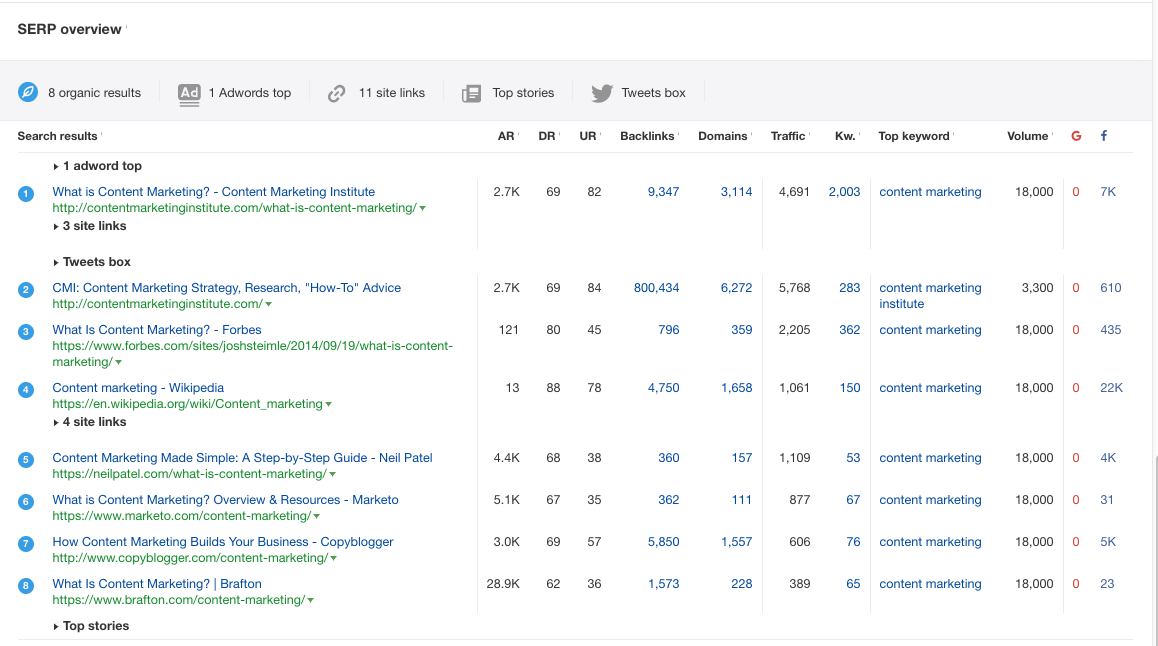
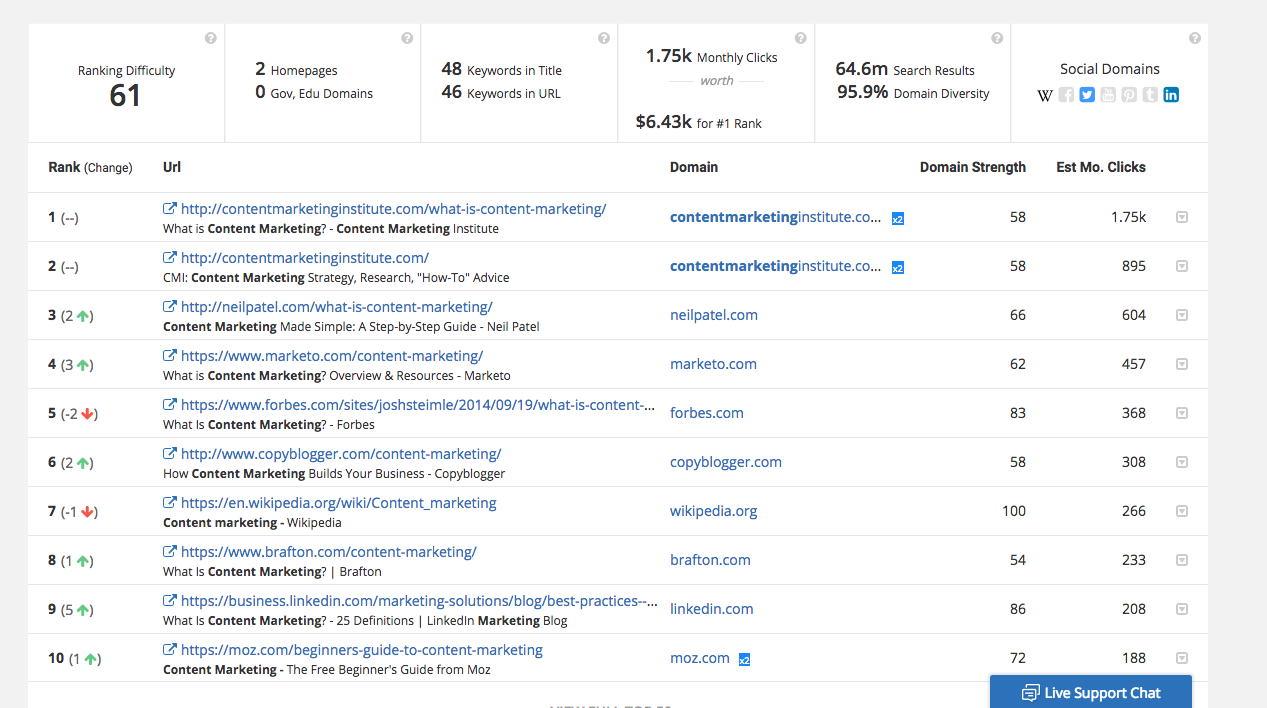
If you were to do a Google search for [content marketing], what sites do you see?
  • Content Marketing Institute
  • Forbes
  • Copyblogger
  • Wikipedia.
  • Moz
What do all these sites have in common?
They have built an incredible amount of trust among online users and website owners. As a result, these sites have gained top rankings and attracted tons of links.
It’s going to be one heck of a challenge to outrank them, no matter how great your content is.
And that’s why every time you want to publish a new article, not only do you need to keep in mind what’s really trending now and what answers your target audience is looking for. But you also need to consider what kind of posts have the highest chance to acquire more links and find the right type of keywords.
This post will show you exactly how to find the right keywords that will give you a competitive advantage and help you figure out how many inbound links your article needs to acquire to appear on the first page of Google.

Step 1: Evaluate Your Current Situation in Google

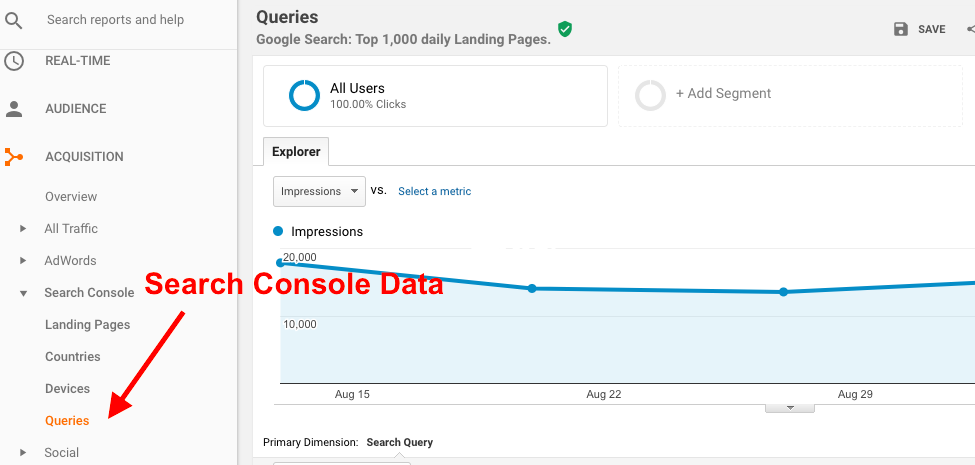
Find what kind of keywords have already been bringing you traffic and conversions. Such search queries can be found in your Google Analytics account if you have connected it with your Google Search Console account.

But there’s one little problem. Google Analytics, even after being connected with Google Search Console, won’t show you which keywords have converted. Unfortunately, Google only allows you to access this data for your landing pages.
And that’s where tools like SEMrush, SpyFu, SERPstat, or Ahrefs come into play. These tools will provide you with this missing puzzle of this data.
The aforementioned tools let you see for which keywords a particular URL appears in Google. They also show you how far from the top of Google your site is for a particular keyword. You’ll see this update displayed right next to the keyword.
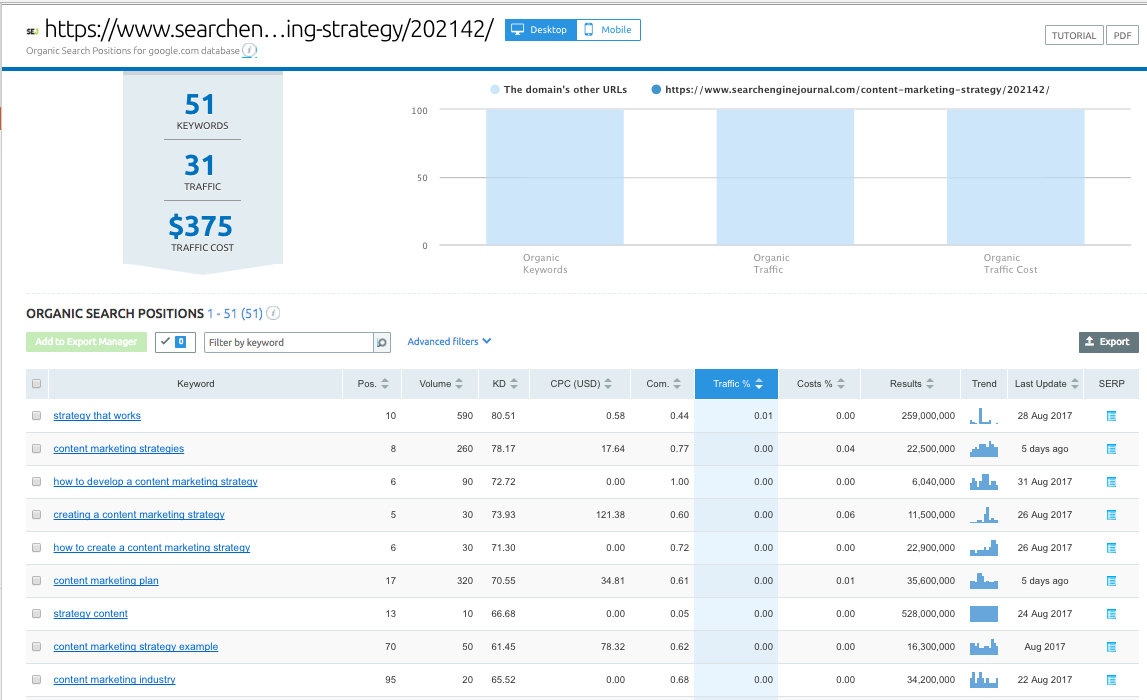
For example, here’s a screenshot from SEMrush that shows all search queries one of my previous articles, How to Build a Content Marketing Strategy That Works in 5 Steps, was ranking for in Google:
serps ranking
To the right of each keyword, you can see the position this keyword currently has and its search volume.

Step 2: Find Related Keywords

Now you need to find keywords that are similar to those you discovered during Step 1.
Let’s say, it turned out that keywords related to content marketing strategy brought you the most conversions. So it’s a good idea to create more content using keywords related to that subject.
Why?
Because those keywords mirror your audience’s search behavior the most. These keywords also have the highest potential to bring you more paying clients.
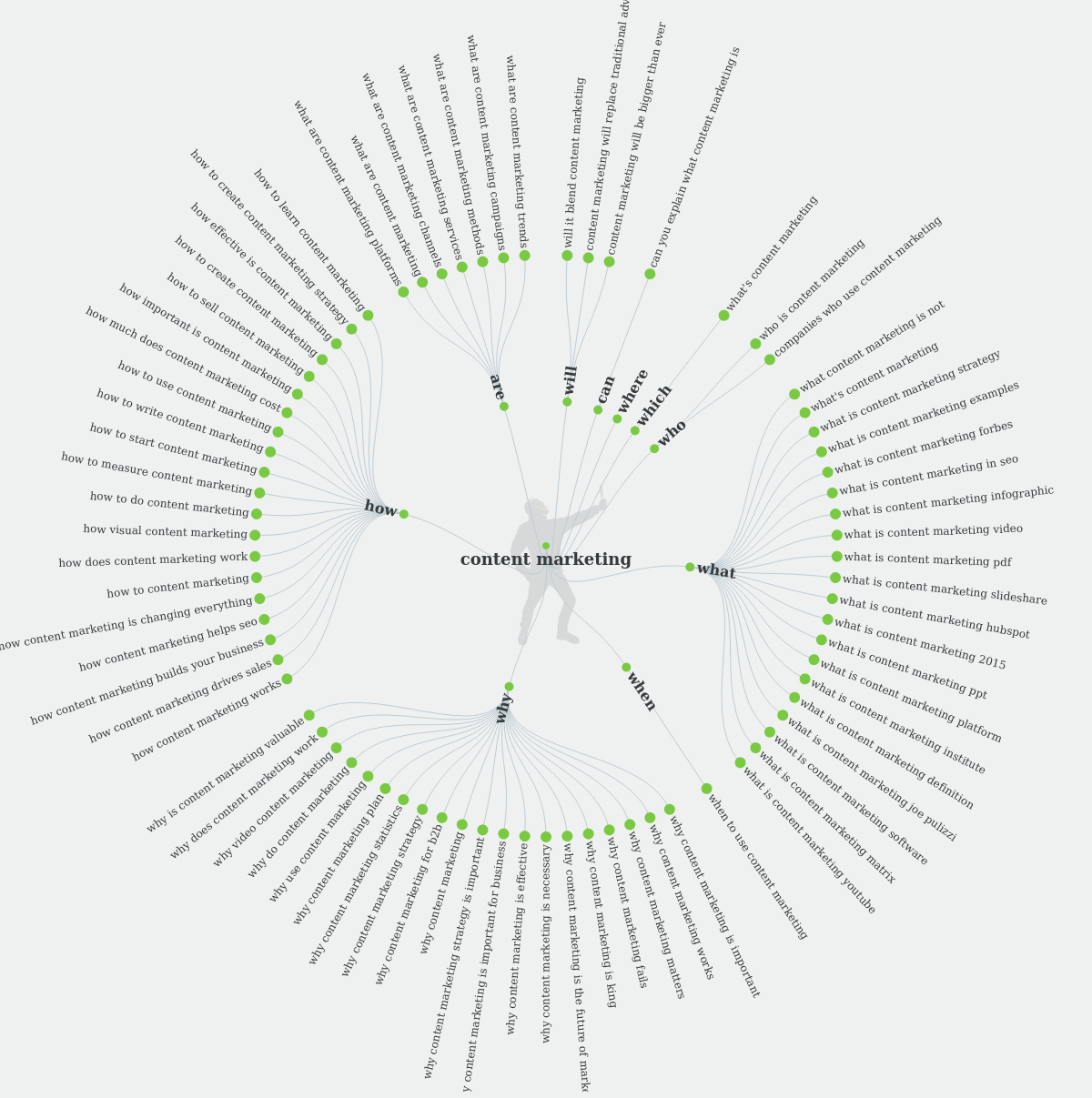
There are several ways to find these keywords. One thing you can do is to simply check Google’s Autocomplete. You can look for autocomplete suggestions either manually, or using tools like AnswerThePublic.com. (A fun fact: guessing what kind of autocompletes made it to the top of Google has become a legit Family Feud-style game.)
Before you start brainstorming a title for your next piece of content, you need to know what subject resonates the most with your target audience. That’s when Answer The Public comes in.
The Answer the Public website is a tool that helps you discover what people are searching for in Google’s autocomplete. It has built a database from myriads of searches and it will predict what you’re going to ask, based on the data that’s already been put in.
The more variations of keywords you try, the more content ideas you’ll get. The results are demonstrated based on the variations used to build them, and can be downloaded as an image like the one shown below:
Answer The Public Results
You should also look at Keywordtool.io. This tool scrapes Google Autosuggest and gives you the search volume for each keyword you entered. This tool can save hours of your time because you need to know the search volume for every keyword in order to estimate how many users this keyword can potentially bring on board.
Another tool you can try is the SEMrush Keyword Magic tool. It automatically provides you with the most important information about a keyword, factoring in metrics such as:
  • CPC and volume (basic, but much-needed).
  • Keyword difficulty.
  • Competition level.
  • SERP features.
  • Exact and broad keyword matches (grouping keywords by the most frequently appearing words in phrases that include your search term or phrase).
This tool quickly gathers the data you need and offers a much wider range of analysis for both single keywords and groups of keywords. I spend less time doing monotonous work and can concentrate on something more complex.

Step 3: Check the Competition Level in SERPs

Now that you have the list of keywords that are related to your most profitable search queries, it’s time to choose the keywords (e.g., topics for your future articles) that will let you rank higher in Google.
For a quick check, you can use SEMrush Keyword Difficulty tool. It tells you how difficult will it be for you to promote based on the domain’s visibility in organic search results.
There’s one problem with this tool, though: it doesn’t consider the number of referring domains for the website or a page URL you’re trying to look up. So you’ll also need to spend some quality time with Excel.
Follow this quick and simple process to make this process hassle-free:
Start by collecting the list of domains and pages (URLs) that currently rank in Google for the list of keywords that you’ve selected during the previous step. To speed things up, use a tool like SEMrush that allows you to export such list of domains and pages.
The same action of finding and exporting domains and URLs can be performed in Ahrefs Site Explorer:
Ahrefs Site Explorer
SpyFu has the same functionality:
Spyfu Keyword Overview
The results show you the ranking difficulty for the keyword you entered, along with the explanation of how many keywords are in the title and in the URL, the number of monthly clicks, and search results. The green and red arrows displayed on the left from the URL show whether a particular page’s ranking has gone up or down.
After you collect all domains and URLs, you need to check the number of referring domains for each of them. This can be done with tools like Ahrefs or the Majestic Bulk Backlink Checker that allows you to analyze multiple links at once.
Finally, you can get a good understanding of what kind of keywords have more or less competition not only based on the number of searchers they have, but also based on the real situation in SERPs.
From this moment on, you know how many referring domains each of your content pieces need to receive in order to rank high in Google. You’ll be able to tell the number of referring domains by looking at how many links have already been acquired by other pages that currently rank well in Google.
Also, you can estimate the number of visitors you’ll attract on a monthly basis and calculate the conversions you will potentially earn because you researched more keywords related to your most profitable ones.

Conclusion

Outranking websites with a high level of trustworthiness and credibility is no easy task. But who says you have to do that?
Work with what you already have. Analyze which of your current keywords have been bringing you traffic and increasing your sales. Look for keywords related to those keywords.
Evaluate the performance of your site’s URLs to see exactly how many referring domains each of your pages needs to have to stay visible in the search results. Elaborate on the topics that your target audience takes the most interest in.
Take advantage of marketing tools to help you leverage the results of hard work you’re putting while doing other types of research for your online marketing strategy. And always be wary of your competition.
Play smart by taking small steps and using keywords that will realistically get you to the top of Google.

Reference:https://www.searchenginejournal.com/seo-content-marketing-strategies/215383/

Wednesday, February 28, 2018

Content Marketing or PPC – Which Is Better?

Which Is Better: Content Marketing or PPC? The Pros & Cons of Both
If you’re a business owner or marketer, there may be a battle going on in your head.
The conundrum you’re facing: How are you going to grow your business reach, brand awareness, and bottom line?
The two opponents: content marketing and PPC (pay-per-click) advertising.
On one hand, content marketing has some convincing statistics on its side:
  • Content marketing adopters enjoy website conversion rates that are almost 6x higher than what non-adopters get.
  • On-page content is the most effective technique for SEO.
  • Branded content initiatives are considered by marketers as more effective than advertising in TV and magazines, direct mail, or PR.
On the other hand, PPC can immediately get you on top of the SERPs, in front of people who are ready to buy.
But is the cost worth the return?
If you don’t know what to do, relax – there’s never a straightforward answer to the content marketing versus PPC question.
To help you wrap your head around it, let’s go over the pros and cons of both. Then you can make a decision that’s right for your specific situation, brand, and target audience.

Content Marketing vs. PPC: Decoding the Pros & Cons

Is there a clear-cut winner, here?
Let’s find out.

Content Marketing: A Lower-Cost Solution That Keeps Building Your Visibility, but Takes Time

If you’re willing to stick with it and accept the upfront costs, content marketing can be a real winner for higher-quality leads and better conversions.
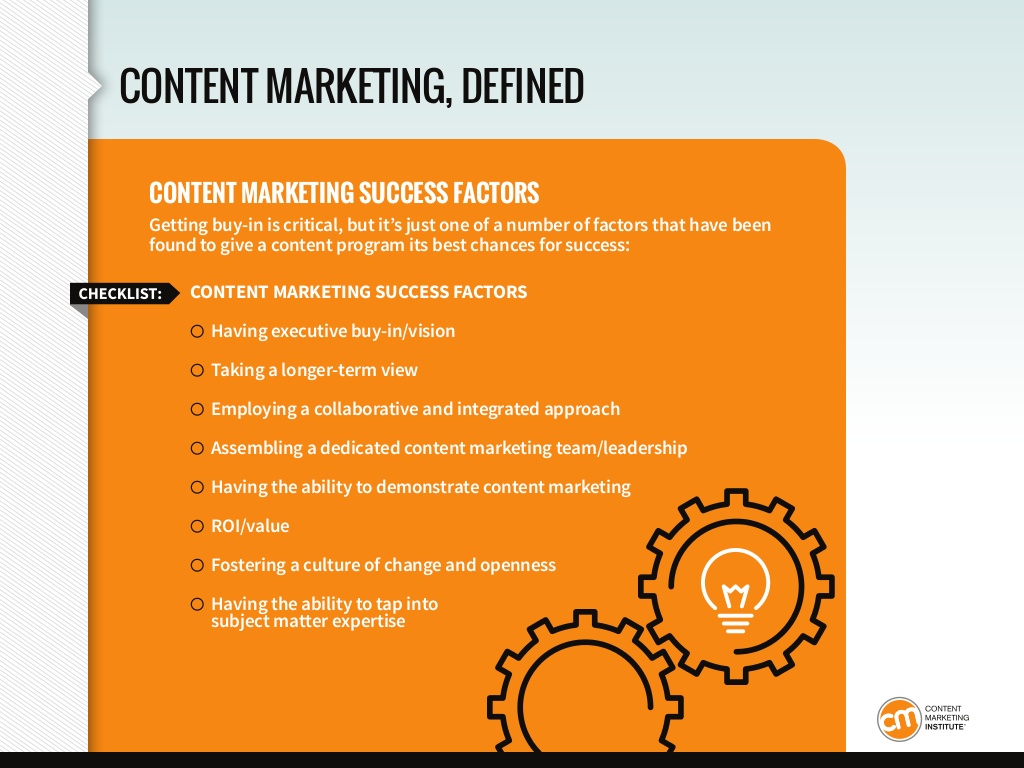
It takes dedication to the right success factors:
cmi_content-marketing-success-factors
But it can be so worth it.
Here are the pros and cons.
1. Con: Content Marketing Takes Longer to Net ROI
Content marketing takes serious commitment. On average, you won’t see results until months after you publish your content.
However, once you do start seeing ROI, it snowballs.
For example, if you use content marketing, HubSpot estimates old blog posts on evergreen topics account for 38 percent of your total web traffic. Those posts published months and months ago eventually start reeling in targeted visitors as they climb the rankings.
Content takes some time to start building momentum. But, once it does, it’s unstoppable.
2. Pro: It Earns You Better Leads
Once your content starts ranking, the leads you get from organic search will be higher-quality than those you buy with PPC.
According to Marketing Sherpa, among online lead generation channels, organic search generates the greatest volume of leads and the highest conversion rates, with paid search ranking third for both – just behind email marketing campaigns.
Quality leads are more likely to buy, and content marketing draws them in better.
3. Pro: It’s More Cost Effective
There are upfront costs for doing content marketing, but they are one-and-done.
Once you publish the content, it will continue to climb the search results, earning clicks and leads, and you won’t have to pay another cent.
4. Con: It’s Hard to Find Qualified Writers & Content Creators
It’s true: A good writer can be hard to find.
Plus, it can take valuable time to vet writers yourself and figure out if they’re a good fit for your brand.
5. Pro: There Are Content Agencies for That Exact Problem
The good news is you can let an agency handle the vetting for you. They’ll match you up with a writer who can seamlessly slide into your brand voice and handle your written content.
Agencies also demand a certain level of success from their hires, including skilled writing and research, so you can rest easy that you’ll be getting high-quality content that fits your business.

PPC Pros & Cons: Targeted Reach for Immediate Visibility That’s Fleeting

Content marketing has a lot to offer. But what about PPC?
What does PPC marketing bring to the table, and what does it leave out?
1. Con: PPC is a Costly Long-Term Strategy
Unless you ooze money, you’ll never be able to sustain a long-term PPC strategy.
That’s because you get charged every time someone clicks on your SERP listing. If your goal is to steadily boost traffic and stay at the top, you’ll be paying a lot just to stay visible on Google.
2. Pro: PPC Gets You on Top – Literally
Do you want to shoot to the top of Google immediately?
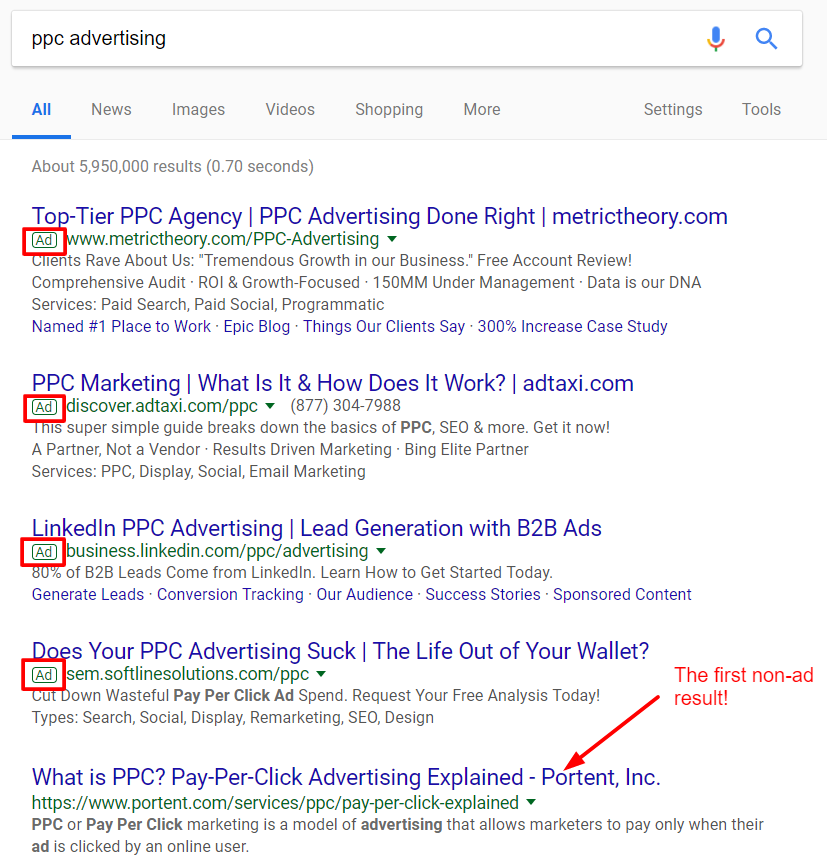
Well, if you use Google AdWords, first you need to bid on your target keyword. If your page is relevant, and you bid enough, Google will put you on top:
ppc advertising
As you can see, the visibility is through the roof. The traffic you get from paying for a top spot could make the cost-per-click worth it.
3. Con: Once You Stop Paying, Your Visibility Disappears
This is the major con of PPC. When your money runs dry, you disappear from the top spot.
Poof. Gone.
This is in drastic contrast to content marketing, where you earn your SERP spot slowly, over time.
Once you rank, and as long as your content remains relevant, it will never disappear, and you won’t pay a cent more than your up-front costs for producing and publishing.
4. Pro/Con: PPC is More Affordable for Certain Industries
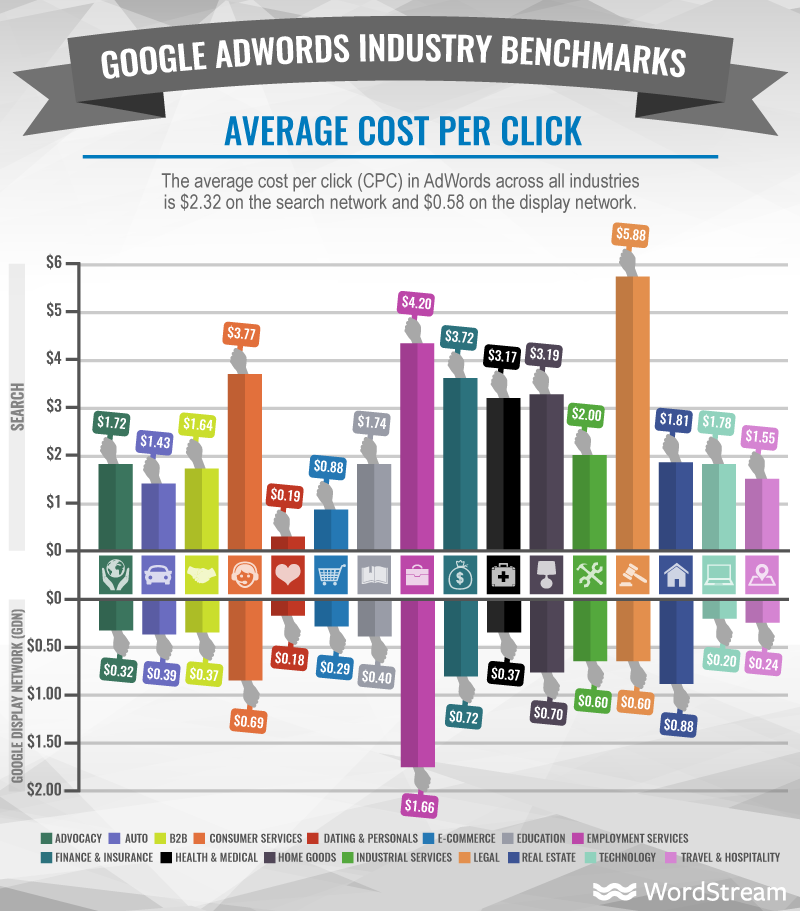
For PPC ads, the amount you pay (cost-per-click, or CPC) varies across industries. To put it simply, some fields (like legal) just have more competition for keywords.
On the other hand, if you’re in industries like e-commerce, education, or employment services, according to Wordstream, PPC is totally affordable.

As you can see, the average CPC across industries hovers around $2.32, which could be way worse (just look at the legal industry’s CPC – $5.88!).

So, Which Channel Wins?

Let’s recap:
  • Content marketing involves producing content with the aim of building trust and loyalty with your target audience, which eventually leads to profitable results.
  • PPC advertising involves paying for a prime spot in search results and the resulting traffic boost. Each time a visitor clicks your link, you pay.
Both methods have pros and cons, but you really can’t choose one over the other. Putting all your eggs in one basket is always a risky strategy.
Instead, PPC and content marketing are each situation-specific:
  • Sometimes, you need targeted visibility and the immediate power of PPC so more people can find your content. (But, if your content sucks, forget about conversions.)
  • You also need awesome, stable content assets that can rise through the SERP ranks and build ROI month after month, year after year.
One thing you’ll notice about the above scenarios: They both require valuable content as the foundation.
PPC can’t help you with conversions – content marketing can.
CMI perhaps worded it most succinctly:

PPC and content marketing are both viable strategies that can work. But content marketing does have an edge with regard to longevity, cost-effectiveness, and stability.
Plus, with quality content, your PPC ads will pay off better, because you’ll be nurturing your incoming traffic.

Reference:https://www.searchenginejournal.com/content-marketing-vs-ppc/236107/?ver=236107X3

Tuesday, February 27, 2018

15 ways to ride the audience wave

If you're not taking advantage of the slew of targeting options available for audiences, you're missing out. Columnist Kevin Lee shares 15 tools you should have in your targeting toolbox.


Marketers universally think of audiences when buying media and advertising. In search marketing, however, audiences have traditionally been ignored because they weren’t always available as targetable entities, but they are now.

If you aren’t riding the wave of targeting options that revolve around audiences, you’re both wasting budget and missing out on what might be your most profitable targeting strategy. This article will bring you up to speed by walking you through 15 audience targeting levers that you should be experimenting with.

Beginning with Google

While Bing and other search engines provide audience targeting for users of their paid advertising platforms, Google — with about 65 percent of search market share — is probably your main concern, so let’s start there. (Besides, Google has released a lot of targeting options recently, and many of these are not truly appreciated or understood.)
Because so many of you SEM practitioners are managing everything you have access to through the AdWords interface, I’ll cover audience targeting choices even if they’re typically used for video/YouTube and the GDN (Google Display Network).
All of the audience targeting choices listed below are powerful when used alone, but when used in combination, they become even more so. Fair warning, though: You can go too far in targeting at a granular level, making the audience size so small that it’s not worth it. (If you’ve advertised on Facebook or LinkedIn, you’re familiar with how the available audience size shrinks as you add targeting filters.)
The “shrinking audience” phenomenon is particularly evident in pure paid search, because paid search relies on the consumer or prospect engaging in a search, an event which may be far less frequent against your keyword set than video consumption or exposure to display advertising/contextual advertising.

Choosing your best audience targeting tool

Audience answers the “who” question in some cases even better than search alone does. That’s what makes it so powerful. So, here we go: 15 ways you should be riding the “audience wave.” These tools are presented in no particular order, not all are available as search placements, and some are exclusively available via search. They are all powerful tools in your targeting toolbox.
  • YouTube subscribers: Link your YouTube account to your AdWords account to enable targeting against viewers of your own YouTube channel.
  • Remarketing lists: You can create these for an AdWords tag or with Google Analytics. If you have an Android app, you can also create an audience around your app users.
  • RLSA (Remarketing Lists for Search Ads): There are many ways to combine targeting and RLSA for improved relevance and ROI. But you’ll need to pay close attention to the specific bid options Google provides to precisely control your campaign’s reach. Google explains the layers of the different bid options here:When you add multiple targeting methods to the same ad group and set these to ‘Target and bid,’ you’re telling AdWords to restrict or narrow the reach of your ads. When you add additional targeting methods and set them to ‘Bid only,’ you’re telling AdWords not to restrict where your ads show but to increase or decrease its chances of showing depending on the bid you choose.”
    1. “Target and bid:” The key here is the AND. To trigger an ad, both your keywords AND remarketing list must be triggered (a pure RLSA campaign). This narrows the focus and the audience. So this is a restrictive bid option.
    2. “Bid only:” Poorly named in my opinion — this is the inclusive bid option.
  • Negative audiences: Selling something once, then you’re done? Exclude those who reach your “thank you” page from being exposed to future targeting/ads.
  • Affinity interest categories: In some industries and product or service categories, affinities or interests predict a willingness to respond to your messaging. So why not take advantage of this targeting option, alone or in combination with others?
  • In-market: Those who’ve engaged in behavior that makes them “in-market” (or “intenders”). While this is a fuzzy definition, it can be useful. The challenge lies in both the way the in-market signal was determined and how recently the behavior of a consumer reinforced that designation. For example, not everyone visiting the Lamborghini section of a car site is in-market for a high-performance sports car. Similarly, two people looking at floral arrangements online might have very different in-market realities; one is making the purchase today for a birthday; the other is looking to plan a wedding six months from now.
  • Gender: Seems obvious, but sometimes response to the same keyword differs by gender (on average).
  • Age: Same as gender; narrow your audience and get a higher Quality Score.
  • Parental status: Same as gender.
  • Household income: Make sure they can afford your product or service.
  • Websites (placements): This tool can work really well with retargeting (provided you’re placing ads on a sufficiently high-traffic site). You can proactively pick retargeting sites that resonate with the message and the searcher’s needs.
  • YouTube videos (placements) and channels (placements): When combined with retargeting, results can be very powerful.
  • Apps (placements): The apps that people use tell you a lot about them.
  • App categories: 140 currently, within placements.
  • Topics: This is similar to “in-market” but is about the context of the page your target audience is on.

Audience targeting is the wave of the future

I predict continued advancements and refinements to audience targeting will be launched throughout the advertising ecosystem in the near future.

Reference:https://marketingland.com/15-ways-ride-audience-wave-227772

Monday, February 26, 2018

7 Quick Tips for Boosting Your SEO: A Beginner's Guide


1. Set up a Google My Business profile

Set this up and get all of your business details uploaded. Google My Business will enable you to appear in local search results specific to the area you're operating in. Even broad searches with large volumes are now showing local results which is something business owners can capitalize upon.

2. Make your site mobile friendly with Accelerate Mobile Pages (AMP)

 AMP generates a mobile version of your site and will increase your SERP in mobile browser. Approximately 80% of internet traffic comes from mobile, so make sure your site is built on a flex template and optimized with AMP.

3. Understand your online audience
 
Obviously as marketers, this goes without saying. But, who is your typical customer? What are they looking for and how do they spend their time online? What kind of content do they like to consume? When you understand your audience, you will know what you need to do online to grab their attention.

4. Optimize your homepage meta description

This is just plain best practice. Get those top terms into a description that isn't too gimmicky or spammy, and is a clear indicator of what your website is about. The rule of thumb here is to get your most important keywords into your homepage title and meta description. 

5. Research keywords and competitors
 
Keyword research is essential to understanding your site's SEO and your competitors', but luckily, you do not have to be an SEO guru to know which keywords to use. Use free tools like SEM Rush to research your current and potential keywords related products and services, your audience's topics of interest or other aspects of SEO. 

6. Make your site load faster

A study shows that most of the visitors wait under 7 seconds for a page to load. If your page doesn't load before that time you risk losing traffic. If you're running on an open source CMS , deleting any unnecessary plugins will help speed things up! 

7. Keep an eye on your back-links

Your external links are a big factor in whether your page ranks on the first page of Google. Pages that are linked the most by outside sites are likely to be viewed by search engines as the most relevant and important. It's not enough to get the most links to your site. Your site should also earn the links of sites that are respected and have high authority in their field or niche.


Reference:http://www.dmnews.com/marketing-strategy/7-quick-tips-for-boosting-your-seo-a-beginners-guide/article/746464/


Friday, February 23, 2018

Avoid an SEO Disaster During a Website Redesign

How to Avoid SEO Disaster During a Website Redesign

Redesigning a website or migrating to a new CMS takes a lot of planning and hard work.
It can also be disastrous if you don’t take the proper SEO precautions.
When done right, the process should be mostly painless.
When done wrong, a redesign can be disastrous.
We all know the incredible importance of organic search.
If you lose a majority of your rankings and traffic, you’ll see fewer leads and less sales.
This post will help you avoid such a fate.
Here are some specific steps you can take before migration, during launch, and post-launch to mitigate risk and avoid SEO disaster when redesigning your website.

Before Migration

Goals & Project Plan

There are likely some pretty compelling reasons why you are embarking on a website redesign. Those could be tied to:
  • Business use-cases.
  • User experience improvements.
  • Marketing initiatives.
  • SEO improvements.
A key aspect of ensuring the project will be a success is setting appropriate goals.
Now is the time to make sure you have a baseline or benchmark to compare to after launch and a plan taking you from start to finish in the process.
Most web projects follow a specific plan or agile methodology. This plan is typically managed by the project owner whether they are in an account service, project management, product, IT, or an aligned role.
Having SEO steps lined out, timing, a checklist, and the quality control plan in front of everyone can allow for ensuring the SEO is represented at each step and taken into consideration.

Content & Information Architecture

Context of the website subject matter overall, and sub-topic themes, are critical to SEO success.
This is built through the specific content on the site and how that content is organized.
Changes to the information architecture, sitemap, and overall content plan in the redesign is key and something SEO needs to be involved in and help drive.
You want to make sure that important pages are not omitted from the site going forward if they carry SEO value and that the overall message and theme of sections of the site are not diluted by the design.
Start with current sitemap and work with your team on requirements for the new sitemap as this will be your guide the rest of the steps in the redesign process for SEO.
You can use a crawling tool (e.g., Screaming Frog or DeepCrawl) to find all pages of your website.

On-page Optimization

Digging deeper to a page level, the relevance of content to the intent of the searcher is important to maintain.
When you know what context and overall architecture is changing (or remaining the same), you can work to protect or proactively optimize at the page level for the specific elements that help with relevance – URL, page title, meta description, body copy, alt text, etc.
How deep the changes are to architecture and sitemap overall will dictate how much you need to focus on relevancy of content at a depth level to ensure you don’t lose subject matter content on the site.
You want to optimize your staging site or code-base that will be launched and not wait until post-launch to make these updates.

Redirects

There’s a basic user experience case to be made for ensuring that you map out 301 redirects for all pages that are getting new URLs and those that are going away in the redesigned site. We never want to serve up a 404 error page to a user if we can avoid it.
The search engines are OK with 404s if we are hoping to have content removed from the index. However, we probably don’t want that to happen either unless we intend for it to.
Any link equity we have will be lost if the pages being linked to result in a 404 error.
It is important to ensure that all pages that have links pointing to them (at the very least) are properly redirected if we don’t have control over ensuring that the links are updated to the new destination page URL.
If you have a large website, this could very well be the most time intensive and important part of the redesign process.
Use the crawl that you did earlier for your sitemap planning to determine all URLs that need to be redirected.
You can also gain a lot of insight from Google Search Console and Bing Webmaster Tools as to which pages the search engines crawl on an ongoing basis to make sure you don’t miss any redirects.
When you have all redirects mapped out, ensure that they are implemented at the server level or in a site plug-in and are ready to go for launch.
Failure to plan for redirects is something that I’ve seen far too many times over the years.
I have been asked to come in and do rescue work after a redesign launches that either overlooked the process as a whole or didn’t consider the impact that redirects could have.
It is difficult to do this work after launch as the damage has often been done with search engines and users getting 404 errors.
Even when we can do some forensics to find the old site URLs and implement redirects, we have lost precious time meaning that we’ll have to take the short-term hit and hope to get back the relevancy and authority status that we had with the old website.

Launch

At launch time, you’ll want to follow along with the go-live checklist and perform any possible quality control checks of the work you have done to date on the staging site.
Don’t give the go-ahead for launch if any of your on-page work or redirects are not in place or tested.
It is much easier to slightly delay launch than to undo damage later or have to roll back to the old website.

Post-Launch

Check Redirects

Your first step is to go back to your redirect file, old sitemap, and old site crawl to test and ensure that all old site URLs perform 301 redirects to new site URLs as you outlined.
This is where you can catch any stray 404s and implement additional redirects quickly.
You can start by spot-checking URLs and then go deeper as time permits to work through as many old site URLs possible.

Dev-to-Live Audit

Beyond the redirects, you want to make sure that all pages and specific on-page optimization carried over from the dev site to the live site.
If your website has a lot of dynamic content, this can prove important as sometimes databases and tables get missed in migration.
For example, if you optimized all title tags on the staging site but the database they are in didn’t go live at launch, you might find missing or default duplicate titles on every page or on product pages, etc.

Code & Performance Validation

Don’t assume that the live website will perform the same as the staging site did. Run the homepage and key pages through the mobile-friendly testing tool to ensure the site achieves passing grades.
Additionally, run the page speed tools to find any areas that need to be optimized on the new website. The difference in servers, hosting, and other loads on the production site can cause hiccups that you wouldn’t have found on the staging website.
Also, don’t forget about any schema markup you have on the site.
Using validation tools to ensure proper implementation here are helpful in case anything changed between the old, staging, and live sites and how the search engines render them.

Submit XML Sitemaps

When you are satisfied with your redirects working properly and the implementation of SEO on the live site, it is time to submit the XML sitemap. Ensure that the dynamic sitemap includes the desired full set of destination URLs. If you are using a static sitemap, generate a new one now, audit it, and submit it.
Note that you want to be sure that your XML sitemap file(s) are pristine. You want to have zero URLs that result in a 404 error and ensure all URLs are the destination URLs versus redirects or pages that canonical to another version.

Monitoring

It feels good to be done with the hard work involved in SEO for the relaunch and the migration overall. It is important to shift your mindset to a monitoring phase.
For the next 1-2 months, you need to monitor Google Search Console and Bing Webmaster Tools to watch for reported 404 errors, crawl errors, and any HTML on-page issues detected. Tackle these quickly.

Ongoing SEO

Remember that SEO is not a one-time thing.
Once the dust has settled and the monitoring phase is in motion, you can go back to your original plan and goals and measure the performance of the new site.

Reference:https://www.searchenginejournal.com/avoid-seo-disaster-website-redesign/232093/?ver=232093X3

Thursday, February 22, 2018

Google to Move Many More Sites to Mobile-First Index Very Soon

Google to Move Many More Sites to Mobile-First Index Very Soon

Google’s Gary Illyes has confirmed that a significant number of sites will be migrated to the mobile-first index in the next month and a half.
Illyes announced Google’s upcoming plans for the mobile-first index while on stage at Pubcon in Austin, Texas.
The last official word we heard from Google regarding mobile-first indexing was this past summer, when Google’s John Mueller mentioned it was being rolled out to individual sites that are ready for it.
Since then, we have published a help article with Google’s advice on getting ready for the mobile-first index.
The company initially planned to have all sites migrated to the mobile-first index by early 2018, but it doesn’t look like that goal is going to be met. Moreover, Google has said it will not tell us when migration to the mobile-first index is complete.
However, following Illyes’ keynote at Pubcon, we have learned that the new index may never be fully rolled out to all sites.
Currently only a small number of sites have been added to the mobile-first index, and it’s not expected to have an impact on traffic.
Savvy site owners can check to see if their site has been added to the mobile-first index by checking server logs and see what is crawling the site most often. If Googlebot mobile is doing most of the crawling, chances are you’re on the mobile-first index.
Without manually checking server logs there is no other way to determine if your site has been migrated to the new index, as Google is not notifying webmasters individually. If you’re “ready” for mobile-first indexing, then perhaps your site will be selected in the coming weeks.

Reference:https://www.searchenginejournal.com/google-move-many-sites-mobile-first-index-soon/238991/