Friday, September 7, 2018

A Step by Step Guide to Boosting Your Brand New Site Up Google’s Rankings


If you’ve just started a new blog or website, you must already be aware of the importance of getting it ranked quickly and effectively on Google. While there are other traffic sources, Google is still the number one search engine with, huge 77% market share. For many businesses, it’s their only source of traffic.
So, if you’ve got a new blog and you want to achieve a high rank for it, you’re in the right place. We’re going to give you a step by step walkthrough of exactly how to rank your site effectively on Google.

Why is Google still so important?

While there are other sources of traffic that are extremely relevant, Google is still the best.
When I first started trying to market my new blog, I didn’t realize how important Google was going to be for me. I thought that I could get traffic from loads of different sources without placing any extra emphasis upon Google. I was wrong. The reality was that when I managed to get a rank on the first page of Google, my visitor numbers went up dramatically.
If you just miss out on the first page on Google, you might as well be nowhere! Research shows that 11th place on Google (top of the second page) only gets around 1% of the hits for that search.
What that means is – if you’re trying to rank for a term with around 10,000 monthly searches, failing to get on the first page could at best get you around 100 clicks. If you’ve got a conversion rate of around 2%, this translates into two sales a month. Is that enough to make your business viable?
Before we get deeper into how to rank your site – let’s have a look at why keyword selection is so important.

Carry out some detailed keyword research

If you want to make your ranking efforts a success, you need to target the right keywords. So, before you start optimizing your content or looking for backlinks (we’ll get to that), you need to know which keywords to target.
There are a number of tools available that’ll help you do this, including Google’s very own keyword research page. The idea is to find a keyword that can generate high search volumes and thus ensure heavy traffic for your bolg or site. At the same time, the keyword should only face moderate competition, so that it is able to rank high on a search page.
Obviously, it is harder to get first page rankings for the highly competitive terms . If you’re new to the ranking business, try and go for more niche terms that are less competitive. Don’t just pick one keyword, choose a few so you can mix them up when you need to.
If you’re looking to make your keyword selection more niche by adding “long-tails” to the end of broader terms – make sure you target active long-tails rather than the passive ones. One great example of such addition is “discount”. It effectively targets and engages people who want to save on their shopping. If you can help them with their saving targets – you could make a sale.
Other great additions are things like the current year. With tons of outdated information available on the internet, people like to add this to ensure that they’re getting the most relevant and up-to-date information.
Try and avoid additions like “free” as these largely encourage people who are looking for a free ride.

Create quality content

People think there’s a shortcut to this and that they can play the system without creating good content. There isn’t. This might have worked in the past, but it doesn’t anymore. You’ve got to create relevant, high-quality content. Not only will this be more shareable (giving you more SEO juice as other people post links to it), but Google can also recognize quality these days.
You shouldn’t overlook the power of getting other people to share your content. Content sharing acts as an effective marketing tool and thus, helps in getting quality backlinks. – . But, all this can only be achieved with great content.
So when you create your content – make sure it’s good. Also, keep the keywords you already researched in mind and mention them enough in your posts. Not too much, but just enough – and use them in headings occasionally if you can.

Get your sitemaps sorted

One thing that Google looks for when trying to rank a page is its sitemaps file. Make sure you’ve got one and that it’s kept up to date (there are plugins that’ll do this for you). Your sitemap will notify Google of any changes so that it knows when to rank new posts or pages.

Make sure all your on-page SEO is fixed

Before we start looking at off-page SEO (backlinks), you need to make sure your on-page optimization is completely sorted. Hopefully, you’re already using your keywords in the posts you create, but you also need to make sure everything like META tags and descriptions is filled out and all your on-page content is fully optimized. Don’t worry – the highly popular Yoast SEO plugin will guide you through this in WordPress so that all your posts are optimized for the right keywords with the right metrics and densities.

Why backlinks are so important for SEO

If you really want to get your site noticed – you need backlinks. Backlinks allow Google to assess the relevance and importance of the web pages on their subject matters. While earlier, it was possible to spam backlinks from various sources to boost your site up the Google rankings, you can’t d that anymore. Now, You need to abide by quality.

Get good quality backlinks

Try partnering with relevant authorities in your domain in exchange for backlinks. Not only do these give you great link juice, they’re also great for relevant residual traffic.
You can also offer testimonials to other relevant authorities in return for a backlink. Post your content to social bookmarks and other social media sites. Make sure, you use the keywords you had picked as anchor text – but vary it a little instead of using the same one again and again.
One great way to get good quality backlinks is to look for the mentions of your site or brand that don’t include a link. Try to “recapture” thereby reaching out to their authors and requesting them to add an anchor link to their mention.
Don’t fall for those gigs on Fiverr that offer 10,000 links instantly. These seem too good to be true because they are!. Using these methods can actually get your site penalized or even blacklisted from Google.
Look for good quality backlinks from relevant, reputable sources and you should be set…
Hopefully, these tips are enough to get you started on your way to ranking success.

Thursday, September 6, 2018

8 Reasons to Use Infographics in Your Strategy

8 Benefits of Using Infographics in Your Content Strategy
Pitch infographics as a content format to a client or your boss and you run the risk of being met with a blank stare.
Why?
Because for some, infographics are a thing of the past.

Infographics Aren’t Dead, They’ve Just Had a Change of Purpose

You see, around 2012, everyone was producing infographics – often of very low quality.
Link builders used and abused the format to death.
Almost regardless of the topic and design, you could fairly easily land coverage on top-tier publications by using infographics.
Look at it from a journalist or bloggers perspective. Literally hundreds of marketers creating content which you can write a quick intro for, post, and embed the visual.
Easy work!
The problem with this was that the format became saturated.
All too often someone would pitch up a “bright” idea in a content strategy meeting:
“Let’s design an infographic!”
The quantity being produced increased over a few years and the quality declined.
Sometime around late 2016, top-tiers stopped publishing infographics at anywhere near the same frequency as they had been doing in prior years.
How do I know?
A few years back, I was producing somewhere between 200 and 300 infographics per year.
Thankfully, most were of a high design quality. But even now, I can look back and feel a little embarrassed as to some of the approaches and “quick wins” we took.
I’ll never forget a series of “sleep hack” infographics we rolled out for a bedding retailer. In reality, the first one was great – “11 Sleep Hacks Every Entrepreneur Needs to Know.” It landed coverage from many top-tier publications and some fantastic links (e.g., Huffington Post, Entrepreneur, Metro).
We then had the idea to change the title a number of times with a different design, yet pretty much the same hacks to roll out:
  • Sleep Hacks for Students
  • Sleep Hacks for Parents
  • Sleep Hacks for Travellers
You see the trend?
Looking back it’s a little bit embarrassing.
But it worked.
Every time we rolled these out they landed big links. Win!
We probably relied too heavily on infographics a few years ago but they worked – until late 2016 when many journalists started replying to outreach emails with “sorry, we don’t cover infographics anymore.”
Damn!
Despite this, we still use infographics in many campaigns and our two most successful pieces of content this year were both infographics.

Infographics Should Be a Key Part of Any Content Strategy

The problem with infographics a few years ago is that they were being used with a format-first approach.
Marketers were simply deciding to publish an infographic without much thought to the story and data behind it.
Infographics simply became an easy way to land links.
Times have changed.
But the good news is that, when used in the right way (as a way to present data and tell stories in a visual way), infographics are still highly effective.
Here are eight benefits to using infographics.

1. The Human Brain Process Visuals Better Than Text

It’s perhaps no surprise that our brains process information presented to us in a visual format far better than text.
In fact, it has been reported that we process visuals 60,000 times faster.
It makes sense and it’s one of the reasons why a well-designed infographic remains one of the best ways to increase engagement.
Think of it this way:
As content consumers, we’ve been overloaded with information in recent years. While there are definitely times when a 10,000-word guide is what’s needed, that isn’t always the case.
Data has a bad name for being boring and not really very to most of us, however, when you visualize it, it can take a new form and attract those who likely wouldn’t read it when presented in another format.

2. Infographics Are a Great Way to Tell Visual Stories

The reason why infographics found such a bad name for themselves is that marketers were using them simply as a way to land links. Rather than focussing on a story-first approach and determining the most suitable content form to present data and information, they became a way to land easy links.
We did what we’ve always done as SEOs… abused a good thing when we have it.
It’s no surprise that journalists got fed up with mediocre infographics and it’s still a mistake to pitch out saying ‘We’ve designed this infographic…’
I’m sorry, but no one cares that you’ve designed an infographic.
Journalists cover stories, not content.
It’s the data and stories behind an infographic which matter most but when you can present them in a visual way, stories can really come to life and be seen far more positively than simply sending out a press release or linking to a blog post.
A nicely designed infographic is a powerful content marketing tool; just be sure that it’s the right format to tell your story, however.

3. Infographics Are Easy to Digest

Not everyone has the time to read long-form content, nor do they always want to.
There’s absolutely no reason why you can’t use infographics to supplement your other content efforts, however.
A great example is my recently published guide on “How to Create Perfectly Optimized Content: 16 Essential Elements.” It’s a few thousand words long and fairly in-depth, however, the guide was summarized be a simple to understand infographic.
Why does it work?
Because it not only visualizes the advice put forward in the text but allows a reader to refer to it visually. The infographic gives context to the content and makes it easier to understand and implement.
Don’t always assume that content formats need to be used in isolation. Use them together to drive engagement and present consumption options for your readers.

4. Infographics Are Linkable

The reason why infographics became overused is because they became a great way to land links, often passively.
I’ll never forget the first infographic I ever (badly) designed myself; sometime in early 2013 in the months following Penguin: “Where to Source Guest Blogging Opportunities.”
Essentially, it was a visual guide on how to find sites who would accept a guest blog.
Pretty cringeworthy, thinking back.
However, this was right at the start of guest blogging becoming widely used.
I landed links from publications such as Social Media Today without doing any sort of outreach to promote it.
I literally shared it on social a few times and managed to get the blog post, which it was hosted on ranking.
This was the power of infographics back in 2013; a content snowball where one publication covers and links because they’ve seen it on another.
And that can still happen now – so long as there’s a great story.
Think about it this way.
Journalists are busy people. If they can quickly consume data in a visual way, without having to read through a lengthy press release, they’re in luck. So long as the data is solid and there’s a story they can pull, it’s a great way for them to build an article.
There’s one big difference nowadays, however.
Very few journalists who cover infographics actually embed them.
A recent campaign of mine earned over 150 links from publications such as Huffington Post, Bleacher Report, Glamour, and many others. Yet I’d estimate than less than 10 percent actually used the infographic.
Why?
Because they didn’t need to. They used the data as a base for their own article and worked in the images and visuals which they wanted to use to add value.
The infographic was a great way to earn editorial links but wasn’t the sole reason why the link was earned.
It was the data behind it.
If anyone tells you that infographics don’t earn links anymore, they’re wrong – and probably still pushing out mediocre ‘how to…’ listicle infographics which most of us stopped using years ago.

5. Infographics Are Shareable

As well as being linkable, infographics are easy to share.
Whether that’s on social, between team members or even within blog posts and articles; they’re a great way to share information with others.
In fact, 80 percent of marketers use visual assets in their social media marketing and that tweets with images receive 18 percent more retweets than tweets without images.
Why not consider slicing up your infographic into social-sized cards which can be shared across social? A great way to repurpose and drive further engagement from the content.

6. Infographics Help Establish You as an Expert

If you take a look at those who have built up a name for themselves in the business community (aside from those simply respected in search), we see the likes of Brian Dean and Larry Kim.
It’s perhaps no surprise that these guys are heavy users of (well designed and well thought out) infographics.
You see, given that infographics are shareable and linkable, they’re a great way to help establish yourself as an expert; so long as there’s the right distribution strategy in place.
Carefully plan a series of informative and engaging infographics, combine with a solid outreach strategy, and watch your engagement grow.

7. Infographics Can Help to Increase Sales

Infographics are a great sales tool.
Remember the statistics around the human brain consuming visuals better than text?
Let’s say you’re a SaaS brand and you’re showcasing what your platform can do.
Why not visualize as an infographic?
Rather than writing out the processes, benefits, and comparables, an infographic could make it instantly obvious to potential buyers as to why they should choose you over the competition.
An infographic doesn’t have to be used as a link building or PR tool.
Think about how you could educate your prospects in a visual way and give it a try.

8. Less Infographics Are Being Promoted Today

There’s no doubting the fact that (finally) there are less and less mediocre infographics being produced.
In many ways, there are fewer infographics being promoted full stop.
The good news is that we’re past the stage where the reaction from journalists and consumers is: “Oh no, not another infographic…”
So long as it’s used as a format to visually tell a story or present data, they remain a great way to attract attention.
Just be sure that it’s the most suitable format and that you have a solid promotion strategy in place.
Don’t waste your time pitching to publishers as an infographic. Simply share the data and the stories and let the infographic enhance these to content consumers.

Conclusion

Infographics aren’t dead, they’ve just been misunderstood and misused for some time.

Reference:https://www.searchenginejournal.com/infographic-benefits/267781/?ver=267781X2

Wednesday, September 5, 2018

How to Measure Content Marketing ROI within an Hour


Content Marketing is all fun and games and extremely thrilling until you sit down to track your ROI. Calculating your ROI for content marketing seems like more daunting a task than the entire process itself.
The trouble is that most people only associate content marketing with vague metrics that cannot be quantified. Whereas it is totally agreeable that Content Marketing does have a lot of unquantifiable impact on your business, still, there must be a way to calculate your ROI because after all, business is a number game.
Before we go ahead and tell you how to calculate content marketing ROI within an Hour, let us first talk about your objectives.

Define Your Content Marketing Objectives

Before launching your Content marketing campaign, you must have defined your objectives- what is it that you wish to achieve through content marketing. The objectives differ from business to business and marketer to marketer.
You might be doing content marketing to establish thought leadership and branding. You might as well have a lead generation strategy aligned with your content marketing plan. Or else, you might also be looking for an enhanced search engine presence.
Calculating direct ROI in all these cases is not feasible. When you are not looking for revenue increase through Content Marketing, you measure performance instead of monetary ROI.

Difference Between Performance Analysis and ROI Calculation

These two are often mistaken and used synonymously. However, the difference is huge.
Consider this scenario:
Scenario 1:
You have started your blog section and the goal of your blog section is to educate your audience in order to establish yourself as a trustworthy source of information and generate brand recall.

Analysis 1:

In this case, you are not generating content to get leads and you are not even trying to do that. When your goal is not leads or revenue, what do you track? You track whatever is your objective at the first place. Branding being your primary goal, you do a performance analysis on how has your branding improved through content marketing. There are various ways of tracking brand awareness such as tracking your direct traffic on Google Analytics.
Now, consider another scenario.
Scenario 2:
You published an eBook and promoted it in order to generate leads for your new service launch.

Analysis 2:

Lead generation being your primary goal, you can quantify the number of leads generated and number of leads converted thereby calculating your monetary ROI.
Now that you understand the difference between calculating ROI and performance analysis, let’s understand how to calculate ROI within an hour. Yes, it’s that simple.

Step 1: Calculate Investment of Time

This has to be extremely accurate. You can even use chrome extensions like Toggl to keep a track of time you invest in the process of content creation and distribution. If you have an individual specifically assigned with this job, it gets even easier for you to track because in that case, all you have to do is to consider the salary you pay to your resource.
Considering you have spent 10 hours creating and distributing content, you translate it to the compensation of those hours. If it is $5 per hour, you end up investing $50. Like I said, if you have an individual doing it full-time, it’s easier for you to calculate.
Let’s suppose it took $50 of man hours to create and publish a piece of content. We will use this as a standard in our examples.

Step 2: Outline Your Metric

If you are doing Content marketing for revenue generation, you could possibly be doing it in one or the other of two ways possible.
You are either targeting direct online sales through your content- like in the case of an e-commerce website, or you are looking to generate leads that then convert into your offline customers- like in the case of a home cleaning service provider.

Step 3: Calculate Gross Returns

Putting a utm-sourced call-to-action to your website, you can track the number of clicks that land on your sales page from your content page. Further, you can also track how many people of those who clicked have finally made a purchase. It allows you to track the amount of purchase made on your targeted page because of your content. Though the calculations can be complex depending on your entire model, figuring out total amount of purchase is totally possible.
Suppose 20 people from your content page land on your sales page where you are selling handbags. Out of these 20, 10 have made a purchase of $20 each leading to $200 sales. Your gross return is $200.
In case of lead generation, you can track how many leads could you end up with and how many of them transformed into a customer. Suppose 1 out of 20 leads converted leading to a sale of $400 for your home cleaning service business. This is your gross return.
The calculations here are rather straightforward, but in your case, it will depend on various other nuances of your pricing.

Step 4: Choose an attribution model

This is the most critical part of your ROI calculation. You need to do it smartly so that you don’t end up wasting more time calculating the ROI than doing the actual work. It’s a one-time activity so you will not have to do it every time you are calculating your content marketing ROI.
Attribution model is how you attribute your revenue to various steps in the funnel. It depends on how many phases do you have in a funnel. If you get 15 leads and there’s a sales guy who pitches the service to these 15 people, this guy needs to be attributed too. The larger the funnel, the complex is the calculation.
There are two types of attribution models you can choose from- multi-touch attribution and last touch attribution.
In last touch attribution, you assume that the last step taken by the customer before purchasing receives full attribution. So if the last step before purchase was reading your content, the content gets the full credit.
In multi-touch attribution, you give credit to each phase in the funnel. Since it is almost impossible to attribute a fixed percentage to each phase, you can give equal credit to each phase, which is again unrealistic, but still more accurate than last touch attribution.
Now suppose there are three phases in your funnel. You divide the total revenue by three and attribute it to your content.
In our examples, let’s suppose both the businesses have three funnels.
So, $66.6 can be attributed to content in the case of online handbag store and $133.3 in the case of home cleaning service provider.

Step 5: Calculate ROI

Time to calculate your final ROI! You are now only left with simple straightforward calculations.
With $50 of man hours spent on creating and publishing the content in question and $66.6 of gross returns in the case of online handbag store, our calculation says $16.6 of returns and i.e. 24% ROI.
Following the same equation for home cleaning services leads to $83.3 of returns and i.e. 62.4% ROI.
Hurray!
Just a little bit of ground work and you have your Content Marketing ROI in less than an hour. The entire calculation does not take much of your time and with that knowledge, you can calculate the ROI of every single piece of content. Now imagine the power it gives you. By calculating ROI of every content marketing effort, you have a lot of data to back your future decisions and strategy. Data driven marketing fuels your digital campaigns and brings precision in every effort that you put forward.
Calculating ROI gives you insights into what works and what does not thereby facilitating better results. If you have yet not measured your content marketing ROI, you should start doing it right now to use the power of data to its full potential.
This post was originally published on YourStory

Tuesday, September 4, 2018

Google Clarifies Internal Anchor Text and Ranking Effects

Google Clarifies Internal Anchor Text and Ranking Effects

Google explains that changes to internal linking can make dramatic changes to a site’s rankings, both positive and negative. In a Webmaster Hangout, Google’s John Mueller explained the best way to update internal linking.

Can Changing Internal Anchor Text Affect Rankings?

A web publisher asked if changing anchor text negatively affect a website.
“Does changing the text of older internal links to help users understand them have any downside? Can it hurt the rankings?”
John Mueller’s answer was unambiguous.
“No. That sounds perfect. If you’re updating anchor text internally to make it more easily understandable by users then usually that also helps search engines to better understand the context of those pages. So I would definitely go for that.
…if you’re just changing the text like the writing and you’re changing the anchor from one text name to something else, that’s perfectly fine. “
John Mueller’s advice illustrates a modern quality of how SEO is practiced today. It’s understood that Google looks at a site in terms of how a user would use it, how convenienced or inconvenienced the user would be and how well that user would understand the content on the page.
So it kind of follows that anchor text that helps a user understand what they are clicking through to will also be useful to Google for understanding what that linked page is about.

Will Updated Anchor Text Help Rankings?

John Mueller does not state that updating anchor text will help a site rank better. He only stated that the anchor text will help the search engine “better understand the context of those pages.”
In the old days, it was understood that the search engine would be influenced by the anchor text to rank the page according to that anchor text.
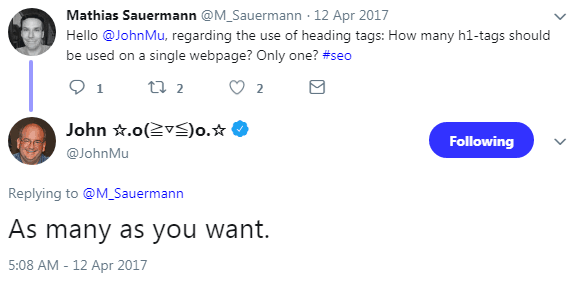
That was the understanding behind the use of H1 heading elements. Which might explain why the SEO community was a little surprised when in 2017 when John Mueller tweeted that publishers can use as many H1 heading elements as they wished.
Screenshot of a tweet by Google's John MuellerJohn Mueller providing an unexpected response to a question about the use of the Heading Element.
Traditional SEO dictates that Heading elements are a ranking element. But Mueller is asserting that Google uses the data as a way to understand content.
The use of anchor text falls into this same category where SEO sees anchor text as a ranking factor where Google sees it as just another way to understand the context of a page of content. Those are two different ways of understanding the what internal anchor text is about.

Images Should be Avoided

The next insight John Mueller shared was that he discouraged the use of images when linking between pages. The main reason appears to be that image links do not help Google understand the context of what that page is relevant for.
To me, this is a rare disconnect within the “if it’s good for Users it’s good for Google” paradigm.
Aphorisms are great but sometimes they are also limited. There may be situations where linking with an image is good for users but apparently it’s not always good for Google.
So it may be best not to take something like “if it’s good for Users it’s good for Google” as an absolute.
Here is what John Mueller stated:
“The one thing I would avoid doing is changing anchor text into an image. So if you have… a fancy font or something that you want to use on your pages and you change a link from being a text link to an image link and you don’t have any textual kind of connection with that image for that link then it’s really hard for us to understand what the anchor text is supposed to be.”

Reference:https://www.searchenginejournal.com/internal-anchor-text/267869/

Friday, August 31, 2018

Balancing Creativity and SEO in Content Writing

Balancing Creativity and SEO in Content Writing
In the realm of search engine optimization (SEO), content is king. Be it website copy, blog posts or guest posting, content is an integral part of effective SEO. However, not all content you create brings glory to your business. Unique, high-quality content blended with creativity supports SEO efforts.
If you're not creative in your writing process, you will be creating content like many of your competitors, reducing the chances of standing out from the crowd. In this article, I’m going to share six SEO content writing tips that will help you balance creativity in your work. Let’s dive in.
Related: 4 Content Assets You Can Publish on Your Website to Attract Attention

1. Search for important keywords.

The first step to creating useful content is to find important keywords and phrases that your audience uses to search on Google. Use Google Keyword Planner, a free tool, to find out terms that your audience uses to conduct online searches. Once you have made a list of keywords, you should include them in your content.
Naturally incorporate keywords into your content. Stuffing keywords in your content will do more harm than good to your business. The more long tail keywords you use, the better it will be for your content to rank on Google. 

2. Solve your audience’s problems.

Writing content that solves pain points of your prospects and customers is a surefire way to ensure the success of your SEO efforts. People tend to share content that they find useful, increasing the reach of content. The more people who read your content, the more Google will like your content. Therefore, you should make sure your SEO content strategy revolves around your audience’s problems.

3. Organize content for skimmers.

Humans have a shorter attention span than goldfish -- and the notoriously ill-focused goldfish has an attention span of nine seconds -- meaning that your visitors might leave your web pages without reading your content completely. Even if they stay, most of them are not going to read between the lines.
That said, be sure you organize your content for skimmers. Use bullet points, subheads and italics to highlight important information. Write short sentences and short paragraphs. Place important information in the beginning, the middle and the end of your content pieces. 
Related: Consumers Don't Have an Attention Problem. It's Just That Your Advertising Isn't Very Good.

4. Include facts and figures.

Facts and figures are essential to persuasive writing. They support your hypothesis and argument in your content. If you make your SEO content writing rich with supporting data, you will create persuasive, inspiring content. However, you should engagingly present data so that your content doesn’t look like a boring report painted with numbers. Also, make sure that the data you are using make sense easily. If your audience struggles to get the meaning of the numbers you mentioned in your content, they will lose interest, no matter how useful your content is.

5. Use enticing, relevant images.

It is true that a picture is worth a thousand words -- and eyesome images help you get noticed. Always use engaging, relevant images in your SEO content. There are several good ways to include images in your content. Product images, blog images and infographics are ways to enrich your content. Whenever you are using an image in your content, don’t forget to add an ALT tag to make it search engine friendly. Sometimes, it is difficult to find/create suitable images. The benefits a good image can offer is worth your time.

6. Write for humans.

While writing SEO content, consider the following questions:
  1. Is this the way a normal person will say things?
  2. How will someone feel hearing what I have written?
  3. Am I making my points clear enough?
If you throw away all the big marketing words and write in the tone and language of your audience, your content will make a lasting impression. 
Related: 3 All-Too-Familiar Writing Patterns You Need to Eliminate From Your Marketing Copy Today

Conclusion.

Unique content is vital for the success of your SEO efforts. If you write content based on important keywords, organize it for skimmers, include data to add credibility and complement it with relevant images, there is no reason why your audience wouldn't love to read your content. Remember, if people love your content, Google will love your content.

Reference:https://www.entrepreneur.com/article/317033

Thursday, August 30, 2018

Dos and Don'ts to Guide Your SEO Campaigns

Dos and Don'ts to Guide Your SEO Campaigns

SEO or Search Engine optimization is the process of optimizing a website to increase its ranking on the search engine results page (SERP). Web-crawlers, or ‘spiders’, of different search engines such as Google, Yahoo, Bing, etc. are constantly scouring the internet and indexing the websites. So when you google something, you are not actually accessing the internet, but rather browsing through the websites indexed by Google. These websites are arranged on the results page according to their relevance to the search keywords, which is computed by special search engine algorithms to determine the significance of each webpage.
Businesses have realised the importance of ranking higher on the search engine results page, as it increases their traffic and visibility across target audiences. This has led to an increased investment in SEO campaigns, especially by companies that have higher stake in expanding their online presence.
However, extensive knowledge of how search engines work is essential to build an SEO campaign. Here are some Dos & Don’ts to keep in mind-
What you should do-
  • Content planning-
Content is the key to a successful SEO campaign. Different types of content- text, pictures, videos, audios, infographics, etc. should be planned for the quarter well in advance. This allows for a smooth measureable step-by-step traffic growth on the website.
Also, one should hire content writers who are well-versed with native writing style as they understand how SEO writing works and utilise the keywords and webpage space optimally. Quality and quantity should be at equilibrium while planning.
  • Aim should be ‘Featured Snippets’-
Google Featured snippet is the highlighted content on top of the results page which provides gist of the information requested. The focus while planning must be to develop the web pages that have all the ingredients that can help you earn "Featured Snippets".
  • Boost organic traffic-
While planning, have measurable sales goals and actionable items which are driven by strategies that boost organic traffic.
That is why it is essential to have a separate budget for premium tools like Ahrefs, SEMRush and Moz which can advance your SEO campaign.
  • Bank on backlinks-
The outreach campaign planning starts with preparing a list of influencers who can be helpful in sourcing content for the website. Aim should be to become an influencer and help others with resourceful content to earn reputation. This helps to increase backlinks which also helps to climb website ranking on search engine’s index.
  • Barnacle SEO Approach-
For the first three months of the campaign, the plan should focus on ‘Barnacle SEO approach’, which means leveraging highly ranked websites to drive your presence on the internet and generate brand equity. This helps to make the homepage powerful, and then the rest follows.
What you shouldn’t do-
  • Over-commit in the projection planning-
Quote achievable figures when presenting the plan to your client. Every industry’s target audience differs, so projection of the people you can reach with your campaign should not be over-stated. This requires extensive homework.
  • Don’t over-do the backlinks-
Those 5 million backlinks gigs might look enticing but rather they are harmful for the website. Google, the most popular search engine, no longer rewards the websites with most backlinks. With the preference of quality over quantity, if the anchor text is not built in a natural way then your website can be penalised, which will lead to a dramatic drop in the ranking.
  • Experience counts, don’t hire novices-
SEO is not a game of guesswork. It requires factual understanding of how search engines evolve, making it a super-specialist domain.
Do not waste your budget by investing in inexperienced agencies or employees. Google is constantly updating the way it operates. If need be, your SEO campaign should be flexible enough to do the same.

Reference:https://www.entrepreneur.com/article/319072

Wednesday, August 29, 2018

Google Explains Why Singular and Plurals Rank Differently

Google Explains Why Singular and Plurals Rank Differently
Google’s John Mueller discussed why Google showed different results for the singular and plural versions of the same keyword phrase.  Many SEOs recommend adding synonyms to content, including the plural and singular versions of the targeted search phrase. John Mueller explains why it may be better to choose singular or plural then focus on that.

Question About Singular and Plural Keyword Phrases

In a recent Google Hangout someone asked the following question:
What are reasons for completely different positions for keywords in singular and plural? We have some examples where the plural ranks in top five and the singular isn’t in the top 100.

Google’s John Mueller’s Answer

The search intent should be very similar. So depending on what is happening there we might be seeing these as something a little different.
So just because one is singular and one is plural doesn’t mean that we would show the same search results for those kinds of queries.
It’s very possible that we see these as completely different elements and maybe even as completely different intent from the user side.
So that’s something were I wouldn’t necessarily assume that Google will always treat singular and plural words as complete synonyms and… show exactly the same search results for those two versions.
As a site owner, it might be worth thinking about what users might be searching differently and if my site’s really the most relevant one for people who are searching for singular version of this word versus those searching for the plural version.

Why Would Google Show Different Results?

The user intents underlying search queries can be different between synonyms and singular/plurals across all possible niches and topics. So it is impossible to generalize that singular keywords mean this and plural keywords mean that.
It can be said with certainty that there are differences between singular and plural keyword variations. But the reasons why they are different will vary specifically for each variation, topic and niche.
That is the meaning of John Mueller’s statement:
“It’s very possible that we see these as completely different elements and maybe even as completely different intent from the user side.”

How Singular and Plural Keywords Can Differ

Singular Can Signal a Search for a Recommendation

For some searches there are user intent differences between singular and plural. For example, for certain forum related searches I discovered that Google tended to promote a page that is recommending a forum but isn’t a forum itself, in searches using the singular version.
The plural version of the same search returns actual forums in the search results.
This does not happen across the board with searches for forums. The differences are, in my opinion, likely triggered by user intent signals, as indicated by click through rate data and/or predicted click through rate data.
This is why I prefaced this discussion by saying that we can’t generalize about the reasons. But we can discover how to identify the user intent on a keyword by keyord basis.
Now I will illustrate a specific instance and show you how Google’s algorithm is detecting the user intent and showing different searches for

How to Identify User Intent

Here’s another example, this time more specific. The search terms are Teddy Bear and Teddy Bears.

Singular Phrase: Teddy Bear

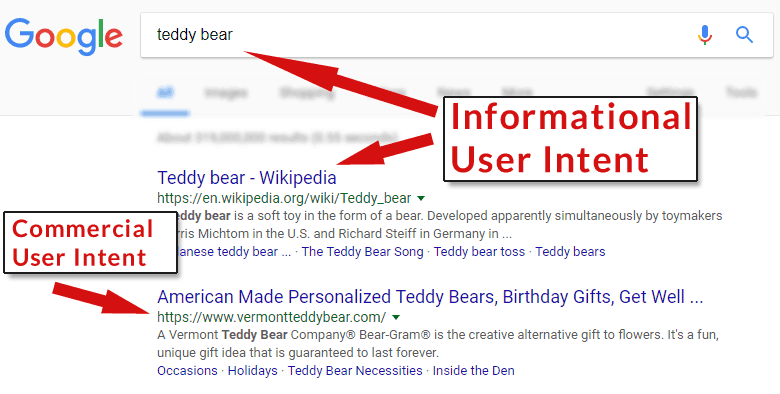
When you search for Teddy Bear, Google shows a Wikipedia result at the top of the page. That is an indication that the top user intent for that particular search phrase (teddy bear) is informational.
A screenshot of a search result for the keyword phrase, Teddy BearThis search results indicates that the most popular user intent for the keyword phrase Teddy Bear is informational in nature.
That means that for most users who search for the singular phrase, teddy bear, they are searching for information about teddy bears. That Wikipedia page is very  likely not ranking at the top of the page because it has the most links or because it’s anchor text ratios are optimal.
That web page is ranking there because it satisfies the most users making that specific search query.
This is why data driven studies of the search results that purport to show ideal anchor text, inbound link patterns or keyword distributions are not accurate. The user intent factor overrides those considerations, rendering them useless for understanding why Google ranks web pages.
One can’t truly understand why a web page ranks for a search query without also considering the user intent that underlies that ranking. 
This is important for diagnosing why a site does not rank well, why a site lost rankings, for content marketing and for keyword research and planning.

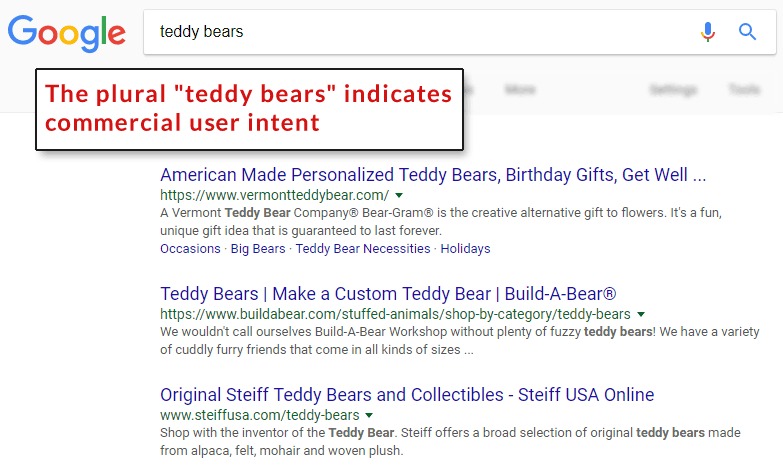
Plural Phrase: Teddy Bears

Google shows predominantly commercial web pages for the plural version of the phrase, teddy bears. This is an indication that most people who search for teddy bears are sastified with search results that show commercial web pages at the top.

Some people are satisfied with informational results for that particular phrase and that’s likely why Google shows the Wikipedia page, but ranked lower.

About Those Synonyms

I have consistently advised against following the trend of seeding a page with synonyms. That is the old keyword spamming trick. It is unsophisticated and separated from the concept of understanding why Google ranks a web page in the context of user intent.
Yes, Google and Bing use synonyms to produce accurate search results. But as you can see by this discussion of singular and plural variations, the user intent plays an important role in the choice of whether to choose one word or another.
Simply adding synonyms to a page is a gross simplification of how web pages are ranked.
If you really want to be accurate in your keyword choices, understand the user intent for each keyword phrase you want to rank for. Then build the content appropriate for that user intent.

Reference:https://www.searchenginejournal.com/singular-plural-keywords/267177/

Tuesday, August 28, 2018

5 SEO Mistakes that People are Still Doing in 2018

Search Engine optimization increase the traffic on your website and we are going to explain how


With the advent of online marketing took a completely new turn. It won’t be wrong to say that businesses which are investing in online marketing faster became more successful than businesses that didn’t. Everything that used to be on papers, newspapers, billboards, flexes, etc. has now shifted to the internet. You now have online banner ads that act like billboards. You have affiliate programs that work like referrals and websites are much better than newspaper ads.
If you want to make your business an international entity you could not rely on throwing pamphlets in people’s homes or handing handbills over. You need to invest in various digital marketing programs for that purpose. In most cases, you don’t even have to spend any money to market your business, product or service. Most of the time is spent on improving your image and reputation. In all of this, SEO serves as the blood and fuel of all online marketing because search engines results are the places where the money lies. SEO has evolved greatly in last 6-7 years and Google must be given credit for that.
Google has been updating its algorithms with some strict rules and keeping SEO professionals on their toes. Panda, Hummingbird, and Penguin are all the different names given to updates done in the search algorithms by Google. This made SEO serious business and while doing it properly could bring you to the top search engine results, any clumsy actions could have you catapulted out of the search engine results.
If you are an aspiring search engine optimization professional, a company looking for a sound SEO strategy or a business currently deploying SEO strategies in its only marketing, here are the 5 deadly mistakes to avoid.
1.  Ignoring the Mobile Users:
We already knew that mobile searches on Google have surpassed the desktop searches. If you are still ignoring the mobile users while creating an SEO strategy for your business, then believe me you are going to lose a bunch of sales. Generally, people consider page speed optimization is the only factor to target the mobile users, but this is not the end of the world. If you have a separate mobile website, then you need to take care of following points while targeting the mobile users:
•    Present short and catchy web pages content to the mobile users
•    Plan separate header and Meta tags (Not keywords focused) to target the mobile users
•    Use short contact forms on the mobile website.
•    Avoid ads in the content

2.  Not Mastering the Keywords
Knowing your business-related keywords is one thing and mastering them is another. Being a master in keyword research, you should have understanding, which keywords will help to get sales and which keywords will work for brand awareness. You can’t mix both of them, so make a separate list of sales related keywords and brand awareness keywords. Use tools like Keywords planner, Semrush, Google Trends, Google etc to find out the best keywords for your business. Master the keywords or simply hire the masters of keywords for the job.
3.  Focusing on Links Quantity
There was a time when the quantity of building links was more important than the quality. If we talk about the present day, Google has cracked down severely on low quality and spammy links and other links which were trying to manipulate Google’s ranking in many ways. So what can we do? Well, the key to link-building success is to generate natural quality links. Focus on earning the links by sharing the good quality and engaging content. Guest blogging, infographics, explainer videos, and broken link building methods etc. are easy and best ways of earning the natural backlinks.

4.  Not Structuring Website Properly
Has it happened to you at any point in time that you watched a great movie with great acting, dialogues and material but you thought that it could have been made better or some scenes were unnecessary? This is the same with your website. How your website is structured is extremely important for your SEO strategies. The structure of your website should be extremely smooth and spiders from search engines should be able to move from one page to another and the pages deep in the layers of your website easily.  But the question is, how can you make your website structure user-friendly? Here are the few easy and effective ways:
  • Make your website URL structure neat and clean
  • Use of breadcrumbs
  • Do internal linking in the content
  • Use HTML and XML sitemaps
  • Use the structure data markups on your website

5.  Not Going Social
If you are still a businessman who thinks, social networking websites aren’t meant for your business then you need a big renovation of your thoughts. Social media is either a friend or enemy of businesses today. It has the power to take your business to new heights and make it an international entity within months or bring you down on the ground within a week. Share your stuff online. Be creative with your content. Share your business-related content, not as business content but stuff that would make the masses smile and talk about your content.

Reference:https://www.entrepreneur.com/article/316721

Monday, August 27, 2018

7 Ways to Use Google Trends for SEO & Content Marketing


Google Trends is one of the best tools for SEO research.
With these seven tips you’ll be able to extract hidden insights that no other tool offers.
These tips affect keyword choice to content marketing to how to best promote your website.

Google Trends & SEO Strategy

1. Learn Amount of Keyword Traffic

Google Trends is an official Google tool that offers a visual comparison of traffic levels. It does not tell you the exact amount of traffic. But it does show a relative amount.
This is especially helpful if you know the amount of traffic from a related keyword phrase.

Tip#1 How to Obtain More Accurate Traffic Data

If you want to unlock the traffic data of a keyword, compare that keyword with a keyword you already rank for and are familiar with the traffic levels.
Although Google Trends won’t show you the exact amounts, as long as you know the amounts for one keyword, the traffic levels of the other keyword will become more understandable.

2. Gain Insights for Content Marketing

There are two ways to look at the keyword data, stretched across over a long period of time and a short period of time.

Long Period Trends

You can set Google Trends to show you the traffic trends stretching back five years. This is valuable for showing you audience trends.

Upward Trending Long Range Trends

If a trend is going up this means to focus energy on creating content for this trend.

Downward Long Range Trends

If the trend line is moving down, then it may be a signal that audience content consumption is changing.
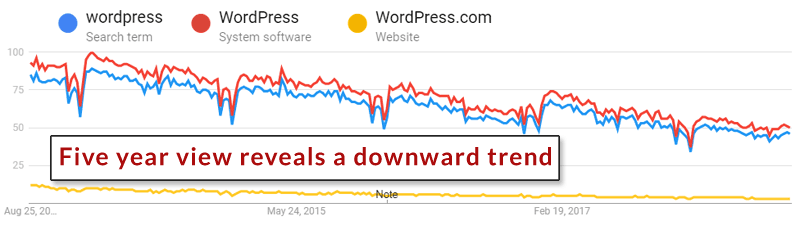
For example, review this five year trend for WordPress the search term, WordPress the software and WordPress the website:
An image of Google Trends tool showing a five year trend
There’s a clear downward trend for WordPress in all it’s variations. The downward trend extends to phrases such as WordPress themes, WordPress plugin, and WordPress hosting.

Tip #2 Plan Future Content

The long view helps you make decisions about future directions. The long view helps you understand where to put the focus for content. If a product is trending downward, then maybe it’s time to think about shifting content resources to another topic or product or even change the content model altogether.

3. Short View Insights

Viewing keyword trends in the short view, such as the 90 day or even 30 day view can reveal valuable insights for maximizing your content marketing.
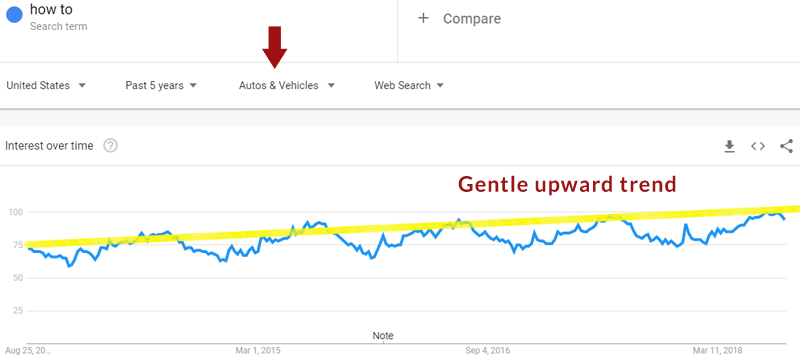
For example, two of the top trending keyword trends are How To and and Near Me searches. When you scale down to the 90 day view you can see what days of the weeks those searches are popular.

Tip #3 Plan Publishing Schedule

This takes the guess work out of creating a publishing schedule. Searches related to How to trend upward on Sundays and Mondays. Searches related to Near Me trend on Fridays and Saturdays.
If you have a site or a podcast focused on how to do things or a hobby related site, then publishing on a Sunday, Monday, or Wednesday and sending out an email to subscribers may be the best approach.
If your business is a restaurant, then you know that it is important to have specials, special pricing and so on published by Thursday so that it’s ready for site traffic on Friday and Saturday.

Tip #4 Keywords by Category

Google Trends has the capability to narrow down your keywords according to categories in order to give more accurate data on your keywords.
Image of Google Trends showing trends for the phrase "How To" within the category of "autos"

Tip #5 Keyword by Geography

Google Trends provides keyword information by geographic location. This information can be used for determining what areas are the best to outreach to or for tailoring the content to specific regions.
Keyword popularity information by region is valuable for link building, content creation, content promotion and pay per click.
For example, if a topic is popular in a particular region you can narrow your content promotion to identifying regional magazines, groups and clubs that are related to the niche you’re publishing or marketing to.

Tip #6 Geography Data May Enhance Ranking

Geographic information can also be used to enhance your content so that it is relevant to the most people. Google ranks pages according to who it’s most relevant for, so incorporating geographic nuance into your content can help it rank for the most people, especially if those people begin to promote your content in social media, blogs and podcasts.

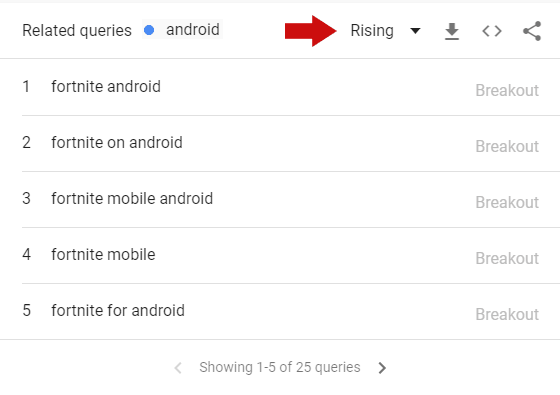
Tip #7 Rising Queries

The ability to gain insight into keyword phrases that are rising is quite possibly the most useful feature of Google Trends.
Image of Google Trends showing how rising trends can be discovered
All you do is type in a keyword phrase and this section will give you twenty five related search queries that are trending upwards. This data helps keep you on target with how consumers are changing. It allows you to react to new opportunities.

Takeaway: Google Trends is Useful

Google Trends is an incredibly useful tool. A little creativity yields important search marketing insights. Spend some time with Google Trends, I’m certain you’ll discover insights that will improve how content is created and promoted online.

Reference:https://www.searchenginejournal.com/google-trends/266721/

Friday, August 24, 2018

5 SEO Concepts Entrepreneurs Should Implement in 2018-2019 to Boost Google Ranking

5 SEO Concepts Entrepreneurs Should Implement in 2018-2019 to Boost Google Ranking

As an entrepreneur, you have an idea you are confident about. You have your initial investments in place, a functional business model and a clear idea about your target audience. The next obvious thing to do now is, spread out to your audience. There could be multiple ways of doing it, word of mouth, adverts or be on the web.
By now, you have probably seen for yourself how influential and helpful the web can be. It can connect you to absolute strangers across the globe at any given time. The web makes for the largest marketplace and most probably the most time and cost efficient marketplace too.
You are on the web now, how do you ensure you are ranked high enough on search engines? A better ranking on these search engines shows you in results when a prospective customer looks out for you. You don’t want to get lost in the crowd of searches, do you? Here comes the concept of SEO or search engine optimization.
You most certainly have a brief idea about SEO. My understanding of it is quite related to our real lives. I have seen relevant people refer to you or your business only when they see the value. Search engines are like those established figurines in society. They suggest your business only when your business seems valuable. Gradually other good websites give a link back to you as you have already been recommended by an established search engine. Wouldn’t you agree a shop is good when the mayor of your city says it’s good? It doesn’t always have to be in terms of how much you have achieved as a business, but about how smartly you have promoted yourself and your business.
Here are 5 SEO concepts entrepreneurs should implement in 2018-2019:
  • Install any Plugin-
Plugins in work great for everything in general if your website is made on wordpress. Plugin doesn’t stop at just managing your meta descriptions and titles for you but does much more. It solves a lot of hidden technical glitches that your website might have been going through. As solopreneurs, we have hundreds of things on our plates and it’s not always possible to pay attention to such details. This Plugin acts like your name label when you go to a party. The name label helps others to know your name, designation and other basic things right. You can update the basic introductory attribute of your blog or landing page so that when Google crawler comes to your website, it quickly identifies you. And if you help Google, then Google is your friends. As the website owner, you can still have control over your features as per your choice. This plugin updates each time google algorithm updates ever so frequently. You can focus on writing and structuring your content while these plugins will take care of the technical SEO.
  • Interlink your blogs-
There are 2 extremely great reasons why interlinking your blog with relevant articles from the past, is good for your SEO. The smartest way of doing it is, strategizing which stage of the customer journey is the Blog targeted at. It could be Awareness, Consideration, Decision or Delight. This will make it easier to interlink your articles with your previous posts. Apart from making your website more relevant, here are the other 2 reasons interlinking is a must:
  • The amount of time a reader spends on your website increases significantly. This is great for you when you have relevant and interesting links included within your content. Here the audience spends a good amount of time without even realizing how much time has passed.
  • Interlinking also informs search engines which particular blogs on your website are relevant. These get better rankings based on the keywords you have used and the targeted keywords.
Linking the right articles within your blog will help the inbound lead generation in your marketing strategy. This will abet search engines and social media platforms to bring a customer to the content you have written for them.
  • All the out-going links from your website should be no-follow-
You don’t want to distract your audience. It’s like when you go to X brand shop for shopping and come across a great shower gel from another new brand. You will feel seduced to check their store for better deal and content. On the web, the other brand is the website you have provided an out-going link to. You don’t want to divert your audience from your website. There is a  concept of LINK JUICE in SEO which essentially can be imagined a juice pitcher with holes. The more holes (out going DO FOLLOW links) you have, the less juice you will have inside. So your aim should be to save the juice. So try giving less out going Do Follow links. If at all you feel link to hyperlilnk other external resources, link them by making them No Follow links.
The right way to do it is, add “No follow” status to all outgoing links. You can either do it by using a code every time you are making a hyperlink
<a href="http://somelink.com" rel="nofollow">Some Link</a>
or by installing a plugin which makes all linking no follow by default. Manually uncheck the no-follow status and ensure all your internal links are “Do follow”.
Plugin name : Title and Nofollow For Links
  • Build external links referring to your website by guest blogging-
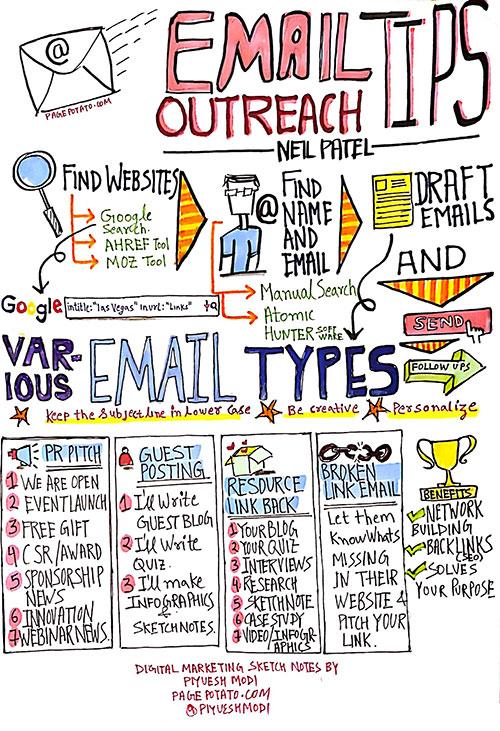
    This is an extremely smart way of putting out the word for your business in front of relevant people and a larger audience. It takes time to grow as a business, but there are established businesses out there with larger audiences. Contribute an article for their website and get a link back to your website. But for that to happen, you will have to make connections with editors online or at networking events. Here is a quick sketch note which I made showing the difference examples of emails you can think of sending to editors. Pitch them your guest blog, resources, infographics, research and many more.

    Start publishing on established websites of your genre and link them to your best articles that are relevant to the content you are writing. Going back to the initial “Mayor” example, Google recognizes your links that have been added to an established website. Additionally, you get to reach out to this websites larger audience pool.
  • Disavow bad links pointing to your website-
Your articles being mentioned and linked on different websites is not a great thing always. Chances are ill-intentioned websites are trying to bring down your SEO by linking your articles to irrelevant articles. Google has specific set standards for the quality of links that point towards your website. When too many irrelevant websites put your links, it raises an alert for Search engines. When your SEO starts building strong grounds, competitors can start maligning your SEO backlinks. IT could be porn websites, non-genre websites that do not go in line with your business, mentioning you repeatedly.
Analyze well in advance which are those bad backlinks pointing at you.  This will allow you to see for yourself which are the good backlinks and which are the ones bringing down your SEO
After you have found the bad ones, share this will Google by going to this link and Google will then not count those backlinks and make them irrelevant to your google rankings

Reference:https://www.entrepreneur.com/article/317943