Thursday, August 9, 2018

Your 6-Step Guide to Planning Your Blog Content

How to Plan a Blog Post in 6 Easy Steps

It can be a challenge to write high-quality, compelling content for an audience.
But the more planning and preparation you do for these projects ahead of time, the better your finished product will be.
This is true for most scenarios in life.
Writing interesting, insightful, and educational content for readers is certainly no different.
Use the six steps below for the best way to plan a blog post from start to finish, and publish content that is interesting and educational for a specific audience (i.e. potential customers).
Readers won’t just respect this content and the brand behind it, but will actually seek out this content and hold the brand in high regard.
This is the natural way to build authority for readers as well as search engines like Google.

1. Know the Brand You’re Representing

There can never be enough emphasis on this.
Too many times when writing on behalf of a brand or business, writers forget (or never consider) said brand’s overall voice and tone.
This is a critical component for success when it comes to consistency, styling, and messaging.
You want to ensure all of this is in line with general brand guidelines and its overall brand image.
Larger, well-established brands typically will have brand guidelines that should include brand voice and tone.
But even if official brand guidelines aren’t available, there are still many ways you can get a greater understanding of a brand, its voice and tone, and its general messaging with goals in mind.

Read Old Blogs by the Brand

A good starting point would be to look back and read older blog content published by the brand.
Depending on how long the brand has been creating well-developed, quality content, you could get a deep understanding of the general style and brand voice used.
Work to recreate that with your own insightful spin.

Run a Content Audit (or a Shorter, Modified Version of One)

When in a position to run the overarching content strategy or just consistently write content for the same brand, it would likely be worth a writer or content strategist’s time to run a micro content audit.
This will help you get the best idea of, not just the overall style and voice of the content, but also the goals of the brand and to identify what works well in terms of traffic, engagement, and performance (and what does not).
This will also help when developing ideas for blog topics and to identify content gaps.

Look at Competitors

Another way to get a good understanding of the brand a writer represents, and what not to be, is to look at some of the brand’s main competitors.
Competitors will likely publish their own quality content, but the content produced on behalf of a competing brand like the one you represent should be unique to that brand.
That is one of the main ways brands can — and are supposed to — stand out. Use it to your advantage.
This is also a no-brainer when moving into a content role within a business or industry one may not be too familiar with.
You want to understand the brand you represent and its messaging, obviously.
But it will also help to understand the brand’s main competitors, how they work to separate themselves from their competition, and ways you can surpass them in terms of educating and enlightening potential customers.

2. Understand Your Audience

Understanding the audience you’re writing for goes hand-in-hand with knowing the brand you represent.
You can’t understand your audience without also knowing the brand you’re writing for.
You can’t publish quality content without fully understanding both of those critical variables.
Using the above-mentioned means to better understand both is always going to help a brand’s overall content strategy and execution.
Remember to use topics that interest your audience and verbiage that makes sense to your audience.

3. Finding Topics to Write About

This may be one of the most difficult steps of the planning process for many. But it shouldn’t be.
As a writer that represents a brand — a brand that is an authority on certain topics and/or industries — there is always going to be valuable insight to offer current and potential customers.
Think about frequently asked questions on many websites; they are built from topics/questions commonly asked repeatedly over time by those interested in the brand and/or its business, and those answers are sought out through search engines thousands of times per day.
Offering people (the right) answers to their questions is always going to build trust behind a brand and the writers representing it.

Competitive Analysis

Aside from the frequently-asked-questions exercise to explore content ideas, writers should also lean on competitive analysis to come up with more good topics to write about.
Some brands will do a decent job of covering a lot of different topics within their industry, while other brands will do a better job covering only specific areas within that industry they may specialize in or have more experience in.
Use all this research to build out quality blog topics based on the abundance or lack of quality content on certain topics.
Identify the content gaps of competitors as areas to focus on and start to gain market share from competition, and stand out in the areas that other brands are lacking in.
An analysis of your own brand in a similar way will help you identify where your brand is lacking as well.

Keyword Research

Conducting keyword research around topics and ideas helps writers develop keyword targets, but also helps shape blog posts in terms of:
  • Topics covered.
  • Questions to be answered.
  • The important elements of more in-depth issues with a variety of layers and subtopics.
Over the last 10 to 15 years, a bunch of keyword-research tools has hit the market to help aid content strategists with topic discovery.
In addition to classic tools like Google Keyword Planner (formerly known as the Keyword Tool), Ubersuggest, Google Analytics, and traditional Google Autocomplete, new-and-improved platforms like SEMrush’s Keyword Magic Tool, Moz’s Keyword Explorer, and MarketMuse, just to name a few, have also made quite the impact on the world of content.
Other proprietary tools that are higher in terms of cost but are ever-so-powerful, like Conductor and BrightEdge, offer even more content ideas and high-value keyword targets to help shape strategy, among other content marketing tools.

Make Sure It’s Interesting

Most of all — and it may sound simple, but it is all too often ignored — make sure the content you’re planning is interesting to the audience that it is being written for.
If you’re well-versed in a brand and/or industry and don’t personally find a blog topic to be interesting, helpful, or educational, chances are the audience won’t think it is, either.
Write about interesting topics while offering expert opinion, feedback, and insight.
The audience will reward it by trusting the brand, its content, and its messaging.

4. Do Your Research

Thorough research from credible sources is a main pillar of quality content.
Obviously, readers will look for expert opinions and analysis based on research done.
That’s what allows writers and brands to stand out — real-life experience and a deeper explanation of sometimes complex situations.
But that research is paramount to building authoritative content that will have a long-standing impact.
As with all published content, be sure to check and double-check all facts and properly source proprietary knowledge to its original publisher.
This can be done using outbound links, in line with SEO best practices.

5. Create a Strong, Enticing Headline

Headline writing is an art, even more so in the age of the internet.
Now, more than ever before in our lifetime, humans are consuming vast amounts of information from all over the place.
Headlines must be great to stand out.
Otherwise, the content will likely never be seen.
There are a variety of different approaches to take when developing a crafty and attractive headline that will grab readers’ attention.
All headlines must:
  • Relate directly back to the content they represent.
  • Be well-written.
  • Not be too long.
Some successful ways to create good headlines include using formulas and keeping it simple, as well as other innovative ways to be sure readers are enticed by the content meant for them.

6. Consider Visual Content

Rich media will always help a blog post in terms of click-through rate and the general likelihood that someone would be more enticed to click on and it and learn more.
This also helps if headline writing isn’t your craft; a good visual typically attracts readers, and it’s easier for the eyes to understand and retain visuals than it is written word.
Know what works best for your content and your audience.

Next Steps After the Blog Post Is Prepared

  • Write it!
  • Optimize it all.
  • Copyedit it, then copyedit it again.
  • Then have someone else copyedit it for you.
Reference:https://www.searchenginejournal.com/planning-your-blog-content/264313/?ver=264313X2

Tuesday, August 7, 2018

How to Use Google Analytics to Find Content Ideas

4 Ways to Use Google Analytics to Find Content Ideas

Data is pivotal in all marketing campaigns.
Companies that leverage data are able to better understand their customers.
Data-driven marketing results in greater customer loyalty, customer engagement, and increases in the number of customers.
However, we mostly use data to inform SEO, PPC, or social campaigns. These areas of marketing are clearly data-driven. But, there’s no reason we can’t use data to create better blog content, too.
The trouble is, most people see content marketing as a creative endeavor. This is certainly true as content needs to be engaging for readers.
Yet, we also use content marketing to get results (i.e., generate leads or sales).
To get the highest impact results in content marketing, we have to use a data-driven approach.
So, here’s how to use data collected from Google Analytics to find content ideas that garner results.

1. Create Variations on Your Popular Content

Naturally, you want to create content that performs well every time.
To do this, you need to look at your existing content to determine your top performing posts.
Ashley Poynter at Business 2 Community says:
“The best content marketers think like data scientists in order to create valuable and insightful content and distribution strategies that are based on facts rather than assumptions.”
By looking at Google Analytics, you can discover which pieces of content are verifiably the best. Not just the pieces that you think performed well.
You can see which topics and content frameworks worked best for your site in terms of page views.
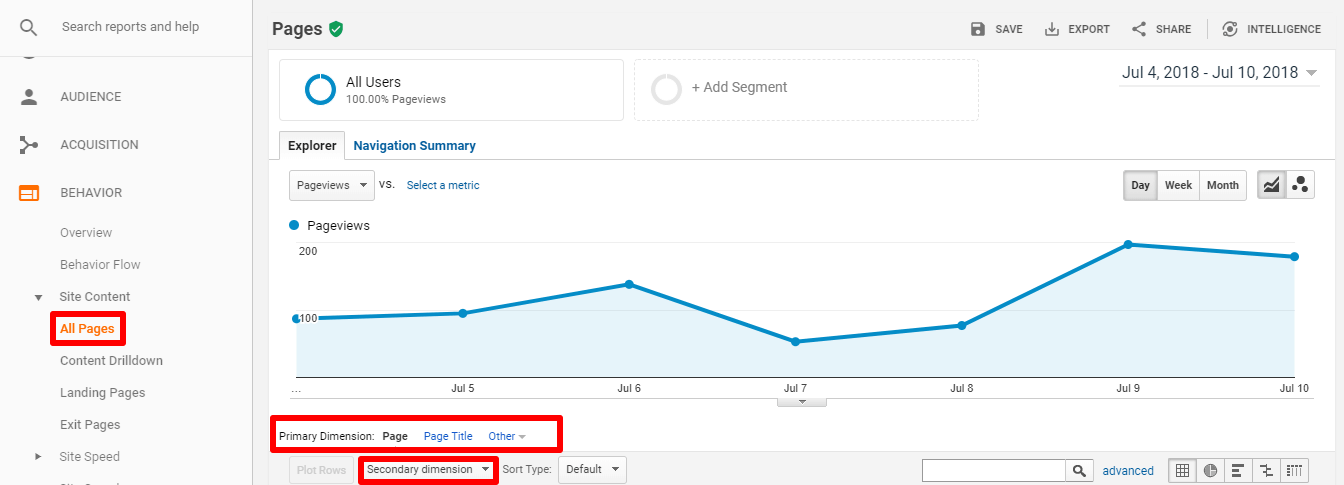
Your first port of call should be the All Pages section in Analytics. You’ll find this under Behavior > Site Content > All Pages.
Within this section, you will also see primary and secondary dimension data you can filter to get a more detailed view of your content.
All Pages Analytics
For instance, you can sort page views by source, average time spent on page, page value, bounce rate, and so on.
You can also set the primary dimension to Page Title to see which of your titles get the most clicks:
which of your titles get the most clicks
Here you can work out a number of things, such as:
  • Do you get more traffic with clickbait titles?
  • Do you get more conversions from titles that aren’t clickbait?
  • Do list-based posts or how-tos perform best?
Once you discover the answers to these questions, you can optimize titles for any new posts to get the results you desire.
Let’s say you’re looking to increase conversions. Analytics shows you that titles containing “The Ultimate Guide” get you the most conversions. Obviously, you’re going to want your next post to be an “Ultimate Guide.”
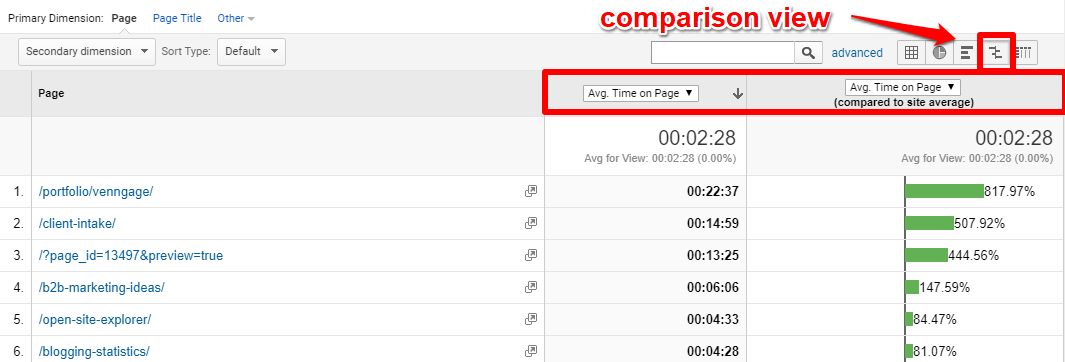
Another filter that will help you a great deal is the comparison view.
In Google Analytics, switch to Comparison View and pick Average Time on Page. You can immediately see which pieces users spent more time on and thus provided them with the most value:
Comparison View
When analyzing data, don’t forget to take out any outlying factors.
For instance, if a post contains video, they may spend more time on that page.
Now you know which titles work best for you and which topics resonate with visitors, it’s easy to come up with content ideas that are likely to work well.
In the above example, a blog post about B2B marketing ideas performs really well. The owner of the site could then dig a little deeper into the topic because they know that subject engages visitors. An interesting variation on that topic might be a case study on B2B marketing.
The trick is to seek out your best content using the data you have on hand and create variations on the topic. Or use titles/types of content that perform well for you and recreate those using a new topic. Or combine both elements.

2. Find Low-Hanging Fruit

Content and SEO go together like tea and biscuits.
Essentially, content is vital for ranking well in the SERPs due to Google’s ever-changing search algorithms.
Google needs to see the high value, quality content to better answer search queries. That’s why on-page content is considered the number one, most effective SEO tactic.
You can come up with some content ideas easily by gathering some low-hanging SEO fruit. If you have a search bar on your site, you can find the keywords people are looking for when they visit your site.
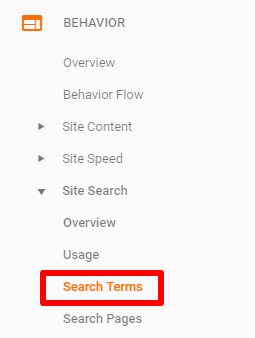
In Google Analytics, go to Behavior > Site Search > Search Terms to locate these keywords.
Search Terms to locate these keywords
Not only will this report help you improve the navigation of your site, but it can also help you find gaps in your content.
In other words, search terms related to your site that people are looking for, but you don’t yet have a page for.
Let’s say you own a resort and some of the top keywords are “day pass,” “map of resort,” and “golf cart rentals.” There you have three shiny, new topics the site could center a blog post on, such as “How to Get a Golf Day Pass” or “Your Guide to Golf Cart Rentals.”
When it comes to finding keywords for blog posts, you should be more interested in getting into the heads of your site visitors than looking at Google Ads’ Keyword Planner.
The Search Terms report gives you a much better idea of what your visitors are actually searching for.
Once you have your highly relevant search terms, you should get to creating posts that will help you dominate that topic. Or improve on existing content to include those terms.

3. Update Existing Content

You can’t bag every visitor that comes to your site.
Some bounce quicker than you can say outdated content. And that right there might be the problem.
Your content is no longer relevant and is in need of a refresh.
The results could be substantial.
Marketer Christopher S. Penn found that by refreshing his existing content, he was able to increase search traffic to his site by over 40 percent.
To achieve such results, you’ll need to work out where visitors are leaking out of your site.
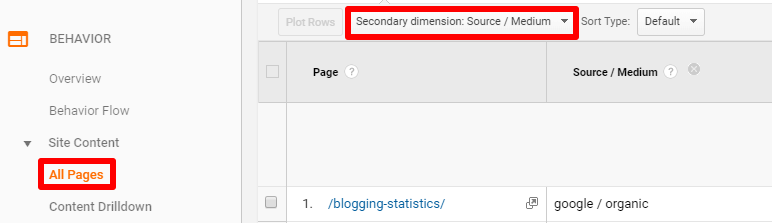
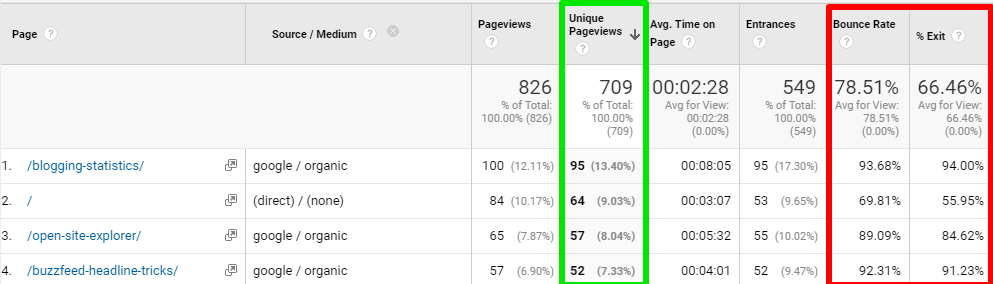
In Analytics, head to Behavior > Site Content > All Pages and choose Source / Medium in the Secondary dimension box.
Medium in the Secondary dimension box
Sort the results by Unique Pageviews or Unique Visits to see how many new visitors your blog posts acquire.
Then compare these figures to Bounce Rate and Exit Rate.
This will show you whether those new visitors are actually reading your content and sticking around.
Unique Page views And Bounce Rate
Posts that have a high number of unique views, as well as a high bounce rate, need updating.
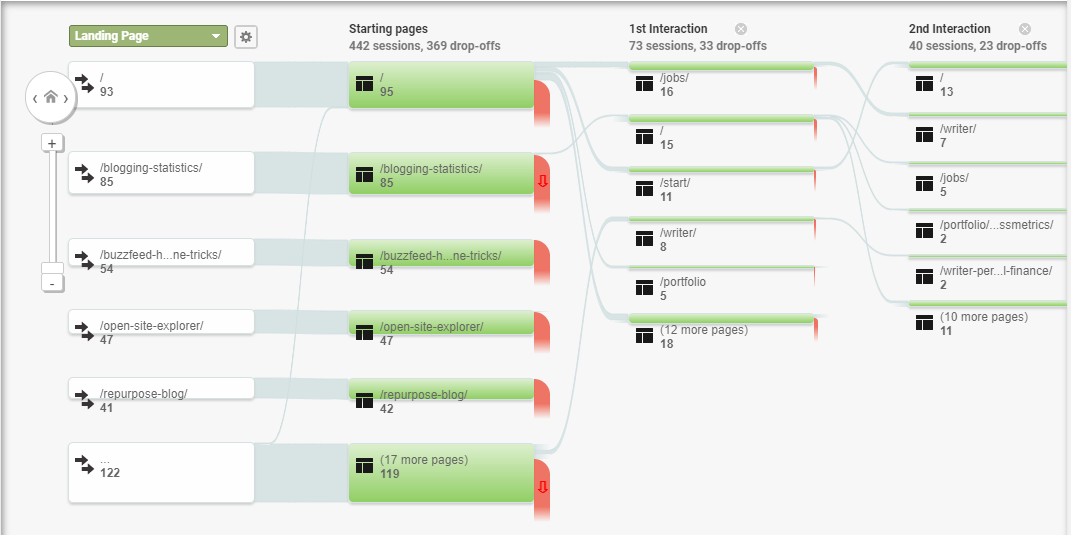
Another report that will help you determine whether visitors are engaging with your posts is the Behavior Flow Report.
 Behavior Flow Report
This report will show you how visitors interact with your site after they have read your content. And thus, if the content is encouraging visitors to convert.
For example, are they reading your post then visiting the contact page to get in touch with you? If not, the content needs a refresh.
This is where your content ideas lie.
Renew, refresh, recycle those posts and re-release them on your front page.
You may have noticed that a lot of top blogs are now doing this.
HubSpot, for instance, continually update their posts:

The state of many industries, like marketing in the above example, continually changes, so it makes sense to update content with new information for the new year.
Alternatively, you can add fresh images or create a video or infographic to go along with the content. Add new relevant internal and external links. Or even create new lead magnets to compliment the posts.
All in all, Google Analytics can help you find stagnant pieces of content.
Recycling blog posts are now commonplace. It’s a good idea to get in on that trend and turn your old posts into new, polished ones.

4. Look at Keyword Intent

Your content needs to serve your audience.
As mentioned above, Google wants you to provide value to visitors. That’s how your content is going to rank well in the SERPs.
To this purpose, it pays to know the intent behind the keywords people search for.
Ben Hocking, SEO Director at Be Found Online, says:
“If you’re an organic search veteran, this might seem obvious to you, but I cannot stress enough how important this concept is to SEO success. If you do not have content on your site to match the intent of a keyword, you will not be able to drive a meaningful amount of search traffic no matter how many times you use that keyword on your site.”
In other words, if the keywords in your content match the intent of visitors, they’re more likely to find your posts useful.
There are four types of keyword intent you should be aware of:
  • Navigational: Users search for a specific website (e.g., “Amazon”)
  • Informational: Users search for the answer to a question (e.g., “how tall is the Eiffel Tower”)
  • Investigational: Users search for information that may result in a transaction (e.g., “best digital cameras”)
  • Transactional: Users are ready to buy (e.g., “hiking boots”)
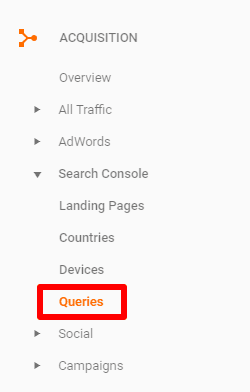
To discover the intent of users visiting your site, you’ll want to view your Search Queries report. Find this via Acquisition > Search Console > Queries.
Search Queries Report
Your search queries report should contain the right type of keywords for your business. If you own an ecommerce store, for instance, you’ll want the majority of keywords to be investigational or transactional.
But if you find that most of the queries that bring visitors to your site are informational, it’s of no use to you. They may find answers to their questions in your blog then simply leave.
If you wanted to go after investigational keywords instead, then you might create content that’s somewhere in between informational and transactional.
This is an excellent example from the nutrition company RealNutritionCo.com:
Keywords that include “vs.,” “reviews,” “comparison,” and so on fit the investigational bracket. And the corresponding content serves users at that almost-ready-to-buy stage.
So, to optimize your content for keyword intent, you should come up with content ideas focusing on the right set of keywords.
Be strategic about the content you create.
If you provide material that better serves users, you have a better chance of ranking over time. Plus, you will get qualified traffic.

Conclusion

The best content is both creative and data-driven. Use Google Analytics to optimize content and get high impact results.
  • Analyze the performance of your existing content. If certain topics or titles have worked well for you in the past, then similar posts are likely to work well for you in the future.
  • Find the exact search terms that people are looking for when they visit your site. Snap up these keywords to create highly relevant content for your audience.
  • Find out exactly where visitors are leaking out of your site. This means you can find content in need of an update that will get people to stick around longer.
  • Discover the intent behind the keywords that bring users to your site. If they don’t correlate to your business goals, then create content focused on keywords that do.
You may already be well-versed in using analytics for SEO purposes. Now, it’s time to explore how analytics can help you create next-level content for your site.

Reference:https://www.searchenginejournal.com/use-google-analytics-find-content-ideas/261025/?ver=261025X2

Monday, August 6, 2018

Google Expands Featured Snippet

Google Expands Featured Snippet

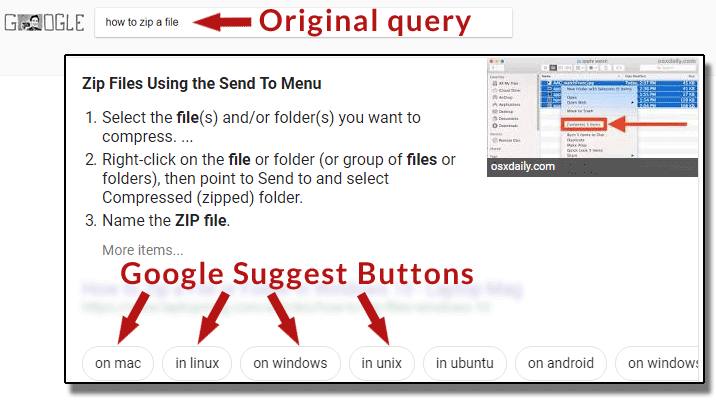
Google appears to have expanded its Featured Snippets to include Google Suggest navigational buttons. This function was previously announced in January. When a user enters a vague search query for which there are more nuanced variations, the featured snippets will now show navigational “chiclets” style buttons that help users navigate to a more specific response. This kind of featured snippets appears to be appearing in more searches.

Featured Snippets with Google Suggest Buttons

The navigational buttons appear to be an extension of the Google Suggest feature. It’s like having search suggestions in a navigational element.
Take a look this search result for the phrase, how to zip a file
Google Suggest style navigation in Featured SnippetsThis is a search for the phrase, how to zip a file. Google shows more precise suggestions to help users navigate to another search result.
As you can see, there are Google Suggest buttons that clarify the search for how to zip a file on a Mac, in Linux, on Windows and so on.

Here is another example, How to Catch Trout

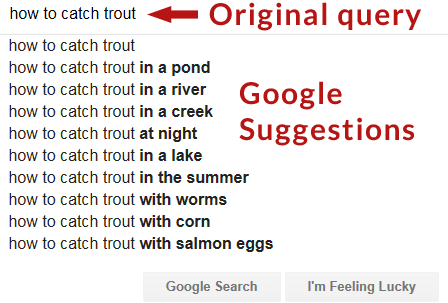
When searching on Google for How to Catch Trout, you’ll get the traditional Google Suggest drop down menu:
Example of a traditional Google Suggest Drop down menuTraditional Google Suggest drop down menu for the phrase, How to Catch Trout.
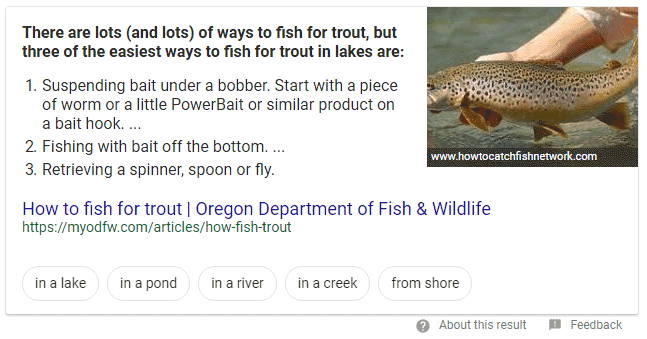
But if search for how to catch trout, without engaging the suggestions in the drop down, Google provides the featured snippets with the Google Suggest navigational buttons.
Here is a screenshot of the new style of featured snippets:
Featured snippets featuring Google Suggest navigational buttons.Featured snippets featuring Google Suggest navigational buttons.

Official Announcement

As of this writing there is no official announcement.  However this change appears to be live on many searches, tested across multiple browsers. You can test it for yourself with the above queries or try your own queries that initially spawn a Google Suggest drop down.

Takeaway: Positive Impact on Search Traffic

The above search result did not previously feature navigational elements. With this update to the featured snippets, Google can now send traffic to sites that offer more precise information. That’s a win-win for users and websites with less generic content.
Hat tip to Leanna Kelly of CPCStrategy.com for noticing the feature and calling attention to it!

Reference:https://www.searchenginejournal.com/featured-snippet/264161/264161/

Friday, August 3, 2018

Through the Process, SEO Will Fulfill Its Promise

A 7-Step Process to Realize the Promise of SEO

SEO can be a deceptively long process.
Some of our clients feel like success is right there for the taking – just a few magical tricks away.
They can picture their content ranking at the top of Google for even the most competitive keywords in extremely competitive industries.
But, in reality, they’re a long way away from realizing your goal.
Why?
Because they love the promise more than the process.

Understanding the SEO Process

Kaspar Szymanski once compared SEO to fitness – and it’s a great analogy.
There are no shortcuts to game the system (i.e., your body) unless you’re OK with taking serious health risks.
You need to have a plan and stick to it. That means exercising, eating right, and pushing yourself to continuously improve naturally.
So I was quite surprised recently on a monthly call to learn that one of my large clients was impatient with the SEO process.
How does someone so successful – and one who typically follows a process for the promise of more clients and cases – not understand and love and respect the SEO process?
You can’t get to the promise without going through the process.
SEO (and most forms of digital marketing) is a process that, with patience and strategy, will bring you the promise of new traffic, leads, clients, revenue, and growth.
To understand the process you have to create a plan, have a strategy, and know all the steps in the process.

1. Audit

The Process

Our process always begins with a technical and/or a content audit.
Technical Audit
A technical audit looks at absolutely every element on the site that can impact your SEO performance.
One of the most important of all these elements is speed.
I’ve seen so many websites put a large video introduction on the homepage that takes far too long to load.
The result?
You have a high bounce rate and have lost a potential client or customer.
If only they did a smaller version of the video, or moved more relevant content above the fold, their speed and conversions would be much better.
A technical audit should be in depth and take weeks to complete, depending on what’s wrong with the site.
Content Audit
If you have a large website with thousands of pages of content, then it’s definitely worth doing a content audit.
It’s during this process when you can identify whether you need to eliminate, repurpose, or rewrite your content to get the biggest benefit.
We’ve worked on websites that we reduced by 50 percent and it’s highly beneficial to the site.
You will likely see a drop in traffic, but that’s the idea – to eliminate non-relevant traffic.
Over time, you’ve likely written about topics that drive traffic, but those visitors don’t actually convert into clients or customers.
Good riddance.
A content audit makes sure all your content is relevant to your target audience. And once Google indexes all your new and improved content, you should see more conversions.

The Promise

By going through the process of a technical audit, content audit, or both, you will have a complete understanding of everything that needs to be fixed in order to rank well in organic search.
It is just the first step. But the first step can sometimes be the hardest.
Now it’s time to build upon that momentum.

2. Technical SEO

The Process

When it comes to technical SEO, there’s a lot to think about, including:
Fixing any one individual thing on this list won’t help any more than choosing another.
You must improve everything!
Everything must work together.
A house needs a foundation, electrical, plumbing, walls, and a roof. If you don’t have all these things, you don’t have a house. You have a shell.
The same is true of technical SEO. You need to get all of these elements right to have an optimized website.

The Promise

If you increase the speed and functionality of your website and webpages, then you’ll also likely increase the number of conversions.
Based on the findings of a technical SEO audit, we recently made fixes to a site in the brewing industry.
After fixing all the errors, this company saw a 1,100 percent increase in traffic.
That’s the promise of technical SEO!

3. Keyword Research

The Process

Keyword research remains incredibly useful.
You need to understand how people search, what people search for, and how search engines use keywords to serve results.
I highly recommend reading Roger Montti’s excellent guide, How to Do Keyword Research for SEO: Everything You Need to Know.

The Promise

As I explained in 4 Pillars of a Successful Legal Content Strategy, keyword research helps you uncover which keywords are most valuable to you.
Optimizing your content around high-value keywords is what will get you in front of your potential clients or customers when they need you most.
If people can’t find you when they’re looking for a service or product you offer, then they can’t buy from you. It’s that simple.

4. Location Demographics

The Process

Whether you’re doing SEO for a local business or a client who offers a service in a specific region, you know the importance of location.
Much like buyer personas, you need to understand how people search for local businesses and service providers, and who they are.
That means you need to ensure you have accurate NAP (name/address/phone) information and content that references your service area, whether it’s a state, city, or neighborhood.
Claim and optimize your Google My Business listing.
For more on this topic, see Bill Hartzer’s excellent post, How to Be a Local Content Machine.

The Promise

Your website should speak to your potential clients. Make sure you speak their language.
Google also rewards websites based on factors such as relevance, distance, and prominence.
The more signals and accurate data you can provide Google, the better you will rank in time.

5. Content Strategy

The Process

You need a content strategy. The following strategy has worked for many of my legal clients:
  • Foundational content: This is your core content that targets your main keywords and topics. Create content that is about your services or products (your “money” keywords). You can further enhance this content by writing about other relevant services and products you offer and any relevant long-tail keywords.
  • FAQ content: Create pages that answers common questions your audience is likely asking using Google. Make sure it has an SEO-friendly URL, you use breadcrumbs, and it is more comprehensive than any other page on the topic (make sure to check the competing pages in the top 10 positions).
  • Authoritative content: Let your clients create content to demonstrate their expertise and authenticity.
  • User experience: Think about ways to enhance your content (e.g., using visuals), your website navigation (e.g., linking to other relevant pages on your website), and calls to action (e.g., free consultation, make an appointment, content download).

The Promise

Creating content with a purpose will attract the people you want to become your customers or clients.
Make it easy for people to understand who you are, what you offer, and find exactly what they’re looking for.
You will be rewarded with more leads and conversions!

6. Content Writing & Editing

The Process
Your client may want to write their own content, or they may want you to do it.
Either way, the content needs to be optimized.
Always think about the audience or personas first, but without neglecting SEO best practices.
You want to write content that people will engage with and share (and that Google will index and reward with great rankings).
Ultimately, it’s about moving people toward a conversion.
If you haven’t already, make sure to read Ron Lieback’s 47 tips to master SEO writing.

The Promise

Content is how you build and demonstrate your authority, relevance, and trust.
Well-written content that has been thoroughly proofread and edited is one way to do that.
On the flip side, poorly written and badly edited content will do the exact opposite – it will send them running to your competitors!

7. Ranking

The Process

OK, you can’t control Google or any search engine’s rankings.
However, you absolutely can understand how search algorithms work (and specifically how Google’s algorithms work). Which helps. But there are never guarantees.
That said, there is one process that can work.
Be excellent at all of the previous points we’ve discussed so far and you should see SEO success.
  • Know your audience.
  • Create great content for your audience.
  • Provide a great website experience for your audience.
Is it easy? No.
But it works!

The Promise

If you do everything you possibly can to optimize your site and build your brand, and you offer a quality product or service, then it’s inevitable that you will be rewarded with the organic search visibility you deserve.

Conclusion

You have to follow a process to get to where you want to be.
You have to have a plan and put the work in if you’re ever going to achieve your goals.
So it’s time to stop driving blindfolded and hoping you reach your destination.
Hope isn’t an SEO strategy.
Instead, let SEO be your GPS and help guide you to exactly where you want to be.
To get to the promise, you have to go through the process.
But when you do? The magic is obvious.

Reference:https://www.searchenginejournal.com/seo-process-promise/264047/?ver=264047X3

Thursday, August 2, 2018

SEO Best Practices to Deal with Pagination

4 Common Pagination Pitfalls – How to Get Into & Out of Them
How do you get search engines from page 1 to 50 and everything in between?
You do it with proper pagination, that’s how.
Unfortunately this is one of the most common areas of SEO that site owners handle incorrectly.
The issue typically revolves around a few things:
  • People doing too much.
  • Having a broken implementation.
  • Not understanding what pagination really is.
  • How the tags work.
Let me address those four situations first. Then we’ll get into how to properly handle pagination for SEO and how you can avoid getting into trouble.

4 Common Pagination Pitfalls

People Doing Too Much

For some reason, people love getting fancy when it comes to implementing tags on their sites.
I don’t know if they’re bored, or they just all use developers who DJ at night, but there is never a shortage of folks implementing too many things that wind up conflicting with each other.

Having A Broken Implementation

Typically, unbeknownst to the site owner, a big pagination problem is when the implementation is simply broken and there isn’t a system in place to discover the issue.
This allows the problem to grow larger and larger over time unchallenged which can lead to a plethora of issues.

Not Understanding What Pagination Really Is

Many folks believe that paginated pages are the same as duplicate content or faceted pages, but they are not.
  • Paginated pages are a group of pages that follow each other in a sequence and are internally linked together. You should be using rel=prev and rel=next tags to handle these types of pages properly (more on how later in this article).
  • Duplicate pages have the exact or very similar (typically referred to as “fuzzy” duplicates”) and compete with one another in search rankings, but aren’t linked together. Typically, these are handled with canonical tags to let Google know which version they should be paying attention to, or redirects to eliminate the problem, which all depends on your platform capabilities.
  • Faceted pages are created when sites implement filters such as size, color, price, etc. These pages are typically blocked in the robots.txt file or controlled through search console so Google knows not to index the endless combinations that can potentially exist. You can also use canonical tags to control these.

How the Tags Work

When site owners use tags like canonicals and rel=prev / rel=next tags, they assume that these are directives that Google and other search engines will blindly follow no matter what.
This is not the case.
Canonical tags and rel= tags can more be viewed as suggestions to Google and other search engines about what you would like them to do.
Ultimately, though, search engines can ignore tags if they believe you have placed them there in error.
This is a common misunderstanding that leads to most of the confusion.
If you want a search engine to do something, then place a directive in your robots.txt file or in a robots tag in your page’s <head> section. Then the engine will respect and obey that directive.

What’s the Proper Way to Handle Pagination?

Use Rel=Prev & Rel=Next Tags

If you have paginated content the proper way to handle it is by using the rel=prev, and rel=next tags to ensure that Google and other engines know that these pages.
It’s very simple, and many platforms actually have the functionality built into them.
For example, let’s say you have an article that has three separate pages and the URLs look something like this:
https://www.yoursite.com/kickass-article-part1
https://www.yoursite.com/kickass-article-part2
https://www.yoursite.com/kickass-article-part3
In the <head> section of your first page you would add:
<link rel=”next” href=https://www.yoursite.com/kickass-article-part2>
Because this is the first page in your articles sequence.
For the second page you would add both a next and prev tag because it is an in-between page:
<link rel=”prev” href=https://www.yoursite.com/kickass-article-part1>
<link rel=”next” href=https://www.yoursite.com/kickass-article-part3>
For the third and final page you would only add the prev tag because it is the final URL in your articles sequence:
<link rel=”prev” href=https://www.yoursite.com/kickass-article-part2>
It is worth noting that you can use relative or absolute URLs in your link destinations within your tags.
If your URLs contain parameters that don’t change the content (e.g., session IDs), those should be included in the tags as well.
That’s it.
That’s all you have to do for your pages to paginate and pass link equity properly.
You can do this with as many pages exist in a sequence, no matter if it’s 3 or 3 million.

What’s the Wrong Way to Handle Pagination?

Don’t Let Google & Other Engines ‘Figure It Out’

Dear lord, never let Google and other search engines simply “figure it out” and implement nothing.
This seems to be one of the most common approaches when it comes to pagination (among other things, looking at you cannibalization and translation).
While Google states that “paginated content is very common and [we do] a good job returning the right results regardless of whether content is divided into multiple pages… (because we’re awesome, yadda yadda yadda)”, this typically results in:
  • Index bloat.
  • Users getting dropped into the middle of a sequence.
  • Link dilution across the sequenced pages.

Don’t Canonical Everything to the First Page

Resist the temptation to take the easy way out and just canonical all pages in your sequence to the first page.
This is the wrong thing to do.
This approach is similar to 301 redirecting every 404 page that pops up on your site to the home page.
While it might seem like it makes sense, it will most likely wind up hurting you in the long run.
As described earlier in the article, canonical tags are not directives. Search engines have the ability to ignore them and crawl and index everything as normal, which would cause index bloat and loss of internal link equity between the sequenced pages.

Wait a Minute – I Have a View-All/Consolidated Version of the Page!

If you have a page that is inclusive of all of the pages in your article or all of the products in your sequence, then Google typically would rather show that page to the user, as it holds everything in one place.
What you would do here is you would canonical the individual pages in the sequence to the view-all page, as you would want Google to give that page precedence in the SERPs.
Taking the same earlier example, if you had an article broken out into three pages, but in this situation, you also had a consolidated version or a view-all page:
https://www.yoursite.com/kickass-article-part1
https://www.yoursite.com/kickass-article-part2
https://www.yoursite.com/kickass-article-part3
https://www.yoursite.com/kickass-article-all
You would place the following canonical tag on the individual pages:
<link rel=”canonical” href=https://www.yoursite.com/kickass-article-all” />
This will roll them up to the consolidated version so Google and other search engines know that version exists and should be shown.
Caveat: Google will revert back to the individual pages that provide a better experience if the consolidated version is:
  • Really big.
  • Has a slow load time.
  • Provides a worse user experience.

Summary

Canonicals and rel= tags are suggestions, not directives.
So ensure your implementations are clean and you have a handle on your pagination.

References: https://www.searchenginejournal.com/seo-best-practices-pagination/259673/?ver=259673X2

Wednesday, August 1, 2018

How to Improve Your SEO with a Topic-Driven Content Marketing Approach

How to Improve Your SEO with a Topic-Driven Content Marketing Approach
The industry is rapidly moving from a keyword-focused approach to a topic-driven model. Google’s recent rebrand of its ad network, AdWords to Google Ads, provides a perfect example of this.
In the SEO realm, we’ve seen this shift for a while, as search engines have slowly shifted to semantic search. A Backlinko study from two years ago confirmed this sentiment when its lead authors found little correlation between organic rank and the presence of a target keyword in the page title.
This isn’t to say that keywords have lost their importance to SEO, but there are better ways to advance your content marketing campaign by focusing on a topic-driven approach.
The problem with focusing solely on keyword planners and keyword optimization is that they vastly limit the scope of your information hierarchy and new content ideas.
Indisputably, selecting the right keywords and topics are the most important step to reaching your target customers and providing them value.
But by focusing on topics first, you can:
  • Uncover new opportunities to create content that receives traffic and is valuable to your industry.
  • Rank for new semantically related keywords that you might not have discovered in your keyword planner by discussing new sub-topics.
Keywords are still important for search engines and users. As searchers, we actively look for bolded exact match keywords in titles and meta descriptions when deciding which page to click on.
But what if we focused on topics first and then picked keywords?
Well, it all depends on what you’re optimizing.
Here, I’ll provide a step-by-step guide for using keywords and topic selection tools to improve the performance of your most valuable webpage using your content marketing strategy.

1. Audit Your Current Site

The first step to revamping your SEO strategy means understanding where your current site is winning and where it is failing.
Chances are, you have some core service pages and top-level tutorial pages that are sitting just in striking distance on the second page.
So how do we improve their rankings?
  • Create sub-topical content that links back to that page.
  • Build backlinks to that page.
  • Expand on existing content by making it more user-friendly or expanding the amount of information within.
  • Improve user engagement on these pages.
For the purpose of this article, we won’t focus on link building techniques, as they should come naturally.
But one thing I would challenge content marketers to do is make their strategy more performance-based. Aside from being a copywriter, we’re also marketers and clients only care about dollars signs, not punctuation marks.

Organic Presence

First, it’s important to evaluate the keyword rank of your core webpages.
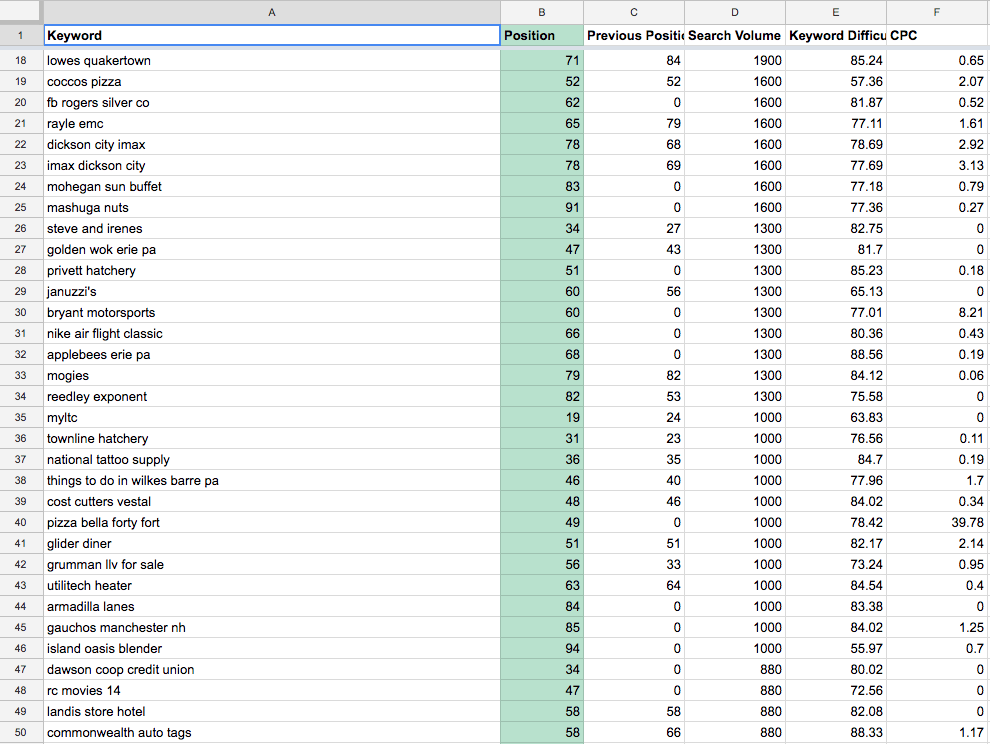
I use SEMrush and then incorporate it into a spreadsheet.
You’re going to run into a lot of junk and random keywords that have no bearing on your business.
keywords list
Here, you can identify opportunities for keywords that are relevant to your business that you can scale up in the rankings by using those three previously mentioned strategies.
Select target keywords with high volume and low competition to optimize your existing content that is essential to your information architecture.
Look at other key metrics beyond keywords on a page-by-page basis, such as Page Authority, to see where opportunities exist to scale pages using both internal links and backlinks.
For more information about your organic presence, you can leverage Google Search Console to look at your monthly traffic volume and how many clicks your content is receiving in organic search results.
Here, you can optimize existing metadata and improve the user signals surrounding your content. Indirectly, this should assist in rankings.

User Metrics

To improve user signals you need to know the behavior of users as they land on your site.
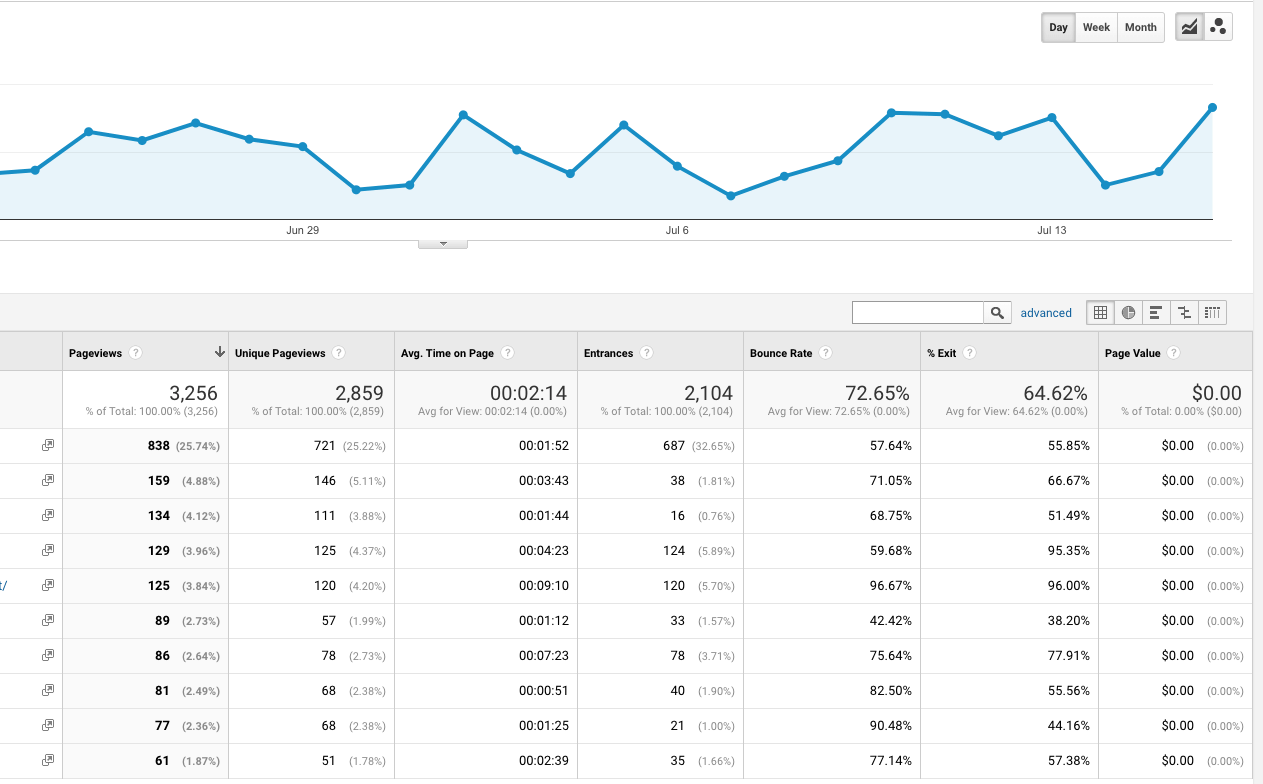
Use Google Analytics to assess how users interact with your webpages once they land on them.
The most important metrics include:
  • Page views.
  • Bounce rate.
  • Average time on page.
  • Conversions (if tracked).
google analytics screenshot
These metrics will provide a good understanding of how well your content is meeting user intent (primary ranking signal) and how users engage with your content: are they leaving or is it encouraging them to explore your site further?
Google Analytics provides a behavioral flowchart that shows you the actions of users as they land on your webpage.
Most informational content will come with a high bounce rate. So in order to keep more users on your site and also boost that contents ranking, it’s ideal to add additional resources relevant to that content to further serve your customers or expand on your existing content for longer engagements.
User metrics will provide a general idea of the quality of your content and whether further actions should be taken.

Establish Goals

Each piece of content will serve a different purpose in your sales funnel. So, you need to identify the goal of each page and set up KPIs to track monthly and evaluate the effects of your content marketing campaign.
Generally, content will serve a number of goals, not limited to:
  • Bringing additional traffic to your website.
  • Moving the needle on choice keyword terms that are within striking distance.
  • Ranking for additional semantically related keywords.
  • Assisting in funneling conversions through your website.
  • Generating visibility around your brand and business.
  • Providing thought leadership or topical authority over the subject matter.
Now you need to track these through a quarterly editorial calendar and audit your efforts at the end of each quarter.

2. Build Out Your Website Architecture for More Authority

As most content marketers profess, the best way to set up your information architecture is through a town-down pyramid approach segmented by categorization.
But one of the best methodologies I’ve found for a topic-driven approach is Hubspot’s Topic Clusters.
Essentially, the idea is to use internal linking to improve the rank of core service pages by building out sub-topics around a central piece of content.
For example, if building out a tree around “Agile,” you’d want to build out sub-level pages around sub-topics, such as:
  • Agile Manifesto
  • Scrum
  • Sprint Planning
  • Writing Agile Frameworks
  • Continuous Testing
This list can also be extended to alternative methodologies, such as Waterfall, RAD, and much more that can still be considered topically similar to agile, even if used as an informative webpage or blog post.
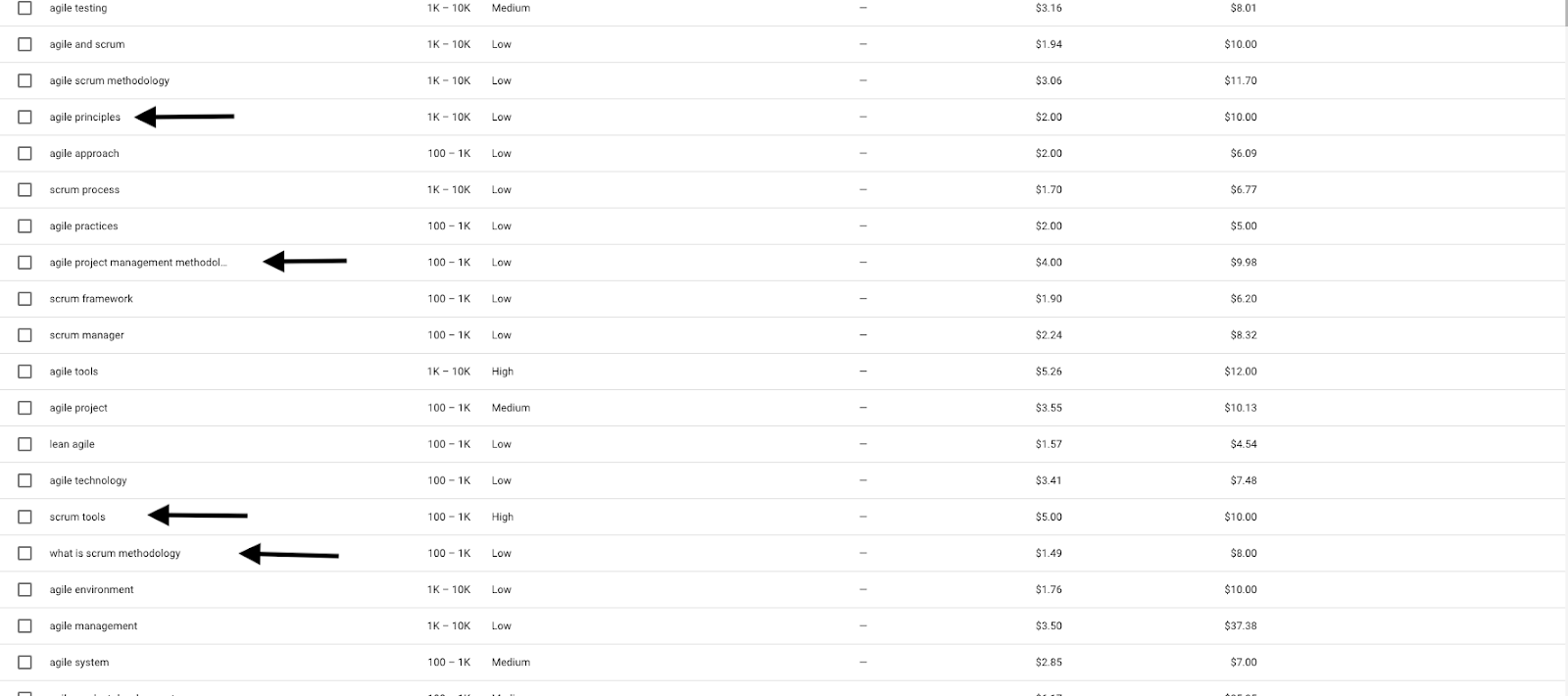
When coming up with subtopics, you should analyze long-tail variants of topically related keywords with high search volume.
You can use Google Keyword Planner, SEMrush, Ubersuggest, and even related search phrases in Google search queries.
For example, when searching for keywords related to agile, you can uncover long-tail phrases with high search volume relevant to your top level topic:

But these phrases only really get us a few ideas for topics, most of which are a little too similar.
Looking outside of this, we can come up with more topic ideas using additional resources.
One of the best resources is competitive analysis. Leverage SEMrush, Ahrefs, SpyFu, or any other competitive analysis tool to evaluate the following metrics:
  • Keyword gaps for choice terms.
  • Web pages that are receiving the highest traffic.
  • Content that is receiving the highest share of backlinks.
  • Content that receives positive social signals.
Leveraging this information, you can discover to see what keywords these pages are ranking for and create content that’s dives more in-depth and provides an entirely unique approach to presentation.
To develop a more coherent strategy you need to understand what people are searching for and what’s important to them as consumers.
When leveraging competitive keyword analysis, you can also filter your search for phrases, such as:
  • Why
  • When
  • How
  • Where
  • Tutorial
  • What
  • Guide
This will provide you with informative content that answers user intent and have high search volume.
But going beyond this, marketers should look to other opportunities to scale their content. For other sources of related topic selection, we can leverage additional tools.
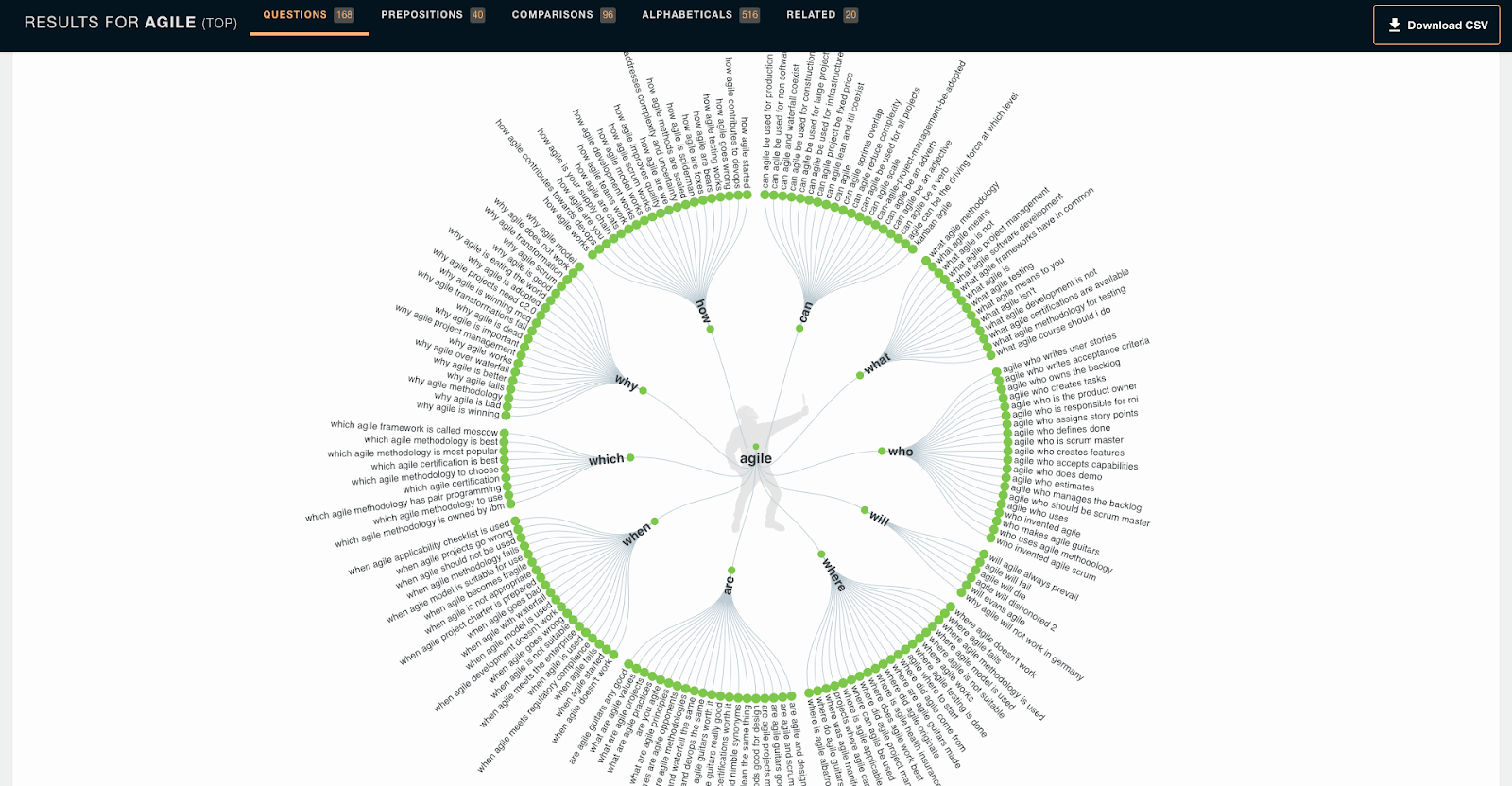
Ask the Public offers questions and prepositions that users are searching for over the web directly related to your broad keyword term.
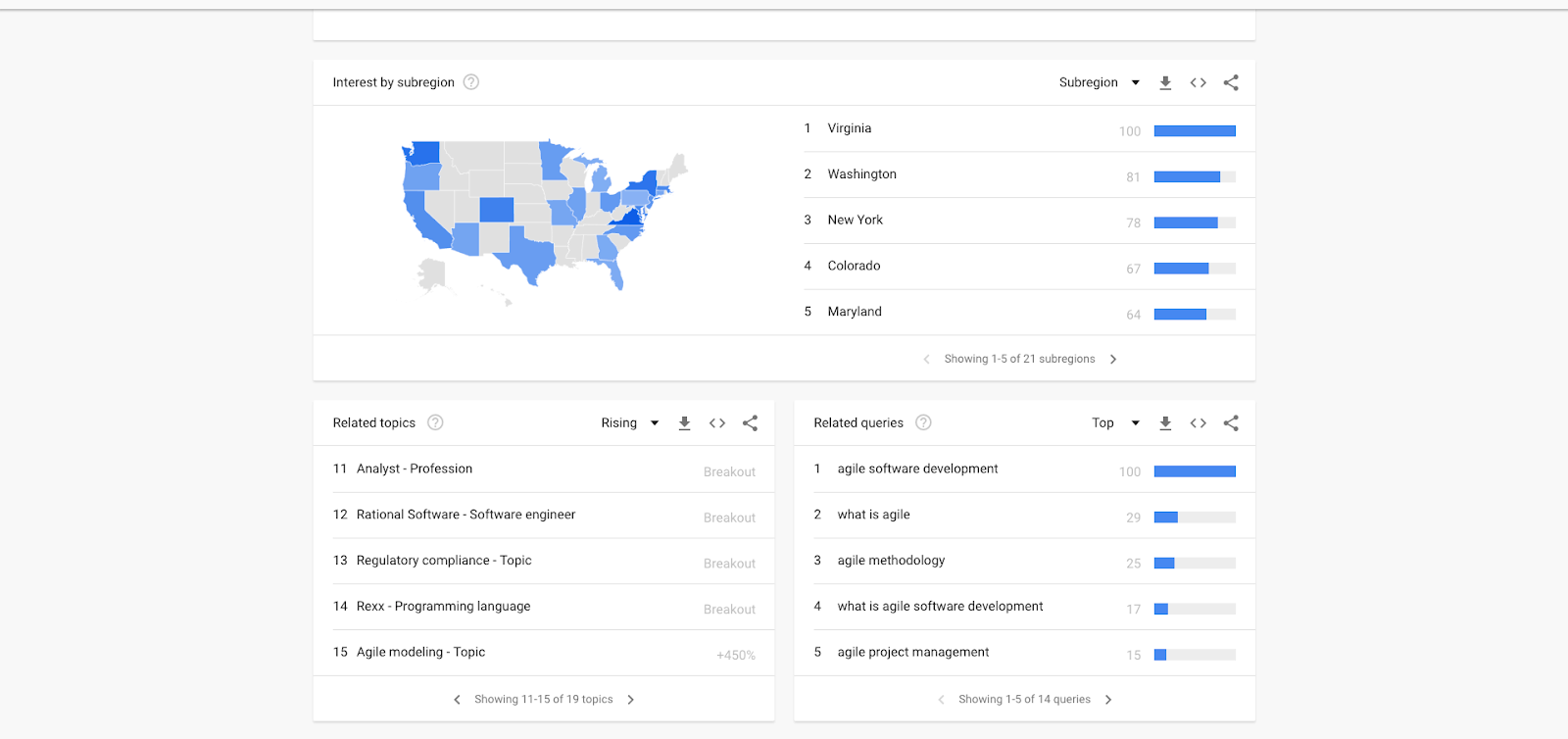
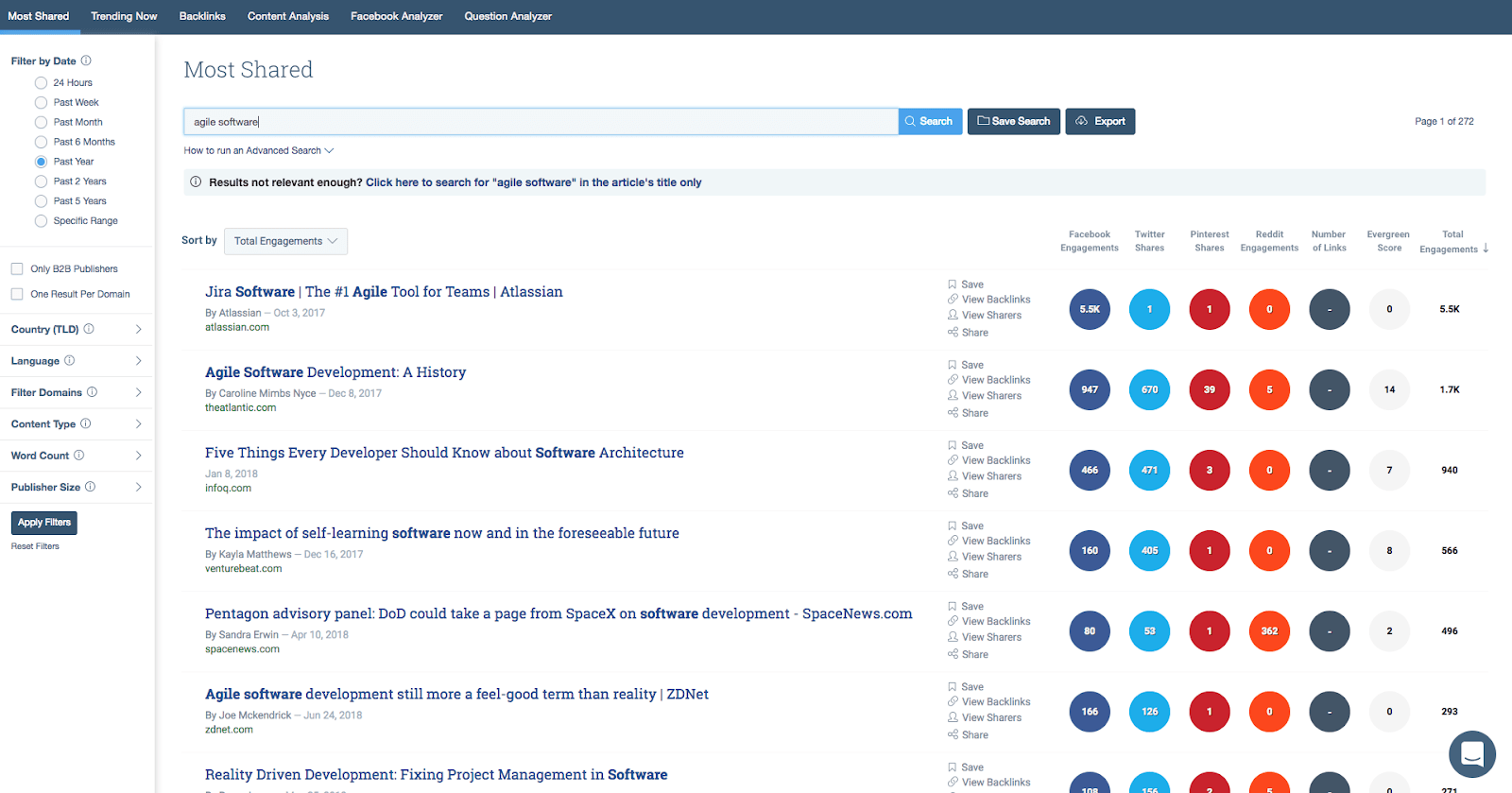
Google Trends also offers great search data around related queries with high search volume that other keyword planners don’t really cover.

BuzzSumo offers data on articles that are being shared and actively discussed in your given industry.
Using these tools and approaches, you can uncover topic ideas that are highly relevant to your core topic pages. From here you can create new content that is both beneficial on its face, but can also pass authority and boost interlinked pages in your pillar topic.
So why go through the trouble of explaining this topic-driven approach?
See, the problem with most keyword planners is that they give you very limited insight into related topics that are also important to your customers.
Keyword planners help you uncover opportunities for wins by optimizing existing content. But competitor analysis and these tools help you uncover opportunities for wins by creating new topics that are related to your core service offering.

3. Use New Content to Improve Existing Rankings

So, where do we go from here?
Sure, creating new content will help with indexation and maybe pull in a little traffic, but how do we use this to increase the rank of our money pages?
Well, link, link, link!
Set up internal links using target anchor text to send authority metrics that way to your core service pages and communicate its importance to search engines.
Furthermore, build out links to these pages and promote them on social media to increase the amount of authority flowing through these pages.
Finally, I would suggest going back and updating old posts to reflect your core service offerings and link back to those parent pages.

Conclusion

By using a topic-driven approach to website hierarchy over a strict keyword approach, you can vastly expand the reach of your content strategy and help promote important internal service pages on your site.

Reference:https://www.searchenginejournal.com/seo-topic-driven-content-marketing-approach/262311/

Friday, June 22, 2018

Machine Learning & Search Engines Explained

How Machine Learning in Search Works: Everything You Need to Know

In the world of SEO, it’s important to understand the system you’re optimizing for.
You need to understand how:
Another crucial areas to understand is machine learning.
Now, the term “machine learning” gets thrown around a lot these days.
But how does machine learning actually impact search and SEO?
This article will explore everything you need to know about how search engines use machine learning.

What Is Machine Learning?

What Is Machine Learning
It would be difficult to understand how search engines use machine learning without knowing what machine learning actually is.
Let’s start with the definition (provided by Stanford University in their course description for Coursera) before we move on to a practical explanation:
“Machine learning is the science of getting computers to act without being explicitly programmed.”

A Quick Aside Before We Continue …

Machine learning isn’t the same as Artificial Intelligence (AI), but the line is starting to get a bit blurry with the applications.
As noted above, machine learning is the science of getting computers to come to conclusions based on information but without being specifically programmed in how to accomplish said task.
AI, on the other hand, is the science behind creating systems that either have, or appear to possess, human-like intelligence and process information in a similar manner.
Think of the difference this way:
Machine learning is a system designed to solve a problem. It works mathematically to produce the solution. The solution could be programmed specifically, or worked out by humans manually, but without this need, the solutions come much faster.
A good example would be setting a machine off to pour through oodles of data outlining tumor size and location without programming in what it’s looking for. The machine would be given a list of known benign and malignant conclusions. With this, we would then ask the system to produce a predictive model for future encounters with tumors to generate odds in advance as to which it is based on the data analyzed.
This is purely mathematical.
A few hundred mathematicians could do this – but it would take them many years (assuming a very large database) and hopefully none of them would make any errors. Or, this same task could be accomplished with machine learning – in far less time.
When I’m thinking of Artificial Intelligence, on the other hand, that’s when I start to think of a system that touches on the creative and thus becomes less predictable.
An artificial intelligence set on the same task may simply reference documents on the subject and pull conclusions from previous studies. Or it may add new data into mix. Or may start working on a new system of electrical engine, foregoing the initial task. It probably won’t get distracted on Facebook, but you get where I’m going.
The key word is intelligence. While artificial, to meet the criteria it would have to be real thus producing variables and unknowns akin to what we encounter when we interact with others around us.

Back to Machine Learning & Search Engines

Right now what the search engines (and most scientists) are pushing to evolve is machine learning.
Google has a free course on it, has made its machine learning framework TensorFlow open source, and is making big investments in hardware to run it.
Basically, this is the future so it’s best to understand it.
While we can’t possibly list (or even know) every application of machine learning going on over at the Googleplex, let’s look at a couple of known examples:

RankBrain

What article on machine learning at Google would be complete without mentioning their first and still highly-relevant implementation of a machine learning algorithm into search?
That’s right … we’re talking RankBrain.
Essentially the system was armed only with an understanding of entities (a thing or concept that is singular, unique, well-defined and distinguishable) and tasked with producing an understanding of how those entities connect in a query to assist in better understanding the query and a set of known good answers.
These are brutally simplified explanations of both entities and RankBrain but it serves our purposes here.
So, Google gave the system some data (queries) and likely a set of known entities. I’m going to guess on the next process but logically the system would then be tasked with training itself based on the seed set of entities on how to recognize unknown entities it encounters. The system would be pretty useless if it wasn’t able to understand a new movie name, date, etc.
Once the system had that process down and was producing satisfactory results they would have then tasked it with teaching itself how to understand the relationships between entities and what data is being implied or directly requested and seek out appropriate results in the index.
This system solves many problems that plagued Google.
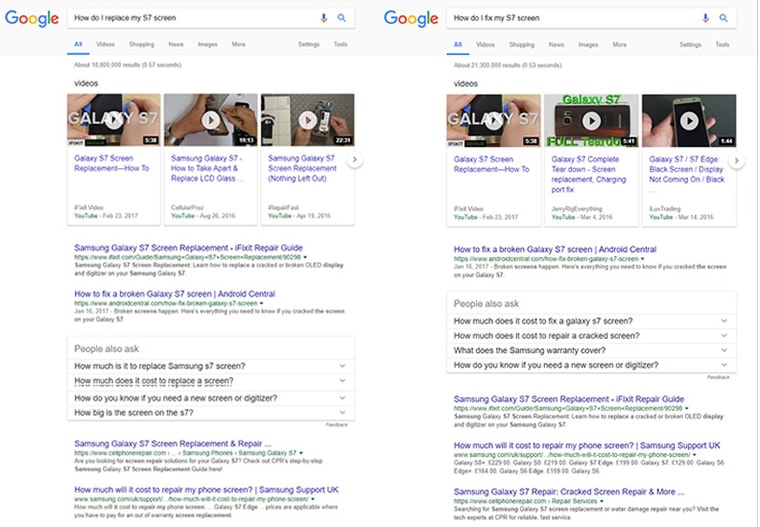
The requirement to include keywords like “How do I replace my S7 screen” on a page about replacing one should not be necessary. You also shouldn’t have to include “fix” if you’ve included “replace” as, in this context, they generally imply the same thing.
RankBrain uses machine learning to:
  • Continuously learn about the connectedness of entities and their relationships.
  • Understand when words are synonyms and when they are not (replace and fix may be synonyms in this case but they wouldn’t be if I was querying “how to fix my car”).
  • Instruct other portions of the algorithm to produce the correct SERP.
In its first iteration, RankBrain was tested on queries Google had not encountered before. This makes perfect sense and is a great test.
If RankBrain can improve results for queries that likely weren’t optimized for and will involve a mix of old and new entities and services a grouping of users who were likely getting lackluster results to begin with then it should be deployed globally.
And it was in 2016.
Let’s take a look at the two results I referenced above (and worth noting, I was writing the piece and the example and then thought to get the screen capture – this is simply how it works and try it yourself … it works in almost all cases where different wording implies the same thing):
how do i fix my s7 screen
Some very subtle differences in rankings with the #1 and 2 sites switching places but at its core it’s the same result.
Now let’s look at my automotive example:
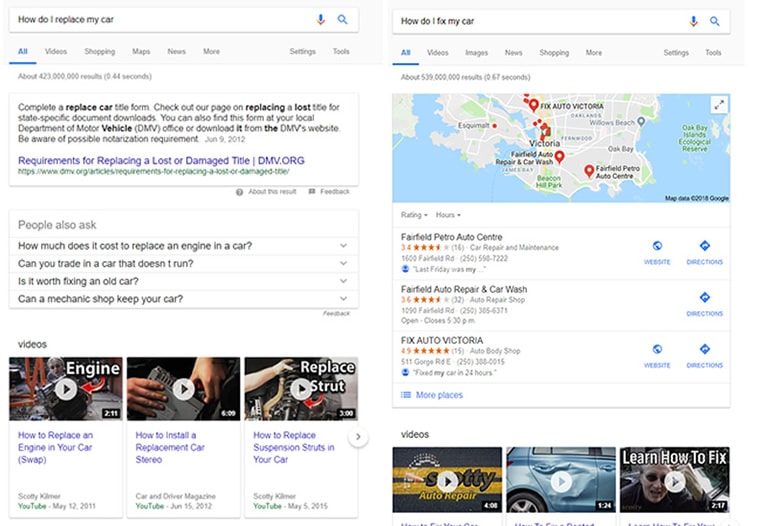
how do i fix my car
Machine learning helps Google to not just understand where there are similarities in queries, but we can also see it determining that if I need my car fixed I may need a mechanic (good call Google), whereas for replacing it I may be referring to parts or in need of governmental documentation to replace the entire thing.
We can also see here where machine learning hasn’t quite figured it all out.
When I ask it how to replace my car, I likely mean the whole thing or I’d have listed the part I wanted. But it’ll learn … it’s still in its infancy. Also, I’m Canadian, so the DMV doesn’t really apply.
So here we’ve seen an example of machine learning at play in determining query meaning, SERP layout, and possible necessary courses of action to fulfill my intent.
Not all of that is RankBrain, but it’s all machine learning.

Spam

If you use Gmail, or pretty much any other email system, you also are seeing machine learning at work.
According to Google, they are now blocking 99.9 percent of all spam and phishing emails with a false-positive rate of only 0.05 percent.
They’re doing this using the same core technique – give the machine learning system some data and let it go.
If one was to manually program in all the permutations that would yield a 99.9 percent success rate in spam filtering and adjust on the fly for new techniques it would be an onerous task if at all possible. When they did things this way they sat at a 97 percent success rate with 1 percent of false positive (meaning 1 percent of your real messages were sent to the spam folder – unacceptable if it was important).
Enter machine learning – set it up with all the spam messages you can positively confirm, let it build a model around what similarities they have, enter in some new messages and give it a reward for successfully selecting spam messages on its own and over time (and not a lot of it) it will learn far more signals and react far faster than a human ever could.
Set it to watch for user interactions with new email structures and when it learns that there is a new spam technique being used, add it to the mix and filter not just those emails but emails using similar techniques to the spam folder.

So How Does Machine Learning Work?

This article promised to be an explanation of machine learning, not just a list of examples.
The examples, however, were necessary to illustrate a fairly easy-to-explain model.
Let’s not confuse this with easy to build, just simple in what we need to know.
A common machine learning model follows the following sequence:
  • Give the system a set of known data. That is, a set of data with a large array of possible variables connected to a known positive or negative result. This is used to train the system and give it a starting point. Basically, it now understands how to recognize and weigh factors based on the past data to produce a positive result.
  • Set up a reward for success. Once the system is conditioned with the starting data it is then fed new data but without the known positive or negative result. The system does not know the relationships of a new entity or whether an email is spam or not. When it selects correctly it is given a reward though clearly not a chocolate bar. An example would be to give the system a reward value with a goal of hitting the highest number possible. Each time it selects the right answer this score is added to.
  • Set it loose. Once the success metrics are high enough to surpass existing systems or meet another threshold the machine learning system can be integrated with the algorithm as a whole.
This model is referred to as supervised learning and if my guess is right, it’s the model used in the majority of the Google algorithm implementations.
Another model of machine learning is the Unsupervised Model. To draw from the example used in a great course over on Coursera on machine learning, this is the model used to group similar stories in Google News and one can infer that it’s used in other places like the identification and grouping of images containing the same or similar people in Google Images.
In this model, the system is not told what it’s looking for but rather simply instructed to group entities (an image, article, etc.) into groups by similar traits (the entities they contain, keywords, relationships, authors, etc.)

Why Does This Matter?

Understanding what machine learning is will be crucial if you seek to understand why and how SERPs are laid out and why pages rank where they do.
It’s one thing to understand an algorithmic factor – which is an important thing to be sure – but understanding the system in which those factors are weighted is of equal, if not greater, importance.
For example, if I was working for a company that sold cars I would pay specific attention to the lack of usable, relevant information in the SERP results to the query illustrated above. The result is clearly not a success. Discover what content would be a success and generate it.
Pay attention to the types of content that Google feels may fulfill a user’s intent (post, image, news, video, shopping, featured snippet, etc.) and work to provide it.
I like to think of machine learning and its evolution equivalent to having a Google engineer sitting behind every searcher, adjusting what they see and how they see it before it is sent to their device. But better – that engineer is connected like the Borg to every other engineer learning from global rules.

Reference:https://www.searchenginejournal.com/how-machine-learning-in-search-works/257837/?ver=257837X3

Thursday, June 21, 2018

10 Critical Factors for Website Success

How to Make a Successful Website: 10 Critical Factors

What does it take to make a successful website?
For most businesses and brands, it won’t happen quickly or easily.
It will take time, effort, and resources.
But that doesn’t mean you’ll need a huge budget to effectively compete.
A successful website is monitored, measured, and improved over time.
Your website is what will help you stay top of mind – and tops in your respective industry.
Focus on these 10 critical factors for your website to be successful.

1. Clearly Define Your Goals

While we should always start a web or marketing project with goals, we need to consider both ourselves and the user with our website.
The site can only generate traffic, leads, and sales when we make sure we have what our target audience wants and we can deliver it for them in a satisfactory way.
Defining goals for both your organization and your user should be easy to do.
If the goals don’t align, then you’ll likely have a problem where you’ll seek to make profits yet not be able to deliver the product and experience your audience seeks.
It is painful to invest time and money into a site to learn that everyone is bouncing and no one wants or understands why they should buy from you as you focused too much on your end goals and not theirs.

2. Earn the Trust of Your Audience

Be clear and transparent in what you are offering and what you want your audience to do.
Know what motivates them and what you’re strong at.
Leverage that.
Too often websites lack the emotional or credibility connections needed to earn trust and the sale.
A prime example that I see often are ecommerce sites (and even service company websites) that lack an About Us page that has substance.
Users want to know who they are doing business with and not that you’re just another commodity site in the space.
If you can’t put names, pictures, culture, philosophy, or some type of story on your website, you’ll lack the ability to state what you’re about.
Customers care about your intentions.
Even cost-conscious shoppers simply looking for the lowest price need to feel like you’re a legit business before plugging in credit card details.

3. Find Ways to Stand Out

Differentiation is key.
You can still use a website template and look different.
By customizing imagery and styles tailoring them to your brand, you can stand out.
This goes along with earning trust.
When you tell your story and create factors like price, quality, customer service, what you do with profits, how you give back, etc., you create the bond needed to stand out from the rest of the templated sites selling the same products or services.

4. Focus on Usability & User Experience

Make it easy for your audience to get to the content they want.
If you’re a viral video website, land users on video pages.
If you have products or services, make sure that users can get to the desired page with the fewest clicks possible.
In addition to having intuitive main menu navigation optimized for mobile and desktop experiences, think about the placement of your search box and other cues to get to popular content.
Don’t assume that a user is willing to click several times to get to the latest cat video or the hot selling product that everyone wants.

5. Remember the SEO Fundamentals

This seems like a basic thing, but don’t forget about SEO.

At minimum, know how the search engines crawl and index your content and ensure the basic on-page factors are optimized.
There are lots of ways to make this easy, including through plugins and semantic coding.
SEO has technical aspects and goes beyond on-page, but if you can at least ensure your content can be indexed (and is being indexed) and that you are customizing all of the on-page elements to literally represent what your content is and is about, then you can win half the battle.

6. Optimize Your Landing Pages

Landing pages are great tools for campaigns.
This includes PPC ads, email promotions, inbound marketing efforts, and more.
Having a system that allows for quick creation and customization of landing pages is critical for success if you’re doing any marketing.
Make sure that your system gives you control and that your site allows you to set indexing status, change navigation, and separate these pages from the normal navigation paths if you’re using them for dedicated campaigns outside of navigable normal website content.

7. Use Your Analytics

Another that seems like a given, but go beyond just installing Google Analytics on your site.
You need information on demographics, goal completions, and more that you can’t get unless you take a few quick steps to set them up.
Don’t assume that you can set it and forget it and go back months down the road and see how things are going.
You don’t have to log into Google Analytics every day.
At the very least after getting it customized, set up some reports and alerts that automatically come to you so you have the pulse of what is working and what isn’t and can adjust on the fly rather than reacting when it is too late.

8. Learn from Heat Mapping

Heat mapping and in-page analytics tools are great sources of additional information on the user experience.
Many of the aspects that are critical to website success are UX related.
Tools like Lucky Orange (I’m a customer and fan – not a compensated endorser) give you insight into how far users are scrolling, where their mouse tracks, how much of a form they complete before bailing, where they get stuck on your website, and a lot more things that Google Analytics can’t show you.
By monitoring this level of detail you can fix UX hangups and further fine-tune the site to see success.

9. Make Sure Your Website Works All the Time

Uptime is often all we think about when it comes to making sure our websites work.
However, you may not notice issues like JavaScript not firing, buttons not working, a browser-specific bug, or mobile experience issue without the right protocols in place.
By just watching sales data and monitoring uptime, you may miss that a segment of your audience is hitting a roadblock.
Many users won’t seek you out and contact you when they can’t buy or can’t get to the content they want – they just leave.
Make sure that your code is functional and cross-browser tested.

10. Listen & Learn Continuously

Don’t assume.
We’re good and optimizing and learning along the way with marketing. SEO is an ongoing process that includes fine-tuning.
Don’t let your website be a static place that has a different management philosophy.
Listen to your target audience and users and learn.
Do this through social media, customer service channels, analytics, heat mapping, and any data and touchpoints you have.
Be active in seeking feedback and ways to improve so your website is an asset that grows and evolves as your business does.

Conclusion

While most of the aspects that lead to a successful website tie into user experience and your brand, it is important to understand and leverage technology, insights, and feedback to optimize and refine your site over time.

Reference:https://www.searchenginejournal.com/how-to-make-a-successful-website/257617/?ver=257617X2

Friday, June 15, 2018

Optimizing Your Content for Search: Don't Forget These 6 Things

Optimizing Your Content for Search: Don’t Forget These 6 Things


However, what good is all that content if no one finds it?
Organic search presents an opportunity to consistently get your content in front of the right audience at the right time in the buyer’s journey.
If you can master your content optimization strategy for search, you’ll see your content performance improve in both the short- and long-term.
A lot goes into a robust SEO strategy – don’t be fooled by those peddling magic SEO bullets.
That said, there are certain best practices you can adopt to optimize your content for search from the get-go.

1. Start with Keyword Research

Content optimization starts before you take pen to paper (or fingers to keyboard) with keyword research.
Keywords serve as a proxy for customer intent and are an indicator if your topic is valuable and meaningful for your customers.
When choosing a keyword, there are a few questions to ask yourself:
  • How many people are searching for this keyword?
  • How competitive is this keyword?
  • What stage of the buyer’s journey is this keyword?
Doing this research at the outset ensures your content is relevant for your audience and impactful for your business – driving traffic and conversions in the long run.
Doing regular keyword research also keeps you abreast of shifts in demand and your market landscape. It can and should influence your content calendar.

2. Choose Your Result Type

Gone are the days when Google’s results pages were just a list of links.
Today, Google displays its results in a variety of user-friendly visual forms to help users find information faster.
From featured snippets, to local packs, to videos, depending on the search, Google serves up different result types.
Securing one of these result types is important because it puts your content at the top of the results page and drastically improves your click-through rate. According to iQuanti, Google’s Answer Box secures an astounding 32.3 percent CTR.
As with most things in the world of SEO, there is no one catchall tip to secure a universal result type, but there are a few content optimization steps you can take:
  • Research which keywords trigger a universal result type: Most of these keywords will implicitly or explicitly ask a question.
  • Structure your content: Most answer boxes are pulled from paragraphs, tables or lists in your content. For paragraphs, make your answer short and to the point. Also, ensure your answer appears at the top of your article. For lists and tables, use the proper HTML markup to ensure Google can crawl your list or table.
  • Be accurate and correct: Google wants to reward websites that offer up the most accurate and complete answer to the question.

3. Create Keyword Themes

Many marketers today stop their keyword research after they choose their primary keyword. But that’s just the beginning.
To improve your visibility, you don’t want to optimize for one keyword, but rather a group of keywords related to an idea. Your goal should be to create keyword themes using like-minded keywords.
Themes do three things:
  • Indicate to search engines what your content is about and how it aligns with user intent.
  • Improve discoverability for other relevant searches.
  • Help you avoid artificial keyword stuffing that makes your content less relatable and relevant to your audience.
When creating a theme, it’s recommended to choose two or three keywords. It’s also important to choose keywords that are within realistic reach.
Avoid choosing keywords that are too broad or have too much competition. You want to choose keywords for your theme that are highly relevant and can bring you qualified traffic.

4. Add Transcripts to Your Videos

Odds are you’re using video content in one way or another. A survey by Wyzowl found that 81 percent of businesses use video as a marketing tool – up from 63 percent from 2017.
Next time you create a video landing page, add a transcript of the video to the page. Search engines crawl the text on a page for indexing. A transcript enables search engines to understand your video content and rank it for the appropriate search terms.
Not only does a transcript make search engines happy, but it also makes it easy for your visitors to quickly gauge if the video is relevant to them, improving the user experience.
Don’t forget that once you have the video transcript, you can repurpose it into a blog post, social quotes, white paper, etc.

5. Impact of Page Speed

According to data from Google, if your content takes longer than three seconds to load, you might be losing 53 percent of your mobile site visitors.
People have little patience for slow load times or poor user experiences. Any friction and they’ll move on to another site.
It’s essential to your content’s performance that your page loads quickly across device types.
To make sure your webpage is fast, Google offers a free PageSpeed Insights tool. This tool not only tells you how you’re doing on mobile and desktop but also offers recommendations to improve your content’s speed.

6. Photos Matter

Along those same lines: did you know the size of your photos can impact your content’s load time?
Before hitting publish, ensure your images are sized properly in the correct file type.
Image optimization doesn’t stop there.
The image title, alt text, and placement of your images offer opportunities to improve your search rankings. All three of these elements add relevance and context, which can help you rank better.
This also makes your image more visible in the image results.

Conclusion

Going forward, don’t let content optimization for search be an afterthought. You’ll miss out on big traffic and conversion opportunities. If you start optimizing today, you’ll see long-term gains.

Reference:https://www.searchenginejournal.com/optimizing-your-content-for-search/255193/