Tuesday, May 15, 2018

Google: Search Snippets Are Now Shorter on Average

Google: Search Snippets Are Now Shorter on Average

Google has confirmed there is still no fixed length for search snippets, though snippets have been shorter on average compared to recent weeks.
This topic was addressed by Google’s Danny Sullivan in response to a number of SEOs who have been noticing shorter snippets in search results as of late.
”Our search snippets are now shorter on average than in recent weeks, though slightly longer than before a change we made last December. There is no fixed length for snippets. Length varies based on what our systems deem to be most useful.”
Google extended the potential length of search snippets back in December, though never once stated there is either a maximum length, a fixed length, or even a recommended length.
The length of search snippets are dynamic, and may be shorter or longer depending on the query.
Some SEOs are upset after having invested time into writing longer meta descriptions. Sullivan reiterates that Google was clear from the beginning there was no need to change meta description tags.
When it comes to writing meta descriptions, ask yourself: If I was a searcher, would I be compelled to click on this search result?
Don’t get caught up on character counts. All you can do is aim for being as useful and concise as possible. Google will ultimately display what it wants as a meta description.

Reference :https://www.searchenginejournal.com/google-search-snippets-now-shorter-average/253025/

Monday, May 14, 2018

How to Do Guest Blogging for Natural Looking Link Building

How to Do Guest Blogging for Natural Looking Link Building

Guest blogging is still huge.
And I have every reason to believe that it’s going to make even more of my mystical creature dreams come true.
Larry Kim is what happens when you blend a 🦄 with high-quality content and an authoritative publication. Kim, the founder of WordStream, is a winning example of how to swirl content into a distribution funnel.
Just look at his post on Inc. 40 Amazing Places To Learn Something New Every Day, which received 40 backlinks.
Guest blogging can, as you’ve seen before, look scary.
But, enhancing your online visibility or backlink profile doesn’t have to be frightening — or require the writing skills of Shakespeare. You just need the proper arsenal to get that natural-looking link building.

Think Beyond the Links

It’s time we think beyond the links.
There’s been an onslaught of guest blogging for links on the market.
To make sense of it all, Moz surveyed agencies and freelancers to see if they still use guest posting, and 90 percent of respondents said yes, they still use a form of guest posting.
There are a lot of winning entrepreneurs using guest blogging in their link building toolkit: Even the aspiring Julie Joyces will find something to fall in love with.
Just take a look at how other entrepreneurs have used this strategy in the past.
  • Neil Patel publishes an average of 100 guest posts per year.
  • Mark Traphagen shared his thoughts on how Eric Enge built his reputation by writing guest posts.
  • Leo Widrich wrote 150 guest blog posts in 2 months to help build Buffer.
  • Julia McCoy at Express Writers gained $5,000 from one guest blog post on SitePro.

Your Guest Blogging Strategy

Here’s a quick snapshot of my guest blogging strategy:

1. Set Qualifying Factors Needed to Work with a Blog

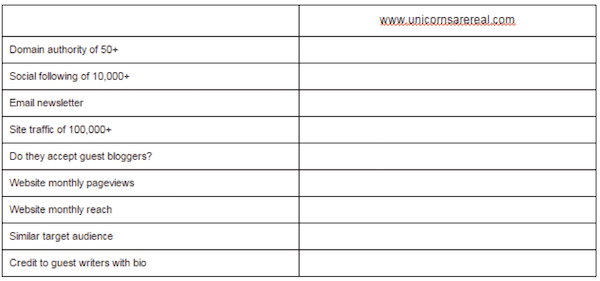
Here’s a look at my qualifying factors I review for every guest blogging opportunity.
Guest blog qualifying factors

2. Check the Bio Section

Researching the bio section is key because it leaves opportunity for you to not only add a link, but add a link for users to sign-up to your newsletter.

3. Engage Before You Pitch

Before I send my pitch email, I connect with the website on every social platform by engaging in replies to tweets and signing up for their newsletter.

Summary

Timeframe: Ongoing starting Month 3
Results detected: 4-12 months
Average blogs posted per month: 4
Tools:
  • BuzzStream
  • BuzzSumo
  • Alexa
Benefits of guest blogging:
  • Guest blogging improves your brand awareness and SEO authority. If you have a solid strategy of posting to multiple websites within a similar timeframe, it gives the illusion that you’re everywhere.
  • Guest blogging increases your website traffic and leads. By adding a link in your bio to a landing page to sign-up for your newsletter, you’re increasing traffic and gaining leads.
  • Read more in Search Engine Journal’s The Top 11 Benefits of Guest Blogging.
More Guest Blogging Resources:
Reference:https://www.searchenginejournal.com/link-building-guide/guest-blogging/

Friday, May 11, 2018

Google Publishes Image Search SEO Tips

Google Publishes Image Search SEO Tips

Google has updated their Image Publishing Guidelines and it’s a vast improvement.
The new version offers actionable information that could make your images rank better, position them to appear in rich results, make them voice assistant friendly, and bring more traffic to your website.
This updated support page has a lot to offer.

Image Search SEO Tips

Google has provided useful image search SEO tips. Here are the actionable takeaways:
  1. Provide good context: Make sure images are contextually relevant because the text of the content is going to influence how Google interprets what the image is about.
  2. Optimize Image Placement: This means to place images so that text that is relevant to the image is nearby. The surrounding text will be picked up by Google to help it understand what the image is about. Adding a caption is an additional good way to do this. Adding an important image close to the top of the page is another tip.
  3. Create informative and High Quality Sites: Google considers the quality of the content as part of the image ranking process. The content is also used to generate a meaningful snippet for the content. So it helps for the page content to relate with the image content.
  4. Create Device-Friendly Sites: Google revealed that users search for images on mobile more than they do on desktop. This means it’s important to be mobile friendly in order to rank better and capitalize on the traffic.
  5. Create Good URL Structure for Your Images: This is an interesting SEO tip. Google revealed that they use the file path and the file name in order to better understand and rank images. This is an actual ranking factor Google is sharing. This is a very useful tip for ranking images. For example, if your images are of different kinds of products, instead of dumping them all into a generic “/assets/” or “/images/” folder, you could in theory create a more organized structure to organize the images into something more meaningful like, /mens/ and /womens/ in order to organize images of men’s and women’s clothing.

Technical SEO Tips for Image Search

The Google support page goes on and offers technical advice for achieving better ranking web pages and images. Here are further insights:

Check Your Page Title & Description

Google confirms that it uses the title element and the meta description as part of their image search algorithm.  This does not mean that they are ranking factors. The role is limited to generating a snippet which then can help users decide to click through or not.
While it was previously understood that title tags were important, it’s an interesting revelation that the meta description tag plays a role.  Here is what the new Google Image Search Support page says:
“Google Images automatically generates a title and snippet to best explain each result and how it relates to the user query… We use a number of different sources for this information, including descriptive information in the title, and meta tags “

Add Structured Data

This is a very interesting addition to the new support page. Structured data plays a role in rich results and although it’s not mentioned in this support page, we also know that structured data plays a role in voice assisted search, which is an important area of search. Google’s Voice Assistant is now embedded in over 5,000 devices including in automobiles.

Here is what Google’s support page states:
If you include structured data, Google Images can display your images as rich results, including a prominent badge, which gives users relevant information about your page and can drive better targeted traffic to your site.
From the Google Support Page about Badges:
“If you’re publishing recipes, add Recipe markup on your page, for products, add Product markup, and for videos, add Video markup.”

More SEO Advice for Image Search

Google ends the support page by highlighting the following SEO tips for image search:
  • Optimize image size for speed
  • Optimize photos for sharpness
  • Use descriptive titles, captions, descriptive alt text, file names, and surrounding text.
  • Use an XML Image Site Map
  • Safe Search SEO: Segregate adult content into it’s own image folder
The Google support pages Danny Sullivan is credited with feature a similar usefulness as this support page. The previous Image Publishing Guidelines didn’t have as many actionable SEO tips.
I don’t know if Sullivan had a hand in crafting this new image publishing guideline, but it needs to be noted that this is an excellent and useful page.  Read: Google’s new Image Publishing Guidelines.

Reference:https://www.searchenginejournal.com/google-image-publishing-guidelines/252149/

Tuesday, May 8, 2018

Google Integrates Search Console With Squarespace

Google Integrates Search Console With Squarespace

Squarespace has become the first content management system (CMS) to integrate with Google Search Console.
For site owners working with Squarespace, this means verification with Google Search Console is now a one-click process.
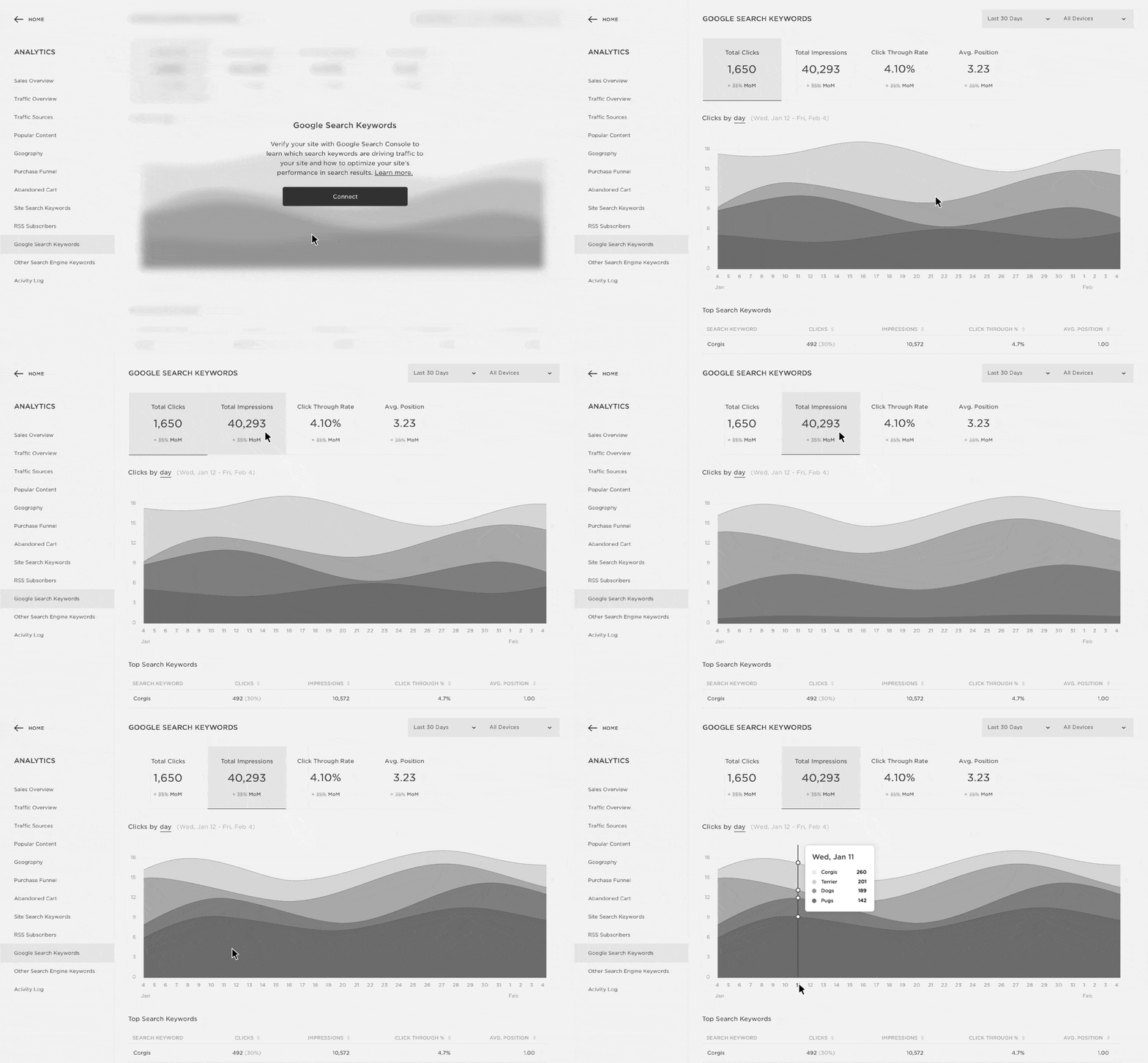
In addition, Squarespace site owners will access to Search Console’s keyword and impression data within the Squarespace Analytics panel.

”Verifying your website with Google Search Console now requires just one click within Squarespace. Once you’ve verified your site, you can access the new Google Search Keywords panel, where you can view your top keywords by total impressions, clicks, click-through rate, and search position.”
The Google Search Keywords Panel is available now on all Squarespace plans.

Reference:https://www.searchenginejournal.com/google-integrates-search-console-squarespace/251927/

Monday, May 7, 2018

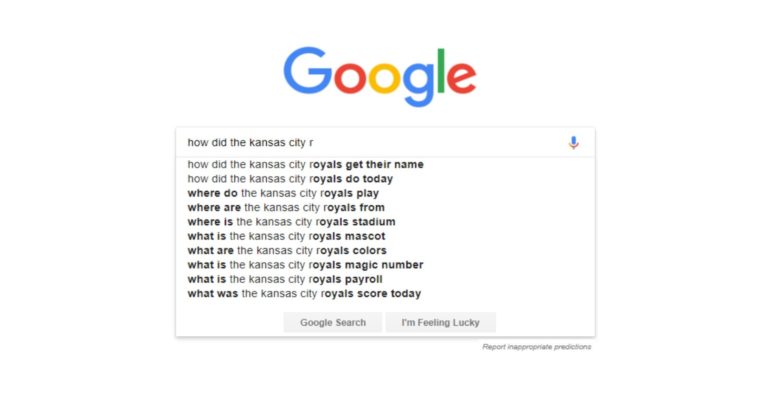
A Guide to Using Google Autocomplete for SEO

Google Autocomplete: A Complete SEO Guide
Google Autocomplete is a legendary search feature.
It consistently makes the news for its sometimes-funny and peculiar habits (and rarely in a positive way). It’s been blamed for political cover-ups, and has accidentally spoiled countless movies, TV shows, and even video games.
But Google Autocomplete is also a powerful marketing tool that SEO professionals and other digital marketers have used for years in a variety of ways.
SEO professionals, paid search marketers, content marketers, and social media managers are among the different digital marketers who rely on Google Autocomplete to help with different keyword-focused and intent-exploring projects to better optimize clients’ digital properties and the content and messaging that make them up.
Most digital marketers are well-versed in the abilities of Google Autocomplete — or at least they think they are. But if they are not, this guide should help prove the real power this simple but super-helpful feature can do for help with your day-to-day tasks as an SEO and marketer.

What Is Google Autocomplete?

Google Autocomplete is, in Google’s own words, a feature “designed to make it faster to complete searches that you’re beginning to type.”
It’s integrated anywhere Google could integrate it, including on the Google app for iOS and Android, the quick-search box on Android devices and the Chrome browser address bar, and of course on the Google homepage and anywhere else you may see a Google search box.
It’s estimated that it saves over 200 years of typing per day, and reduces typing overall by about 25 percent.
And, while its quite obvious the primary purpose of the Autocomplete dropdown is to cut back on time a user spends typing by offering predictions of what a user may be typing — including for websites using the built-in Google Custom Search Engine feature — there are a number of other useful ways that the feature can be used to leverage content ideas, keyword suggestions, intent exploration, and online reputation management, among other data-driven tasks.

Best Ways to Use Google Autocomplete

While Autocomplete has been a desktop search feature since late 2004, it has become even more useful as a time-saving feature on mobile devices in terms of its intended purpose of reducing typing by predicting what a user is looking for.
Typing on a mobile device is a bit tougher than doing so on the large keyboards we have grown up with and are accustomed to, so for many, it’s a welcomed tool for providing assistance and saving time.
Created by former Googler Kevin Gibbs, then called “Google Suggest” by another former Googler (and former Yahoo CEO) Marissa Mayer, Google has since moved away from the “Suggest” name since it’s not always offering the most thoughtful, caring, or appropriate predictions.
Much of Autocomplete’s behavior is computer-generated — with data collected from millions of other Google searches and their results, including the content on those pages — so one can only imagine the wild Autocomplete predictions that have come up given the obvious lack of intelligence seen daily online (i.e. YouTube commenters, Twitter bullies, user-generated-review trolls, etc.).
It wasn’t until 2008 that Google built Autocomplete into its default search engine (it was previously an opt-in feature), and, since then, Google has expanded the feature while other major platforms like Facebook, Twitter, Amazon, and many, many more have adopted it.

1. Keyword Research

It’s a long, tedious, and laborious task, but it’s also the foundation of all SEO strategies, and has been for a long time.
Explicit keyword targeting isn’t what it used to be, but keywords and their related ideas are always going to be an important part of search marketing.
Keyword research is one of the first tasks tackled at the start of an engagement — and carried on throughout the engagement — to understand not just a brand and the content it creates, but also its potential shortcomings, website strengths and weaknesses, and content gaps.
Autocomplete doesn’t do all the work for you in terms of keyword research, but it’s a great place to start at or to use early and often when developing content calendars and general organic search strategies.
Using it (along with other keyword resource tools like Google Keyword Planner and other third-party keyword databases) to get an idea of the right keywords you want to target by considering monthly search frequency, competition, and even cost-per-click (CPC) pricing will do your search strategy justice.
One of the shining advantages of Google Autocomplete is its ability to uncover quality long-tail phrases that are commonly searched across the web.
Since the primary measure for Autocomplete is popularity — based on real searches by users in real time — the value of Autocomplete lies in its plethora of keyword-level data that you can dig up if you work at it hard and long enough.
As always, be sure you are signed out of Google to ensure you limit personalization for an unbiased look at predictions.
Long-tail keywords are incredibly useful when fulfilling content gaps, but also offers endless possibilities in terms of high-value blog posts and educational content within a brand’s niche.

2. Intent Exploration

Understanding user intent is important because it guides the goal of the page, its messaging, its layout, and even imagery. We know pages perform best when they fully satisfy the user intent of a search query.
Using Autocomplete to better understand user intent is also quite involved and laborious since visiting many different webpages in the search results tied to specific predictions is going to take some time, focus, and content consumption.
But you’ll be happy when you do.
Keywords overlap various stages of user intent, and without more keyword context, it can be tough to understand the intent.
Autocomplete will help you not just understand different high-value long-tail keywords and the intent surrounding them, but it will also help marketers recognize the volume of content around specific stages of intent, as well as which long-tail phrases and intent stages could be optimized for as a higher priority.
Of course, for high-value keywords — long-tail or traditional one-, two-, and three-word phrases — it’s important to satisfy all stages of intent as they relate to the high-value keywords.
That’s the idea behind an all-encompassing, quality search strategy. And Autocomplete can help get you there.

3. Online Reputation Management

Autocomplete has been significant in the realm of online reputation management, too.
Remember, when a user searches for your name or your brand name, the first thing they see, even before your site on the SERP (search engine results page), is the Autocomplete predictions tied to that name.
If those predictions are negative, or if even just one of them is negative, it can have a real impact on your business’ performance.
Think about it. You search [Dog Washers Inc] and the first prediction finishes with “loses dog,” you probably won’t feel too keen on bringing your dog there for his next bath.
Same for a restaurant; if you search [Ted’s Seaford Spot] and the prediction finishes with “E. Coli,” I have a pretty good idea of what you’re not eating tonight.
Point is, Autocomplete makes up an important part of ORM (online reputation management) and cannot be ignored when working to balance any and all negative connections made with brands.
One must be vigilant, just like most ORM strategies. Several ways brands can work to offset negative Autocomplete predictions are:
  • Taking control of the conversations surrounding your brand to ensure the right connections are being made in Google Autocomplete.
  • Social media account optimization to reinforce the positive connections that may be overshadowed by negative ones.
  • Social media content, messaging, and engagement that is in line with the optimizations above, as well as the brand’s voice and tone.
  • Consistent branding and messaging for profile websites with positive keywords association used elsewhere
  • Starting small and making an impact by searching for positive connections for the brand from different locations. Obviously, the more people, the better. But you’d be surprised of the impact it can have.
  • Building backlinks to Google SERPs for positive keyword associations with your name; things like [sam hollingsworth seo writer] and [sam hollingsworth handicapper] would be great starts for someone like myself. ðŸ˜Š

Autocomplete Policies

With a history of backlash due to some of its search predictions, Google does manually work to prevent inappropriate Autocomplete predictions when it comes to:
  • Sexually explicit predictions.
  • Hateful predictions against groups and individuals.
  • Violent predictions.
  • Danger and harmful activities in predictions.
It also may remove predictions that could be considered spam, facilitate or advocate piracy, or if given legal request to do so.
Google makes it clear that it removes predictions that relate to any of the above-mentioned situations unless they contain medical or scientific terms that are not malicious.

Looking for Feedback

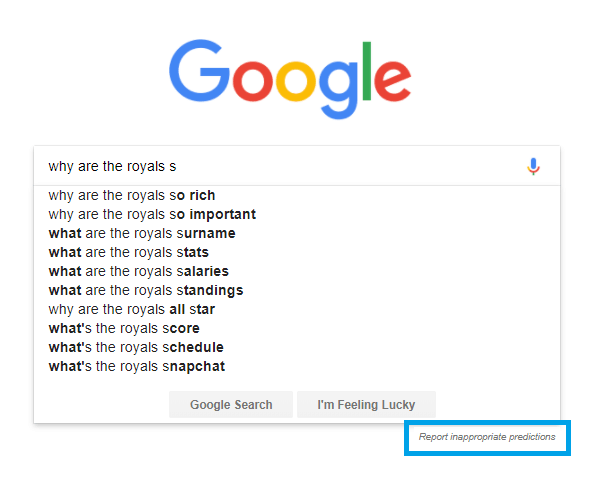
To better control inappropriate Autocomplete predictions, Google launched its feedback tool and uses the data to make improvements consistently.
For instance, there doesn’t have to be a particular demographic that is being targeted by something that is hateful in nature; and feedback helps get that discovered faster and easier.
google-autocomplete-report-inappropriate
Reference:https://www.searchenginejournal.com/google-autocomplete-a-complete-seo-guide/251407/?ver=251407X2

Friday, May 4, 2018

6 Meta Description Mistakes You Might Be Making

6 Mistakes to Avoid When Writing Your Meta Descriptions

Optimizing your meta descriptions is an important aspect of on-page SEO.
Unfortunately, because meta descriptions are not a direct ranking signal, some SEO professionals fail to give them the attention they deserve.
Little do they know that properly optimized meta descriptions play an important role in getting visitors from search engines to click your links. They are mini-ads that you can optimize to drive more customer action and increase CTR.
If you are ready to spend some time enhancing your meta descriptions, first be aware of these six common meta description optimization mistakes.

Mistake 1: Duplicate Meta Descriptions

Even though meta description duplicates won’t get you penalized, you should put together unique meta descriptions for every page for practical reasons.
According to Google:
Good meta descriptions are short blurbs that describe accurately the content of the page. They are like a pitch that convinces the user that the page is exactly what they’re looking for.
Since meta descriptions act as “a pitch” in the SERPs, you can use them to control the narrative around your site. The better you deliver your message with unique copy, the better chance you have of driving more traffic to your pages and increasing CTR.
If all of your pages have similar meta descriptions, they will be more misleading than helpful.
If you don’t have time to write meta descriptions for every page, you can let Google generate them automatically. Based on the query, Google will pull relevant parts of your page’s content to feature in the snippet.
Bear in mind that it is still preferable to have unique meta descriptions for your core pages, such as your homepage, category pages, and top-performing pages with content, products, or services.
As a shortcut, you can also use a template to automatically generate meta descriptions for more or less similar pages. Change one single keyword and get OK-ish meta descriptions.
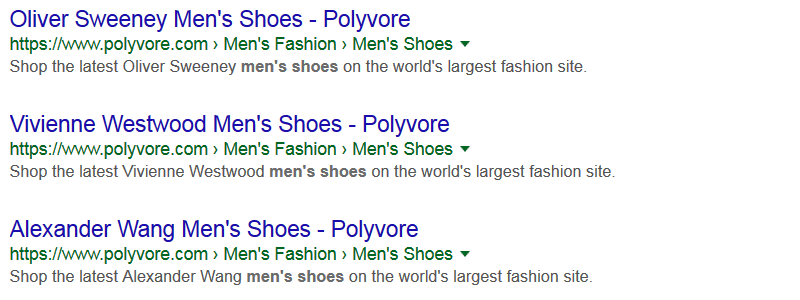
Using different keywords in meta descriptions template

Mistake 2: Character Count Obsession

For many years, the SEO best practice was to write a meta description between 135–160 characters.
That changed in 2017, however. Google meta descriptions can now be as long as 320 characters.
In the screenshot below, the first meta description is 161 characters long. The second one is 240 characters long, and it does not get truncated.
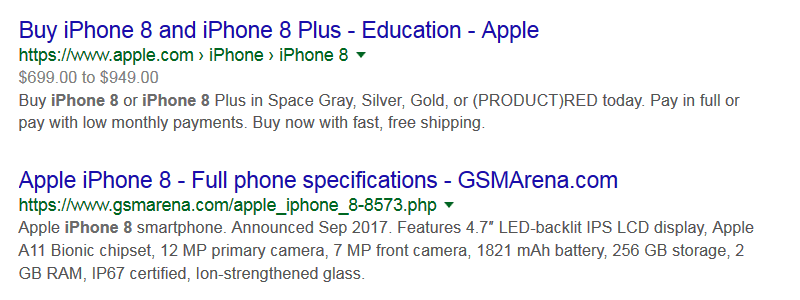
Length of meta descriptions 2018
However, when it comes to Google’s longer search snippets, it’s really pixels, not characters, that actually matter.
Based on the width of the device, your ideal meta description can be between 160 and 320 characters long (920 -1,840 pixels). That is why, if you have short descriptions, you should not necessarily try to squeeze more characters in.
On top of that, bear in mind that Google does not always display manually assigned meta descriptions. When the situation calls for it, it generates unique, longer descriptions by simply pulling a relevant piece of content from a page.
In other words, don’t waste time obsessing about the ideal number of characters in your meta descriptions.

Mistake 3: Not Using Keywords

Your meta descriptions should include the right keywords. You want to use keywords that:
  • Are relevant to a page’s content.
  • Your customers are looking for.
If your meta description is not relevant to a page, Google will pull the first sentence with a relevant keyword and show it in the search results.
For instance, when I was searching for productivity tips, I found this description:

Keywords use in non-optimized meta descriptions
Google pulled the first sentence with the keyword “productivity” in it. No wonder, since the page’s meta description is: “From Eric Schmidt to Danny Meyer: How super successful, super busy entrepreneurs organize their day.”
Though this meta description is creative, it looks and feels like a title. Plus, it does not feature any keywords related to either “productivity” or “tips.”
In short, ensure that your meta descriptions are aligned to a page’s title and are relevant to the page’s content. Otherwise, you can end up with irrelevant truncated descriptions pulled out of context.

Mistake 4: Not Optimizing for Rich Snippets

Structured data optimization should be on your to-do list.
With rich snippets, your meta descriptions will easily stand out in the crowd.
Just look at this example:
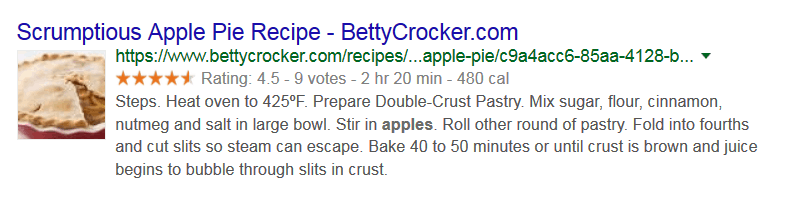
Rich snippet optimization for meta descriptions
There are many schema types you can use to optimize your pages, but the most common are:
  • Review
  • Aggregate Review
  • Product
  • Offer
  • Place
  • Local Business
  • Person
  • Event
  • Creative Work
You can find the complete hierarchy of schema types here.
If you are unsure how to start, Google guidelines will help. Plus, you can use lots of tools, like:
In short, rich snippets can make a difference in terms of the quality of your meta descriptions. Make sure to optimize for them.

Mistake 5: Avoiding HTML Tables for Direct Answer Queries

Since Google’s mission is “To organize the world’s information and make it universally accessible and useful,” the search engine naturally gives preference to websites that provide direct answers to searchers.
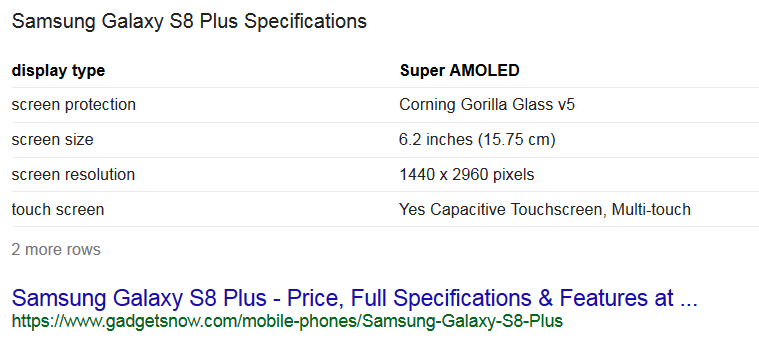
In this context, HTML tables can help you gain an upper hand over your competition. Just compare two search results for “samsung galaxy s8 plus specs” below:

Search result with no structured data markupWithout HTML table
Search result with HTML table structured data markupWith HTML table
The second search result is by far more descriptive and easier to digest. In this case, you can actually learn a lot of information about the smartphone without having to access a page at all.
This table-based result gives a direct answer, and is convenient for searchers. No wonder Google places it at the top of search results, even above the dedicated Samsung Galaxy S8 Plus page by Samsung.com.
With that said, identify question-based search queries, prepare detailed answers, implement HTML with structured data, and enjoy high positions in the SERPs for direct answer queries.
All you need is to learn some HTML table basics and be pretty good at structured data markup. This HTML Tables as Google Rich Snippets guide will help.

Mistake 6: Writing Boring, Unimpressive Copy

Does this meta description sound familiar?

A meta description example with boring copy
A wide selection. Free shipping. Free returns. Eligible items…
Amazon, you can do better!
Boring and unimpressive copy in meta descriptions is so common that most users do not even notice them. However, creative copy that plays up to your user’s expectations will not only help you stand out in the crowd, but will also increase traffic, CTR, and conversions.
Here are five simple rules you can rely on to improve the copy of your meta descriptions:

1. Keep Your Copy Readable

Avoid keyword stuffing at any cost. Meta descriptions are not a ranking factor, and you do not want to give visitors the impression that your website is spammy.
Your meta descriptions should feel and look natural.
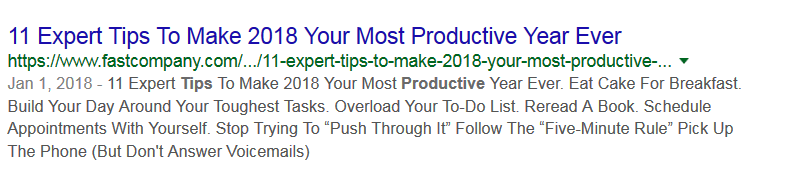
Example of bad meta description copy
While the description above offers productivity tips right in the snippet, the text does not look normal and human-written.
Ensure that your meta descriptions consist of logically-bound sentences, not parts of text pulled out of context.

2. Make Your Copy Specific

Vague copy that does not tell much to users is a no-no.
Make sure that your meta descriptions include all details and specifics that match the content on the page.

Optimized meta descriptions copy
The example above not only provides enough details, but also makes customers curious, which is never a bad thing.

3. Use Numbers, Symbols & Special Characters

Headlines with numbers generate 73 percent more social shares and engagement. Using numbers in meta descriptions makes sense as well.
Actually, not only numbers, but any characters other than letters (e.g. symbols, special characters, emojis, etc.) can help drive customers to your web pages.

Example of meta description featuring numbers and special characters

4. Keep Your Copy Customer-Centric

The first two questions your customers ask when coming across any search result are, “What is this page offering?” and “Why should I visit this page?”.
Naturally, your meta descriptions should answer these questions. They should appeal to your customers, talk about your customers, and solve your customers’ problems.
Your meta descriptions should not be about you or your business. Do not write meta descriptions like the one below:
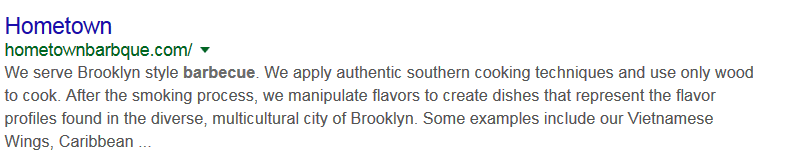
Example of business-centered meta description copy

5. Include a CTA

This one is optional. In some cases, CTAs can feel too aggressive and even “screamy.”

Example of meta description copy with CTA
However, a clear, respectful CTA provides guidance to your customers.

Good CTA in meta descriptions example

Conclusion

High-quality meta descriptions can make a difference for your website. Though they do not impact your site’s organic search rankings directly, meta descriptions can help your business stand out in search results.
Put together value-packed, optimized meta descriptions that match the content on your site’s pages and reap the benefits. Avoid making the mistakes outlined in this article, and you will get higher CTRs, drive more targeted traffic, and improve conversions.

Reference:https://www.searchenginejournal.com/meta-description-mistakes/250897/?ver=250897X3

Thursday, May 3, 2018

14 essential WordPress plugins to improve SEO


SEO is often a long and convoluted process which takes time, dedication and expertise.
Therefore, anything that can simplify or speed up aspects of a campaign are welcome additions: cue plugins! If your website is hosted on a WordPress CMS, then you are fortunate enough to have access to a plethora of handy plugins.
But with over 54,000 plugins to choose from, selecting the most appropriate and effective plugins for your SEO needs can seem a bit overwhelming. Luckily for you, in this article we have picked out the 14 WordPress plugins which we believe are essential for improving SEO.
From general all-rounder SEO plugins to those engineered for more specific tasks, our recommendations will cover a range of SEO needs.

1. Yoast SEO

We’ll start with the all-rounder SEO plugins and arguably the most well known of the lot. Yoast SEO is an exceedingly popular plugin for fulfilling SEO needs, and is suitable for total newbies and seasoned pros alike.
Yoast is easy to use and intuitive, making it possible for anyone to work with. Its traffic light system provides detailed guidelines, which is perfect for those who are new to SEO.
Its only main downside is that sometimes the plugin does not analyze the entire page – if, for example, part of the content for a particular page sits elsewhere within the CMS. Not an issue in itself but can cause clients to have a temporary meltdown when they see a sea of red alerts.
Nevertheless, with its powerful content analysis abilities, Yoast is my personal recommendation for an all-rounder SEO plugin.


2. All in One SEO Pack

A popular alternative to Yoast, the All in One SEO Pack plugin was actually created prior to Yoast, and therefore built up a dedicated fanbase in the initial years. It provides much the same tools and features as Yoast, but the general consensus is that All in One SEO Pack is slightly less user-friendly than its main rival.
Ultimately it comes down to personal preference. Many people are a fan of the traffic light system deployed by Yoast, as it provides a whole host of handy, actionable tips for you to implement.
Alternatively those red, orange and green lights may drive you up the wall, in which case you may want to consider the All in One SEO Pack, or even our third suggestion…

3. The SEO Framework

The SEO Framework is an alternative to Yoast and All in One SEO Pack. It provides an automated and fast SEO solution, plus it is unbranded, meaning a clean interface. Many users find it less bloated than Yoast, therefore arguably more efficient for the user.
This particular plugin is not quite as accessible as Yoast, but it is by no means difficult to use. Accordingly, it may pay to have at least a basis of SEO knowledge for this plugin.
In short, stick to Yoast if you’re a complete beginner, but if you’re confident with the basics, The SEO Framework is a viable alternative.

4. Redirection

Setting up redirects for broken links or deleted pages is key in maintaining a solid user experience.
Redirection is a useful plugin that allows you to handle all kinds of redirects from one easily accessible place. Quickly create new redirects, manage your current redirects and tidy up any loose ends.

5. Smush Image Compression and Optimization

Page speed is probably one of the biggest headaches when optimizing a website and image size is the most common reason for slow loading times. However, if you have a website that is extremely image-heavy, then the thought of manually compressing each image is probably enough to make you want to quit your job.
Well, don’t do that. Because a plugin called Smush exists and aside from being the best-named plugin on this list, it’s also incredibly useful. Smush Image Compression and Optimization compresses all images on your site at the touch of a button.
You also have the option to resize them while you’re at it. It’s perfect for increasing that pesky page speed with minimal effort.

6. W3 Total Cache

Continuing the theme of page speed, W3 Total Cache reduces load time, increases download speed and improves conversion rates. As a result, it helps to improve the overall performance and speed of your site.
With the stamp of approval from numerous high profile websites and industry leaders, what more do you need to know? It’s a no-brainer.

7. WP-Optimize

Another tool for helping you with a website spring clean. WP-Optimize cleans up your WordPress database, making space and improving its overall efficiency. A more efficient database means a better performing and faster site.

8. Google XML Sitemaps

An XML sitemap helps the search engines to crawl your site. Anything that makes life easier for the search engines is generally worth doing. The Google XML Sitemaps plugin allows you to create a sitemap quickly and easily, without the need for using a third-party tool.
Don’t forget to submit your XML sitemap to Google Search Console. We also recommend trying Google XML Sitemaps for Video and Images.

9. Broken Link Checker

It’s in the name – the Broken Link Checker identifies any broken links on your website.
Broken links can undermine your overall link structure and provide a frustrating user experience. This plugin allows you to uncover any broken links and take the necessary steps to fix them.

10. All In One WP Security & Firewall

Search engines take site security very seriously. The worst kind of user experience would be one which ends in a virus or other form of malware. If your site gets hacked, then it could have a highly detrimental effect on your rankings.
The aim of the All In One WP Security & Firewall is to prevent this happening and keep your website as safe as Fort Knox. On a related note, make sure you invest in an SSL certificate while you’re at it.

11. Yet Another Related Posts Plugin (YARPP)

Search engines take into consideration how quickly users leave your website. It’s therefore worth spending time trying to lower your overall bounce rate. As part of this, you should ensure clear call-to-actions and provide somewhere for users to naturally go once they are finished with a particular page or post.
For blog content, related posts are perfect for retaining users. Ideally, this functionality would be integrated into the design of your blog.
However, if not, then the Yet Another Related Posts Plugin (YARPP) is a handy alternative and uses an algorithm to determine the most effective related posts. Great for user retention and lowering that bounce rate.

12. All In One Schema.Org Rich Snippets

Schema markup can bring some serious SEO points your way. Although there is no evidence that the markup itself is a ranking factor, just the appeal of having a more enticing appearance in the SERPs through rich snippets should be enough.
It is normally best to implement schema manually, without the use of a plugin. However, the All in One Schema.Org Rich Snippets plugin can help bridge the gap in the meantime until you get around to it.
I know it’s one of those tasks that gets pushed to the bottom of the to-do list, but there’s no time like the present!

13. Akismet

Akismet is the most popular plugin to deal with spam comments and is useful in preventing those weird and wonderful comments. From an SEO perspective, it stops potentially harmful links appearing in the comments on your site.
Too many of these links could associate you with bad neighborhoods, as although the links are in the comments, they are still coming from your website. They are therefore best avoided at all costs.

14. AMP for WP

With the news of Google’s mobile-first index and the knowledge that over half of website traffic is via mobile, you need to implement Accelerated Mobile Pages (AMP for short) if you haven’t already. The AMP project is an open-source initiative that provides an easy way to generate web pages which will load quickly and smoothly on mobile.
The AMP for WP plugin automatically adds Accelerated Mobile Pages functionality to your site, therefore making it faster for mobile users. It’ll save you a lot of hassle.
This is by no means a comprehensive list of plugins to improve SEO, but these are our personal recommendations. It’s important to remember not to go overboard with plugins. Avoid cutting corners by choosing to use a plugin over achieving better results manually.
Nevertheless, installing and activating a selection of carefully chosen plugins can make the SEO process more accessible, fast and effective.

Reference:https://searchenginewatch.com/2018/04/13/14-essential-wordpress-plugins-to-improve-seo/

Wednesday, May 2, 2018

Google Begins Sending Mobile-First Indexing Notifications

Google Begins Sending Mobile-First Indexing Notifications

Google has started sending emails to notify webmasters that their site has been migrated to mobile-first indexing.
The company announced last month that it would be sending notifications regarding mobile-first indexing, but today marks the first time anyone has actually seen them.
However, that doesn’t mean mobile-first indexing is just starting now. Google has confirmed that migration to mobile-first indexing began months ago.
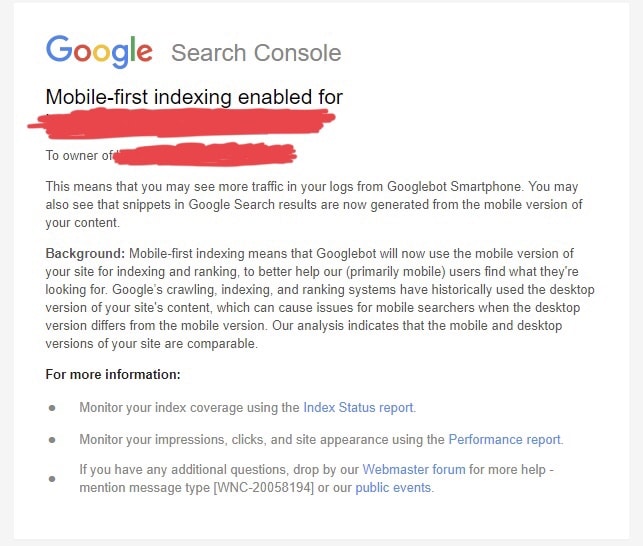
Here is a look at the notifications Google is sending to webmasters who have verified ownership of their site with Google Search Console.

In case you cannot see the image above, here is what it says:
”Mobile-first indexing enabled for <URL>
To owner of <URL>
This means that you may see more traffic in your logs from Googlebot Smartphone. You may also see that snippets in Google Search results are now generated from the mobile version of your content.
Background: Mobile-first indexing means that Googlebot will now use the mobile version of your site for indexing and ranking, to better help our (primarily mobile) users find what they’re looking for. Google’s crawling, indexing, and ranking systems have historically used the desktop version of your site’s content, which can cause issues for mobile searchers when the desktop version differs from the mobile version. Our analysis indicates that the mobile and desktop versions of your site are comparable.”
Google has previously mentioned that sites migrated to mobile-first indexing will see an increase in activity from the Googlebot Smarphone crawler.

Reference:https://www.searchenginejournal.com/google-begins-sending-mobile-first-indexing-notifications/251095/

Monday, April 30, 2018

10 Best Mobile Landing Page Optimization Tips

10 Best Ways to Optimize Mobile Landing Pages
Mobile only continues to grow more important every year.
Google’s recent rollout of a mobile-first index only emphasizes this point. It also helps to reinforce the notion that mobile SEO is deserving of a significant amount of marketers’ time and strategic efforts.
The differences between a user landing on a desktop landing page and a mobile landing page are crucial to consider.
Users behave differently across multiple devices, and that behavior must be taken into account when it comes to optimization.
In order to really prioritize the ever-increasing usage of mobile devices for search, it is wise for marketers to ensure that a company’s site has landing pages designed specifically for mobile.
Simply making a “mobile-friendly website” is just not good enough.
There are many things to consider when optimizing for mobile landing pages, but there are a few that continue to stand out over the years and also grow in importance as well.

1. Get to the Point Fast

You have a ridiculously limited amount of time to grab a user’s attention.
So it’s imperative to place the most relevant messaging that you want users to see in front of them as quickly as possible.
This becomes even more important with mobile, where space is limited due to size constraints of devices.
If a user isn’t captivated by what they see on the screen, they will quickly move on.
Ensure that the most important information is prioritized so that visitors can find it fast.

2. Content Placement & Length

Again, screen size is crucial.
The amount of real estate you have to grab a user’s attention or direct them toward what you would like them to look at is significantly minimized on mobile devices in comparison to desktop.
If there is a notable call-to-action you are trying to entice the user to engage with, then it is absolutely critical to place this somewhere it can be seen, without scrolling, on a smartphone.
Also due to size constraints, it’ important to think about how much content is displayed.
Overloading a mobile landing page with large blocks of text can potentially reap havoc on click-through rates.
The content should be clearly organized in a way that the user can easily understand, and they should be guided to the meat of that content.
Graphics can also help guide users to this, in place of large chunks of text that are not as fitting for smaller screen sizes.

3. Easy-to-Use Navigation

Navigation should essentially be intuitive.
If a user cannot easily find the primary navigation in order to get from one place to another on their device, they have a much higher chance of bouncing.
A home page link and other significant buttons should be easily viewable and accessible.
Keep in mind, though, that on landing pages you want to limit the number of navigation options a user has in order to direct them to the desired action that you want them to take.

4. Scalable Across Multiple Device Types

There are hundreds of device types out there – Apple, Android, and Windows, among others.
All have various sizing constraints and specifications.
Creating a mobile landing page that works across all of these can be a challenge.
That is one of the reasons why it is particularly important to have a responsive website that can display the page accurately across multiple devices.

5. Avoid Pinch to Zoom

Simply put, a user should not have to zoom in on their phone in order to see your website content.
It has been proven that users oftentimes do not prefer to have to either zoom or scroll for long amounts of time in order to view the content that they are trying to get to.
Make it easy for a user – display the most critical content at an appropriate size and above-the-fold for mobile so that they can easily get to what they want.

6. Aesthetics

A proper look and feel can make all the difference.
Be selective in the choice of fonts, color schemes, etc.
This is arguably even more important on mobiles, where the scope of viewability is more limited.
You must cue your readers with effective design aesthetics as to what content is important in order to get them to take the action that you are wanting them to take.

7. Page Speed

If you aren’t paying close attention to page speed load times on a site, you could potentially lose a large amount of users quickly.
A page that loads slowly only causes users to become impatient and bounce off the site.
No one wants to sit and wait for content to load on their device.
One of the common items that affect load time that people overlook is images.
They should be scaled appropriately so that they can fit on the screen, and also be compressed to reduce their size.

8. Geo-Targeting

A user’s location can be determined within a range of about 5-20 miles thanks to GPS on smartphone devices.
Using an IP address, a user’s location details can be calculated, including their country, region, ZIP code, or metro area.
This can be an advantage particularly for brick-and-mortar stores, which could edit particular mobile landing pages based on a user’s location and add some personalization this way.

9. Effective CTAs

The purpose of a mobile landing page should be clear. It should also be compelling and entice a user to take action.
Ensure that that action is visible and stands out to the user.
Do this using compelling graphics and a concise layout, and limit the options a user has.
For instance, if a user can click to access social profiles, share the page, submit a form, have a menu expand, expand, they are being presented with more options, which decreases the likelihood that they will take the action you are wanting them to take.

10. Always Be Testing

A/B tests have been used frequently, and due to extra size constraints of mobile, they can be even more helpful.
The only way to know if any of the above tips are effective is to test them.
Try changing one attribute at a time and see what really works.
For example, swap out a graphic or reposition a CTA and analyze the results to see if it made a difference. You can then use those results to help guide any future iterations of a page.

Conclusion

When it comes to mobile, you have even less space, and arguably less time in some scenarios, to really grab a user’s attention and guide them to take an action.
It is critical to separate the mobile and desktop experiences and understand how users’ behavior varies between the two in order to optimize for conversions.

Reference:https://www.searchenginejournal.com/optimize-mobile-landing-pages/250661/?ver=250661X3

Wednesday, April 25, 2018

Content Promotion Tactics That Result In Attracting Traffic

Content Promotion Tactics That Result In Attracting Traffic
If you produce content and really want to generate traffic, then running a content promotion campaign is a must. There are numerous articles describing this subject. So why is this post any better than the rest of them?
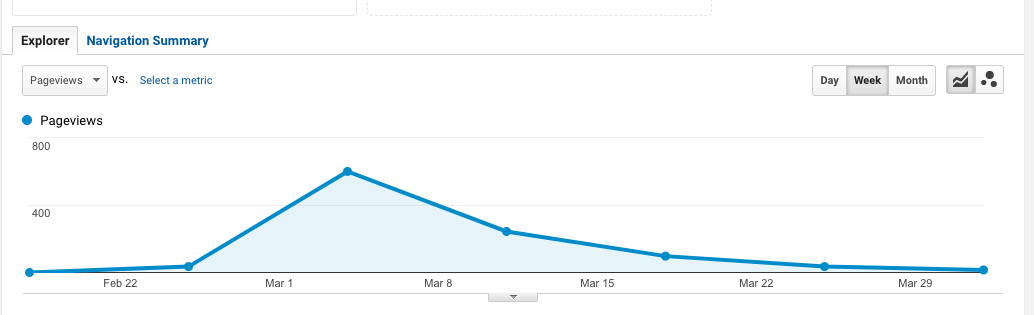
Through trial and error, Prnews.io has been able to figure out which tactics work and which techniques one needs to avoid:
Pageviews
Let us guide you through five of the most successful strategies in driving traffic.

5 Subtleties of Successful Traffic Acquisition

Is there a prescribed recipe for bringing new users on board? Probably not.
But are there any sure-shot strategies that can drive traffic to your site? Yes, there are.
As Andy Crestodina put it, “Where there’s traffic there’s hope.” Let’s hop in!

1. Using Quora & Reddit

Both communities are great sources of new users, especially for a relatively small site.
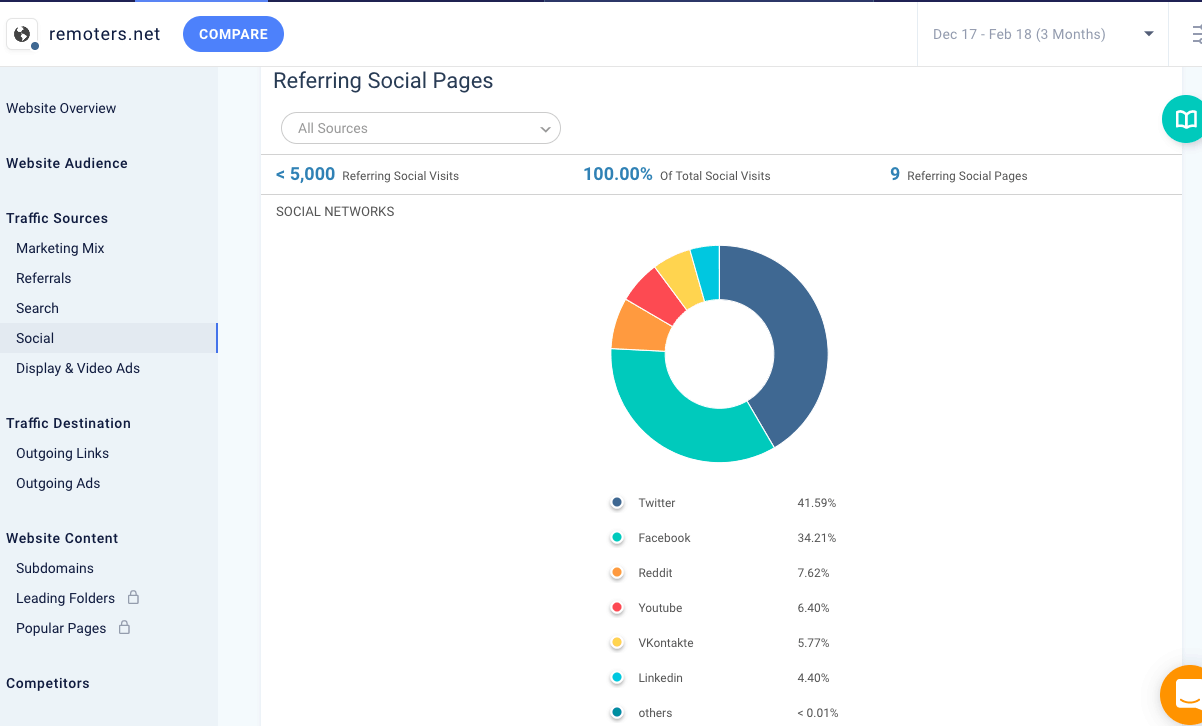
For instance, in the screenshot below you can see that Remoters.net (project belonging to an illustrious Aleyda Solis) receives a fair number of users from Reddit:
Social Pages
To help you get motivated and inspired, I’d like to share a couple of real-life cases of successful networking and communication on Reddit and Quora.

Reddit: Success story 1

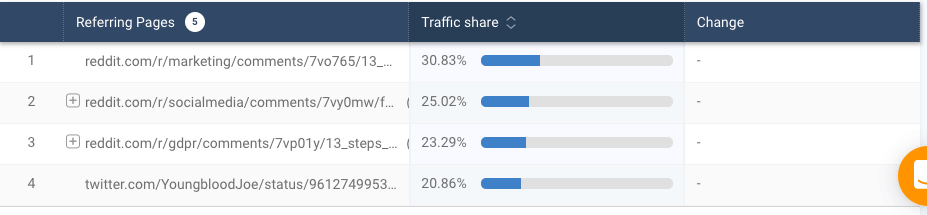
An influential expert, Joe Youngblood, once shared his thoughts about the changes that were happening to Facebook’s algorithm. Then, a blogger visited the thread and asked Youngblood if he would be OK with her using Youngblood’s conclusions in her own post.
After Youngblood agreed, she promptly published her article with a link to Youngblood’s post within the same thread on Reddit. Here’s what happened:
Referring pages

Reddit: Success story 2

Another example is a little more straight to the point, but it seems to work well, too.
You can share something valuable without selling anything.
In this post, a user shares information about his free tool. This brought him a decent number of new users:
Referring pages

Quora: Success story

One of Quora’s discussion board mentioned link building tools.
Among all comments, there was one that contained a meaningful question from a guy who also skillfully and subtly managed to talk about himself. His comment has a link to a post that attracts a lot of visitors on a monthly basis:
Referring pages
Unlike Reddit, Quora allows you to bring traffic from your profile page because profile pages on Quora are designed for this task. So if you’re active on Quora, then your own profile page can become a traffic magnet.

2. Guest Posting

If you want to use guest posting to acquire new users, then you should know that this tactic requires some die-hard determination.
However, if you can handle it, then you’re hitting a jackpot! We’re talking 500 new users coming to you all at once.
The most common mistake is to target popular sites and blogs. Such sites can only bring value to your SEO performance because receiving links from them is extremely valuable.
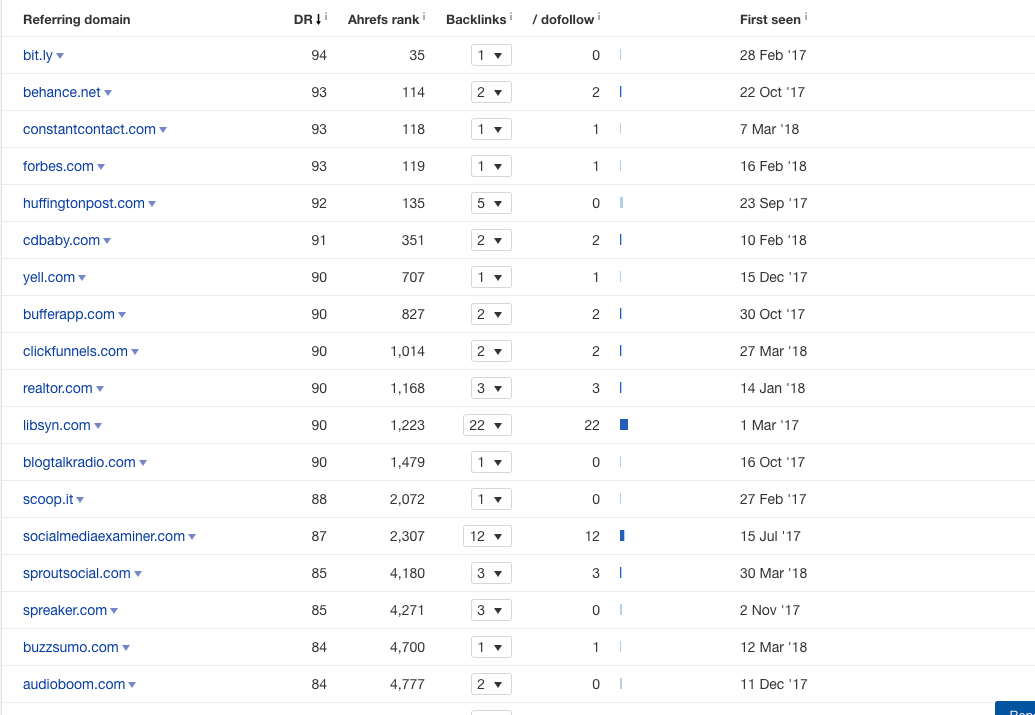
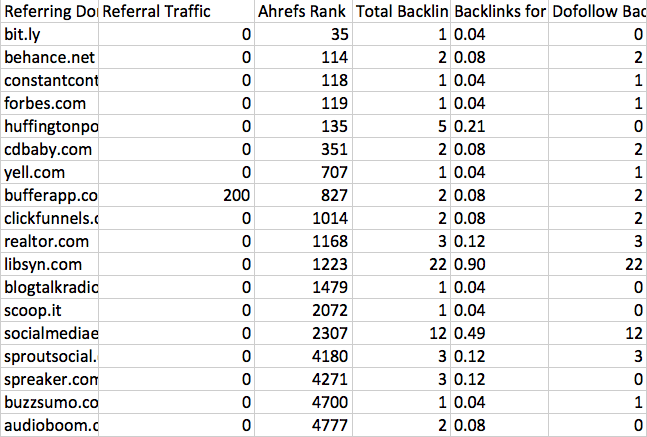
If you still don’t believe me, then take a look at the screenshot below. These are the leading referring domains of one of the websites we analyzed:
Referring domain
We can see blogs like Forbes, Buffer, and Social Media Examiner. But what if we check whether any of these referring domains are actually sending traffic to this site?
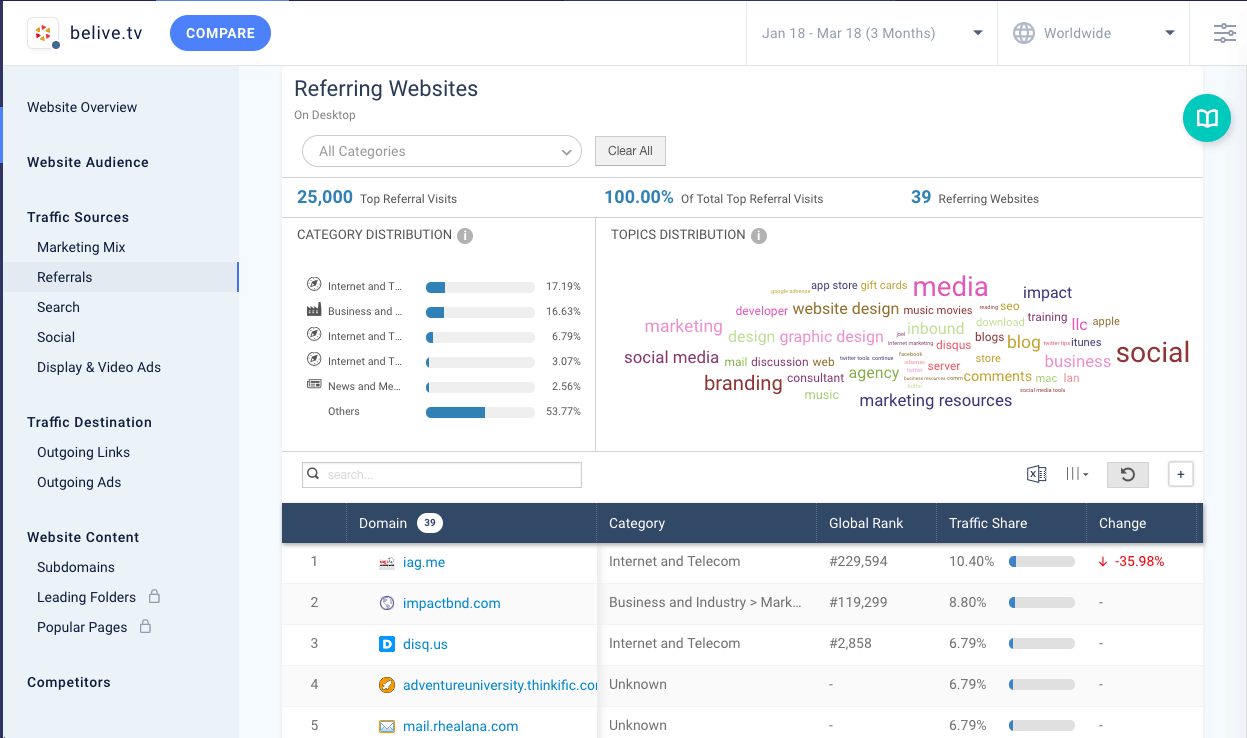
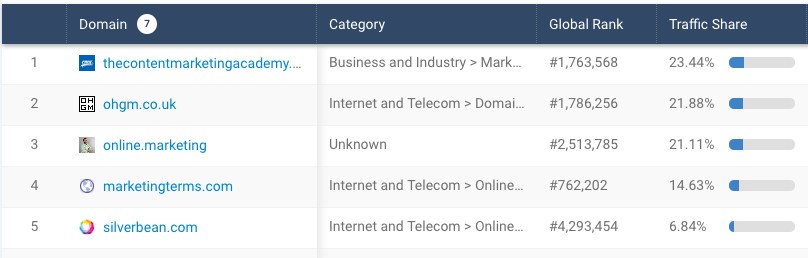
We can do it by simply matching data from Ahrefs with SimilarWeb’s report that tells which sites are bringing users to the same domain we analyzed:
Referring websites
After matching the data we got from both Ahrefs and SimilarWeb, we receive the following results:
Referring domain
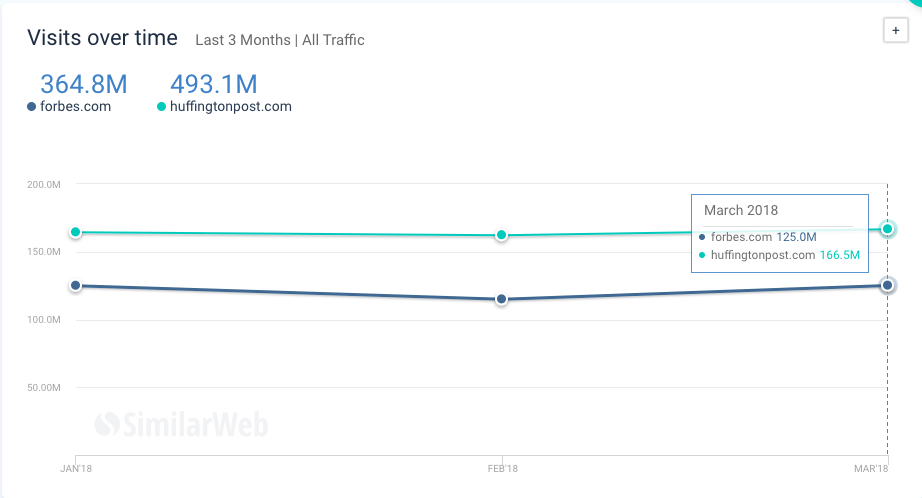
Numbers don’t lie. They demonstrate us that big sites with mind-blowing traffic like Forbes (125 million monthly visitors) or HuffPost (166 million monthly visitors) won’t bring you new users:
Visits over time

So Where Do I Go to Find Traffic? We’re Glad You Asked!

Your best bet is to search for smaller blogs where users directly engage with content.
Here’s what you can do to find these blogs:
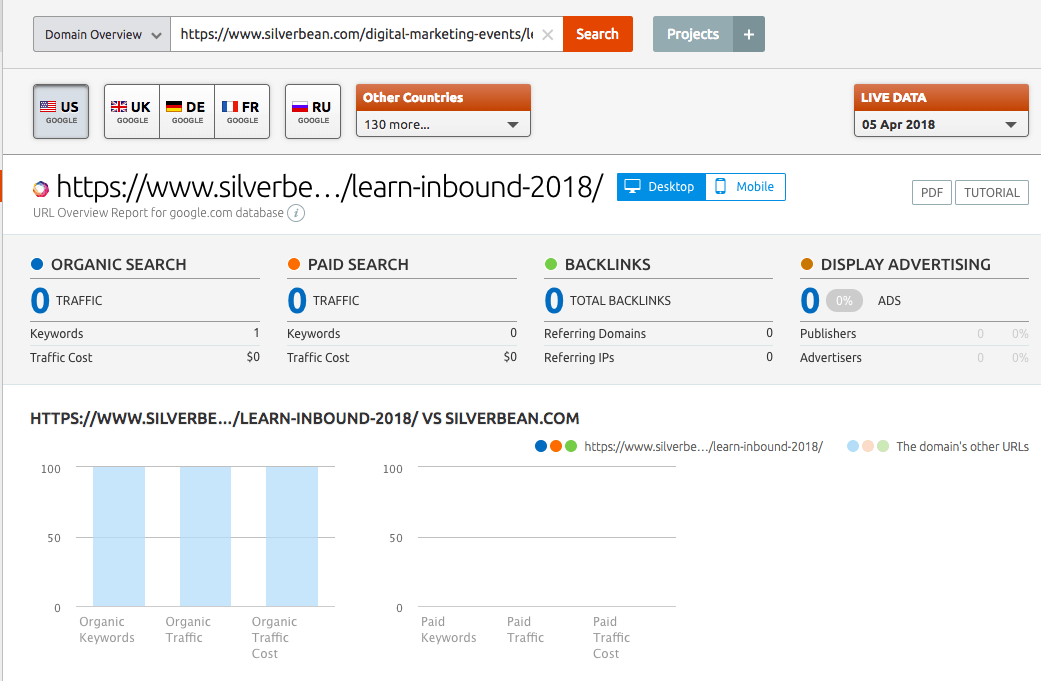
1. Use tools like SimilarWeb that allows you to spot which resources bring referral traffic to websites related to yours. And they are also relatively small businesses. Most likely, you’re going to see something like this:
Referral traffic
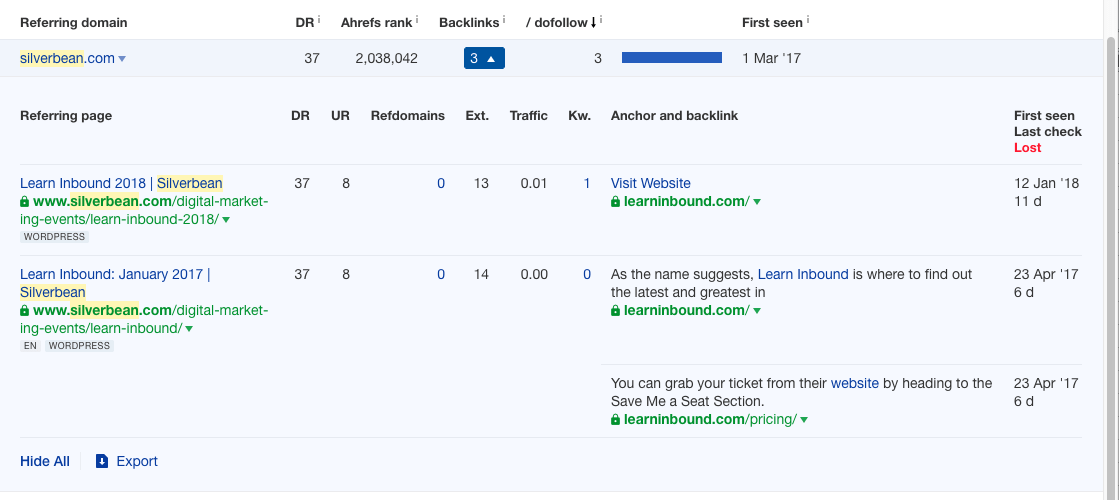
2. You need to figure out what kind of pages are sending traffic. You can use Ahrefs to find which pages of a particular site have links:
Referring pages
3. As your final step, you need to find the reason why a site is sending referral traffic to another site: is it their active community, or is it because a URL is ranking well in organic results? SEMrush is here to help:
Referral traffic
Our example demonstrates that visitors of the domain we’ve been researching continuously interact with its content, and this is exactly what we needed to know.
But what’s important is that if the referral traffic comes from organic search results of the URL you’re examining, it might take months for your URL to get to the top of SERPs.
This is a long-term investment that is irrelevant in this particular case. We don’t need sites that are bringing referral traffic through organic channel.

3. Sponsored Posts

As it was mentioned above, guest posts are the essence of hard work: you need to research those relevant resources that will bring you traffic, and then to convince the editors to accept your content.
Even with smaller blogs, it takes a while for the process to move to its final stage. So don’t hold your breath to see your post published the next day after you created it.
Sponsored posts, on the other hand, can offer you a lifeline because you won’t have to wait too long. Platforms that offer sponsored posts are always passionate about customer satisfaction. Some of these sites will even include an email blast to maximize the efforts, free of charge.
So we recommend  considering sponsored posts. Getting nearly as many new visitors on your own will take you longer than if you simply purchase a sponsored post.
It’s a matter of simple math. If you need to spend more than 20 hours of your time to get 100-200 conversions, and an hour of your time costs $100, then the overall cost of attracting this traffic is $2,000.
But then you have a platform that offers the exact same results for only $1,000. The problem with the market of sponsored posts is the fact that it’s complicated, and you need to spend who knows how long to understand the prices and to contact different blogs that publish sponsored posts.
This is when sites like Prnews.io come to the rescue.
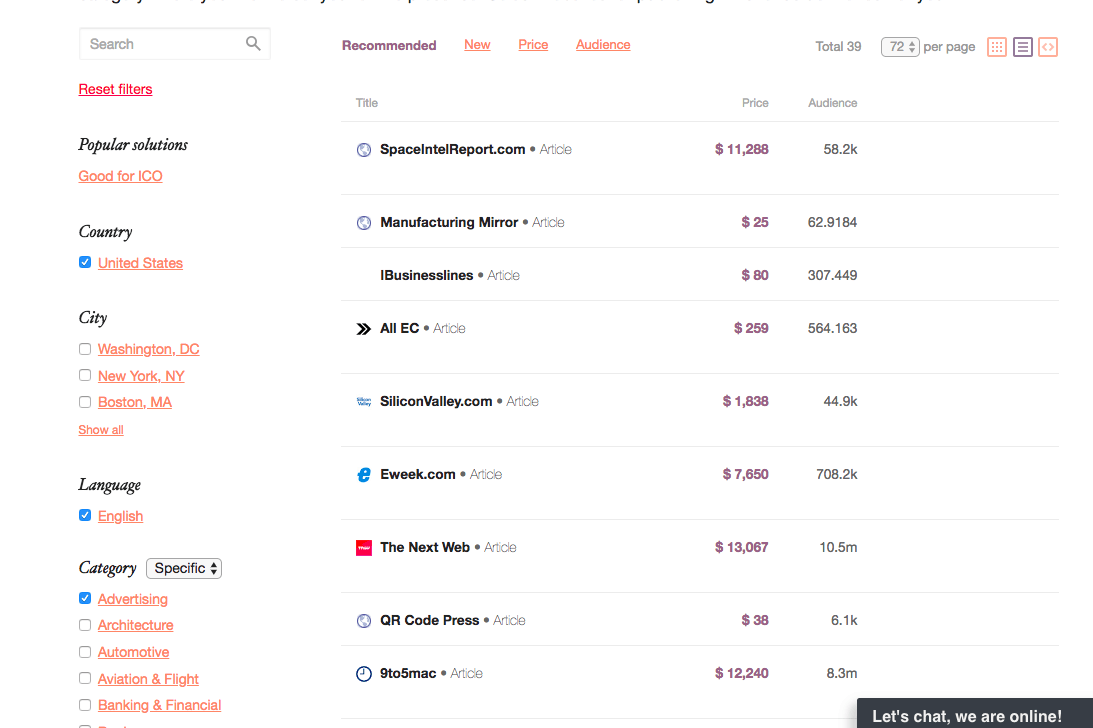
Prnews.io has already collected all possible options to choose from, and they even organized this information by adding traffic numbers:
Traffic numbers
Another great thing about Prnews.io is that it takes care of all negotiations involved in the process. All you need to do is to come up with good content, sit back, and relax.
As you are waiting for the article to get published, you can spend some time promoting your content through other channels.

4. Slack Channels

We’re sure most of you thought of Slack as a way to talk to your coworkers.
Yes, but there’s a variety of Slack channels you can join to network with industry experts.
However, Slack groups aren’t initially for content promotion.
So if you wish to use this strategy, stay active in selected groups and bring value to the group you’re contributing by sharing posts of other authors.
There’s a great way to research new and interesting Slack channels. You can find them using SimilarWeb’s Referral Traffic report.

5. Social Media Promotion

Social media promotion mostly depends on the size of your online audience.
Here’s what we think: This tactic will only pay you off if some of your users with established communities around them will do you a favor of supporting your post.
By the way, that’s the reason why roundup posts are among the most popular types of content. As a result, you can generate around 100 to 200 new visitors from social media channels.
However, in case you don’t have any roundup posts of your own, you can always quote your industry experts that have thousands of followers.
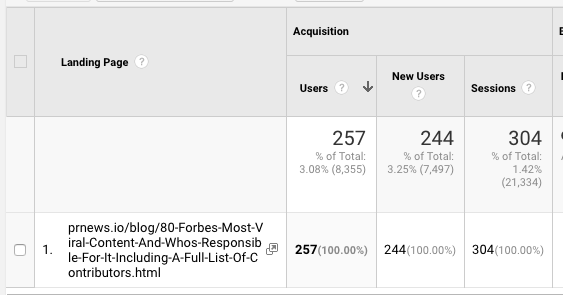
We have our own example when experts who were mentioned in our article called “Forbes Most Viral Content, And Who’s Responsible For It” contributed to its distribution across major social networks using their own communities for spreading the news.
Thanks to them, Prnews.io was able to increase the volume of traffic coming to our blog. Most of Prnews.io’s channels aren’t performing that well, but social media promotion attracted a lot of new users.
Landing pages
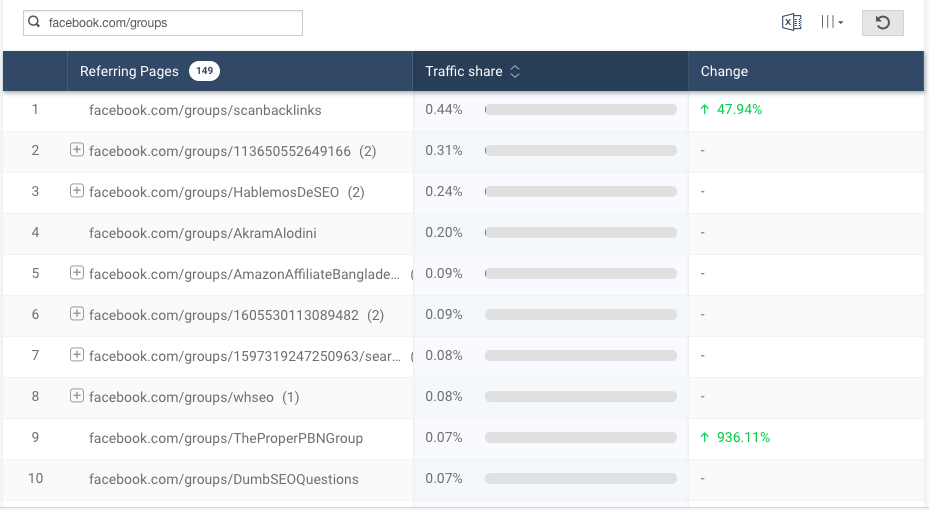
Another option is to share your content with industry groups on Facebook. In order to find private Facebook groups that will bring you traffic, you can use SimilarWeb.
To find these Facebook groups, you can also use SimilarWeb and analyze which Facebook groups drive traffic to your rival’s websites:
Facebook groups

It’s Time For Action

We hope that one of these strategies help you improve your traffic volume. They are easy to implement and some other people like Youngblood have managed to take advantage of them.
But regardless of the platform you choose, or the kind of content you want to create, if your content sucks – nobody is going to care about your product.

Reference:https://www.searchenginejournal.com/prnewsio-content-promotion-tactics/248369/